To share disks from my Gentoo Linux server with Mac OS X machines on the home network, the protocol I used during 2012 was the Apple Filing Protocol (AFP). Later on, Apple started recommending SMB.
To implement this protocol you need to use the Netatalk package, an open source implementation of the AFP file server. The AFP protocol can run on top of both TCP and AppleTalk; in my case it will obviously only use TCP.
Installation on Gentoo
# emerge -v netatalk
:
[ebuild N ] net-fs/netatalk-3.0.5-r1 USE="acl avahi cracklib pam samba shadow ssl tcpd utils -debug -kerberos -ldap -pgp -quota -static-libs" PYTHON_TARGETS="python2_7 -python2_6" 1,674 kB
Next I prepare the configuration file and enable only what I need. Note that since version 3.0 you only need to modify the file /etc/afp.conf.
In my case I’m going to share an HFS+ file system on a FireWire disk via the AFP file system protocol – very “Apple” all around :-).
; Global server settings
[Global]
vol preset = default_for_all_vol
log file = /var/log/netatalk.log
uam list = uams_dhx.so,uams_dhx2.so
save password = no

; Applicable to all volumes
[default_for_all_vol]
file perm = 0664
directory perm = 0774
; Database for storing directory
; and file IDs. Recommended: dbd
cnid scheme = dbd
valid users = luis

; Export "despensa"
[Despensa]
path = /mnt/despensa
valid users = luis
host allow = 192.168.1.4
HFS+ File System Permissions
In my case I’m going to export an HFS+ filesystem via AFP (which was originally created on an iMac) from my Linux box, so before doing that it’s necessary to understand the permissions properly.
I’m going to change the owner:group of all files in /mnt/despensa/* (HFS+ partition) so the owner is a Linux user. Remember that this disk came from an old iMac where the owner:group was 501:20, so I use find to change it:
# find . -uid 501 -exec chown luis:luis {} \;
Now I can start the service
# /etc/init.d/netatalk start
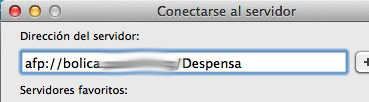
And from a Mac client, connect to the disk. When doing so, I need to enter the username and password of the Linux machine.