
HFS+ (Hierarchical File System Plus), also known as MacOS Plus, is the format used by default on the partition where Apple’s MacOS operating system is installed. It was released as an improvement over the original HFS in 1998 and introduced in macOS from version 8.1 onwards.
To support an HFS+ filesystem on Linux, the kernel needs to be properly configured.
  File systems --->
   [*] Miscellaneous filesystems --->
      <*> Apple Macintosh file system support
      <*> Apple Extended HFS file system support
Compile, install and reboot the machine. In my case I had an external FireWire disk with an HFS+ partition created on an old iMac. I connected this external FireWire disk to my Mac Mini and can now access its data since HFS+ is supported on Gentoo Linux. Here’s what the partition table looks like (viewed with gparted)
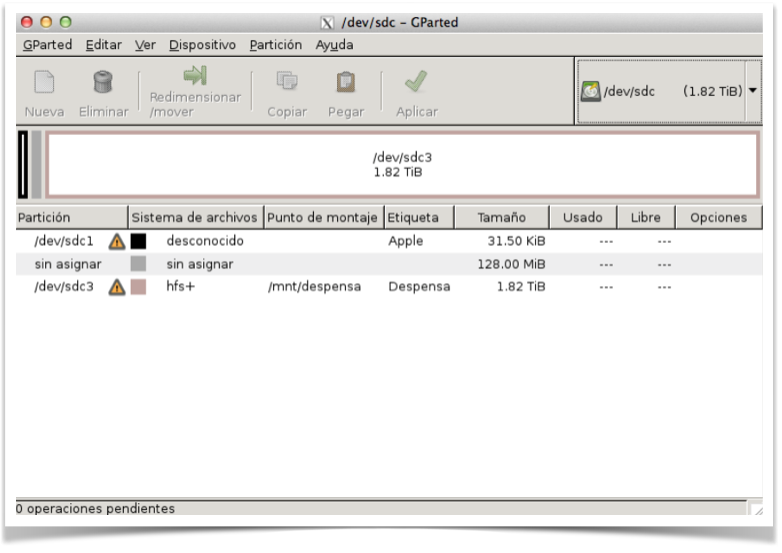
I create the mount point and configure the /etc/fstab file
# mkdir /mnt/despensa
# cat /etc/fstab
:
/dev/sdc3 /mnt/despensa hfsplus noauto,rw,exec,users,noatime 0 0
:
From here I can access the data
# mount /mnt/despensa
WARNING, READ-ONLY!! That is, we have a problem – unfortunately Linux support for HFS+ partitions with journaling is not available, so the partition was mounted in “Read Only” mode.
From this point I can access the data READ-ONLY, which is usually a problem :)
# mount
:
/dev/sdc3 on /mnt/despensa type hfsplus (ro,noatime,noexec,nosuid,nodev)
Possible solution: remove journaling. In my case this is acceptable, since I’m never going to connect this disk to a MacOSX again.
Let’s see how to remove journaling from an HFS+ partition from Linux: You can use the following C program – compile and run it as root. Here’s the entire process. Copy and paste the following into a file named disable_journal.c
#include <stdio.h>
#include <stdlib.h>
#include <unistd.h>
#include <sys/types.h>
#include <sys/mman.h>
#include <fcntl.h>
#include <byteswap.h>

int main(int argc, char *argv[])
{
 int fd = open(argv[1], O_RDWR);
 if(fd < 0) {
   perror("open");
   return -1;
 }

 unsigned char *buffer = (unsigned char *)mmap(NULL, 2048, PROT_READ|PROT_WRITE, MAP_SHARED, fd, 0);
 if(buffer == (unsigned char*)0xffffffff) {
    perror("mmap");
    return -1;
 }

 if((buffer[1024] != 'H') && (buffer[1025] != '+')) {
  fprintf(stderr, "%s: HFS+ signature not found -- aborting.\n", argv[0]);
  return -1;
 }

 unsigned long attributes = *(unsigned long *)(&buffer[1028]);
 attributes = bswap_32(attributes);
 printf("attributes = 0x%8.8lx\n", attributes);

 if(!(attributes & 0x00002000)) {
  printf("kHFSVolumeJournaledBit not currently set in the volume attributes field.\n");
 }

 attributes &= 0xffffdfff;
 attributes = bswap_32(attributes);
 *(unsigned long *)(&buffer[1028]) = attributes;

 buffer[1032] = '1';
 buffer[1033] = '0';
 buffer[1034] = '.';
 buffer[1035] = '0';

 buffer[1036] = 0;
 buffer[1037] = 0;
 buffer[1038] = 0;
 buffer[1039] = 0;

 printf("journal has been disabled.\n");
 return 0;
}
Compile and run the program
make disable_journal
:
disable_journal /dev/sdc3
:
journal has been disabled.
The last step is to run a “File System check”. You need to install sys-fs/diskdev_cmds which includes both fsck.hfsplus (to check an HFS+ partition) and mkfs.hfsplus (to create an HFS+ partition)
emerge -v diskdev_cmds
fsck /dev/sdc3
From this point on I can access the data in READ/WRITE mode
mount /mnt/despensa
mount
:
/dev/sdc3 on /mnt/despensa type hfsplus (**rw**,noatime,noexec,nosuid,nodev)