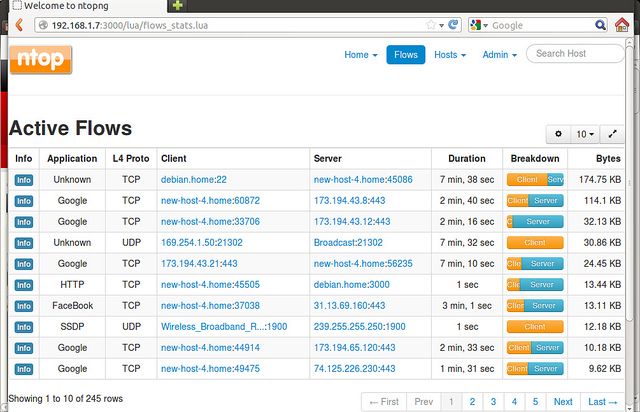
Not too long ago “ntopng” 1.1 was released and it’s time to give it a look. It’s not yet in Portage, so thanks to the Eigenlay overlay (via layman) I found what I needed to perform the installation.
I already had layman installed, so these are the steps I followed:
# layman -a eigenlay
I configure Portage to accept this “beta” version
# echo "=net-analyzer/ntopng-9999 **" >> /etc/portage/package.accept_keywords
# echo "=net-analyzer/ntopng-9999" >> /etc/portage/package.unmask
I run the installation process. Note that I clear all options in the MAKEOPTS and EMERGE_DEFAULT_OPTS variables – it’s important to do this to prevent it from running in silent mode.
#  MAKEOPTS="" EMERGE_DEFAULT_OPTS="" emerge -v ntopng
These are the packages that would be merged, in order:
Calculating dependencies ... done!
[ebuild N ] dev-libs/geoip-1.5.0 USE="ipv6 -city -perl-geoipupdate -static-libs" 3,921 kB
[ebuild N ] dev-libs/jemalloc-3.3.1 USE="-debug -static-libs -stats" 248 kB
[ebuild N ] dev-db/redis-2.6.13 USE="jemalloc -tcmalloc {-test}" 972 kB
[ebuild N #] net-analyzer/ntopng-9999::eigenlay 0 kB
Total: 4 packages (4 new), Size of downloads: 5,139 kB

/usr/bin/ntopng
/usr/share/ntopng
/usr/share/ntopng/httpdocs
/usr/share/ntopng/scripts
Gentoo init
The above package doesn’t include the script we need in /etc/init.d nor the configuration one that goes in /etc/conf.d, so I created my own:
#!/sbin/runscript
#
NTOPNG_USER=${NTOPNG_USER:-nobody}
NTOPNG_GROUP=${NTOPNG_GROUP:-nobody}
NTOPNG_OPTS=${NTOPNG_OPTS:-"--pid ${NTOPNG_PID}
--daemon
"}

command=/usr/bin/ntopng
start_stop_daemon_args="--quiet"
command_args="${NTOPNG_OPTS}"

pidfile=${NTOPNG_PID:-/var/run/ntopng/ntopng.pid}

depend() {
use net localmount logger redis
after keepalived
}

start_pre() {
checkpath -d -m 0775 -o ${NTOPNG_USER}:${NTOPNG_GROUP} $(dirname ${NTOPNG_PID})
}

# ntopng user
NTOPNG_USER="nobody"

# ntopng group
NTOPNG_GROUP="nobody"

# comma-separated interfaces
NTOPNG_LOCALNETS="88.212.145.112/32,11.64.119.91/32,192.168.15.2/32,192.168.1.0/24,0.0.0.0/32,224.0.0.0/8,239.0.0.0/8"

# interfaces
NTOPNG_INTERFACES="-i ppp0 -i vlan500 -i vlan400 -i vlan100"

# pid file
NTOPNG_PID="/var/run/ntopng/ntopng.pid"

# where Redis listens
NTOPNG_REDIS="localhost:6379"

# Final options
#
NTOPNG_OPTS="
-m ${NTOPNG_LOCALNETS}
${NTOPNG_INTERFACES}
--pid ${NTOPNG_PID}
--daemon
--redis ${NTOPNG_REDIS}
"
Startup and initial configuration
- First we start
REDISand add it so it always starts at boot.
bolica ~ # /etc/init.d/redis start
bolica ~ # netstat -nap | grep -i redis
tcp 0 0 127.0.0.1:6379 0.0.0.0:* LISTEN 12642/redis-server
bolica ~ # rc-update add redis default
* service redis added to runlevel default
- Next we can start ntopng and add it so it always starts at boot
bolica ~ # /etc/init.d/ntopng start
* Caching service dependencies ... [ ok ]
* /var/run/ntopng: creating directory
* /var/run/ntopng: correcting owner
* Starting ntopng ...

bolica ~ # rc-update add ntopng default
* service ntopng added to runlevel default
GeoIP Configuration
The ntopng ebuild doesn’t yet properly integrate the GeoIP feature. Below is a script you can use to download the .dat GeoIP files, install them in the correct directory, and you can also invoke this script from crontab to update them, for example once a week.
#!/bin/bash
#
# update-geoip.sh updates the .dat geoip files for ntopng
#
# :

# Show how to use this program
uso() {
echo -n "\`basename $0\`, v"
echo -n $version | awk '{printf $3}'
echo ". By Luis Palacios"
echo "Uso: update-geoip.sh [-h]"
echo " -h help"
echo " "
echo " "
exit -1 # Exit
}

# Option parsing
while getopts "h" Option
do
case $Option in

# EOM, no comments
h ) uso;;

# Remaining arguments, error.
* ) uso;;

esac
done

#
# ================================================================
#
echo

#
cd /usr/local/share/ntopng/httpdocs/geoip
wget -nc http://geolite.maxmind.com/download/geoip/database/GeoLiteCity.dat.gz
gunzip -f GeoLiteCity.dat.gz

#
cd /usr/local/share/ntopng/httpdocs/geoip
wget -nc http://geolite.maxmind.com/download/geoip/database/GeoLiteCityv6-beta/GeoLiteCityv6.dat.gz
gunzip -f GeoLiteCityv6.dat.gz

#
cd /usr/local/share/ntopng/httpdocs/geoip
wget -nc http://download.maxmind.com/download/geoip/database/asnum/GeoIPASNum.dat.gz
gunzip -f GeoIPASNum.dat.gz

#
cd /usr/local/share/ntopng/httpdocs/geoip
wget -nc http://download.maxmind.com/download/geoip/database/asnum/GeoIPASNumv6.dat.gz
gunzip -f GeoIPASNumv6.dat.gz
- Create the file, give it permissions and run it to download the
.datfiles
bolica bin # chmod 755 update-geoip.sh
bolica bin # ./update-geoip.sh
:
bolica bin # ls -al /usr/local/share/ntopng/httpdocs/geoip/
total 39296
drwxr-xr-x 2 root root 4096 nov 23 21:30 .
drwxr-xr-x 9 root root 4096 nov 22 09:16 ..
-rw-r--r-- 1 root root 3507428 nov 19 02:48 GeoIPASNum.dat
-rw-r--r-- 1 root root 3754285 mar 18 2013 GeoIPASNumv6.dat
-rw-r--r-- 1 root root 16231805 nov 6 16:55 GeoLiteCity.dat
-rw-r--r-- 1 root root 16731716 nov 6 02:54 GeoLiteCityv6.dat
- Connect to ntopng: http://192.168.1.1:3000/login.html