What are “SMB”, “CIFS”, “Samba” and the version confusion? SMB (Server Message Block) is an application-level network protocol that enables sharing of files, printers, and other resources between devices on a network. Originally developed by IBM in the 1980s, it was later adopted and extensively improved by Microsoft, becoming the foundation of file sharing in Windows networks.
The SMB protocol has evolved through multiple versions over the years. SMB1 (also known as SMBv1 or NetBIOS) was the initial implementation but had security and performance limitations. Microsoft introduced significant improvements with SMB2 in Windows Vista and Windows Server 2008, and later SMB3 with Windows 8 and Windows Server 2012, with each version adding better performance, improved security, and new features like data encryption and compression.
Introduction
CIFS (Common Internet File System) is a “Dialect” of SMB. A dialect is a set of “messages” that define a particular version of the SMB protocol. Microsoft implements SMB on its systems and added multiple improvements in its CIFS dialect. Although technically CIFS and SMB are different, in practice the terms are used interchangeably, since CIFS is based on SMB and shares most of its characteristics.
Samba is a free implementation of the SMB protocol (or call it CIFS if you prefer) available on GNU/Linux platforms (e.g., QNAP), Mac OS X, or Unix.
- SAMBA 3.5.2 uses SMB1 (stable and widely implemented)
- SAMBA >= 3.6.0 uses SMB2 (in 2014 entering the scene on QNAP, macOS, …)
- SAMBA >= 4.0.0 uses SMB3 (in 2014 still in “development”, stable, little adoption)
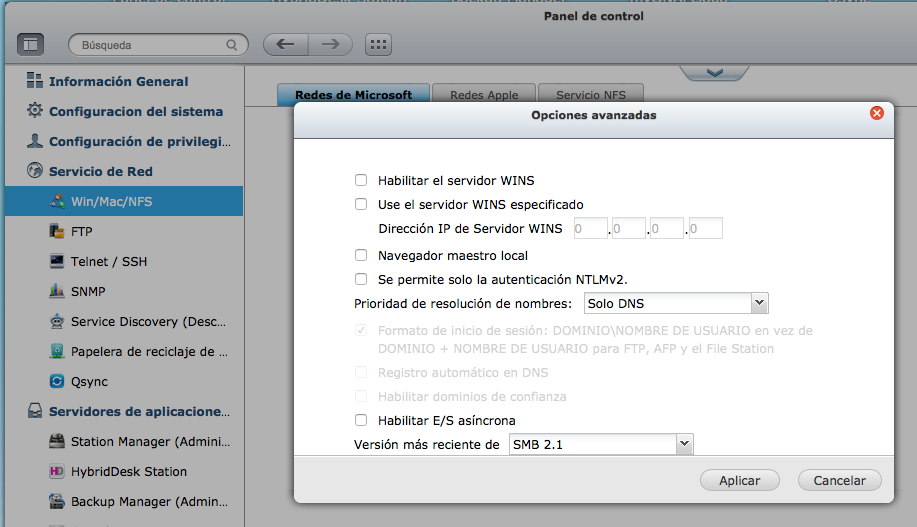
I installed version 4.1 of the QNAP software and as you can see it already includes Samba 3.6.x support, selecting the SMB 2.1 option in the advanced settings.
obelix:~ luis$ ssh -l admin panoramix.tudominio.com
[~] #
[~] # /mnt/ext/opt/samba/sbin/smbd -V
Version 3.6.23
SMB2 vs AFP
Apple’s traditional native protocol has always been AFP, but OSX Mavericks includes SMB2 and has made it the default protocol. In this PDF OSX Mavericks Core Technology Overview, page 21, we can read the following:
___SMB2___
SMB2 is the new default protocol for sharing files in OS X Mavericks.
SMB2 is superfast, increases security, and improves Windows compatibility.
• Efficient. SMB2 features Resource Compounding, allowing multiple requests
to be sent in a single request. In addition, SMB2 can use large reads and
writes to make better use of faster networks as well as large MTU support
for blazing speeds on 10 Gigabit Ethernet. It aggressively caches file
and folder properties and uses oppor- tunistic locking to enable better
caching of data. It's even more reliable, thanks to the ability to
transparently reconnect to servers in the event of a temporary disconnect.
• Secure. SMB2 supports Extended Authentication Security using Kerberos
and NTLMv2.
• Compatible. SMB2 is automatically used to share files between two Mac
computers running OS X Mavericks, or when a Windows client running Vista,
Windows 7, or Windows 8 connects to your Mac. OS X Mavericks maintains
support for AFP and SMB network file-sharing protocols, automatically
selecting the appropriate protocol as needed.

___AFP___
The Apple Filing Protocol (AFP) is the traditional network file service
used on the Mac. Built-in AFP support provides connectivity with older
Mac computers and Time Machine–based backup systems.

___NFS___
NFS v3 and v4 support in OS X allows for accessing UNIX and Linux desktop
and server systems. With AutoFS, you can now specify automount paths for
your entire organiza- tion using the same standard automounter maps
supported by Linux and Solaris. For enhanced security, NFS can use Kerberos
authentication as an alternative to UNIX UID-based authentication.
This is the main reason I decided to stop using AFP and switch to SMB(2) for connecting my Macs to the QNAP file service. I now use smb:// instead of afp:// when connecting to shared volumes — in fact, I’ve disabled AFP on the QNAP.
SMB2 Quirks on QNAP
There are a couple of things I’ve noticed as “quirky.” The first is that you need to be careful not to use certain characters in file names, and the second is that QNAP doesn’t support certain extended file attributes (I noticed this when GoodSync complained while copying some files).
I recommend taking a look at this article about special character limitations depending on the operating system. In my case, historically I never had problems with AFP — apparently any character worked when writing from the Mac to the network. But beware, that’s not actually true.
Regarding extended attributes, I’ve seen that in some cases it cannot set those extended attributes on the network copy. It’s not serious because the file itself copies perfectly and works, but “some” attribute isn’t making it to my network file system. This is something I need to investigate further.
Not Recommended Characters
I developed a small tool that detects if any of your file and/or directory names contain “peculiar” characters. What’s it for? Well, to be forewarned — if you try to copy those files (with certain odd characters) to your NAS, it might not like them very much. Oh, it also can “replace” the characters with substitutes (though be careful with that option as it’s very intrusive…)
The program runs from the command line (Terminal.app or iTerm) and you can use it in “informational” mode or “intrusive = replace peculiar characters with safer ones” mode. It also supports two character sets that I divide between characters I’ll WARN you about (WARNING SET) or characters you SHOULD REPLACE (MUST-SWAP). The characters in each set are:
- WARNING SET
|?*<":>/ - MUST-SWAP
:?
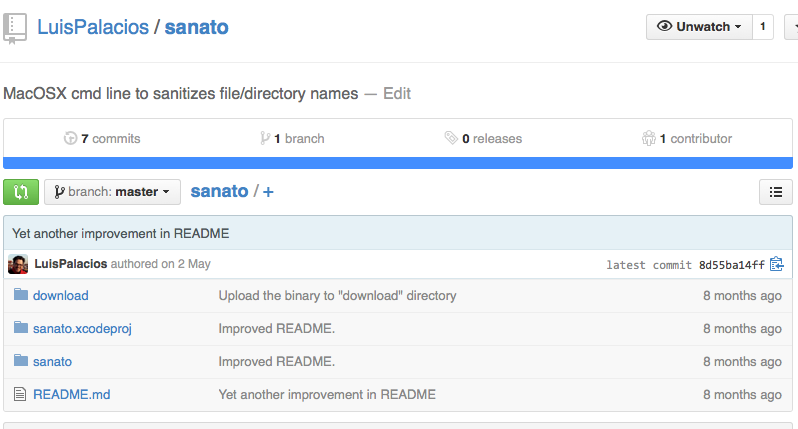
The program will warn you about files containing the WARNING set and will also let you replace the two MUST-SWAP characters if you tell it to. It’s called “sanato” (from Latin: healing) and it’s on GitHub, where you can download the executable or if you have Xcode you can download the source code and compile it.
Be careful because some applications or documents may have these kinds of characters inside their bundle, since they are perfectly valid. I recommend using it only for your own files, photos, videos, and documents that you’ll store on your QNAP file server. Remember that the program has the option to sanitize those two :? characters, and therefore it does rename the file or directory (replacing those two characters with a hyphen ‘-’), so use it carefully.