
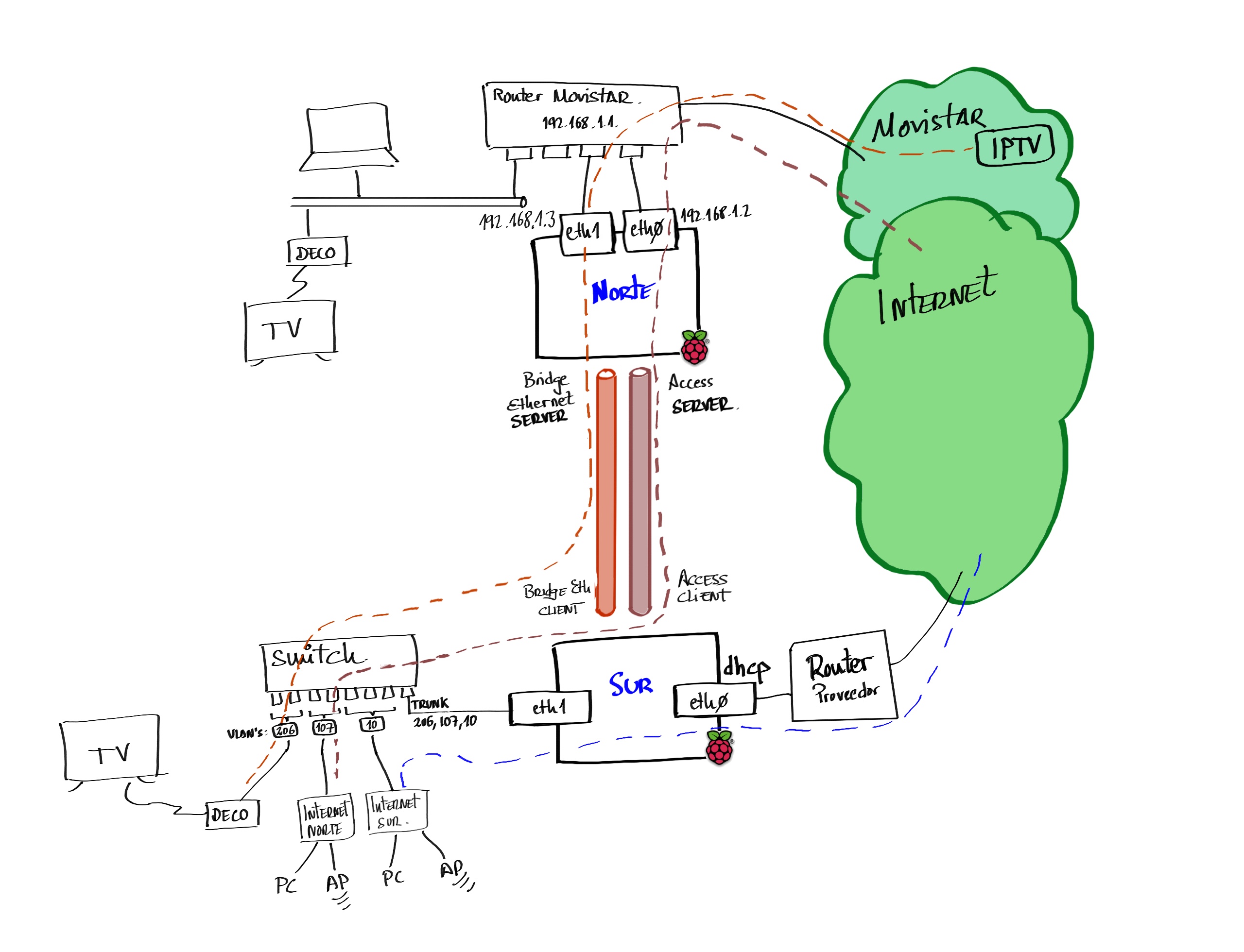
Proof of concept to extend my home network to a remote site through the internet, from where I could consume Movistar’s IPTV services. I used a pair of Raspberry Pi 2s, connected to each other by a pair of IPSec tunnels.
This post is related to Linux Router for Movistar and video on demand with Fullcone NAT on Linux.
| 2023 Update: In terms of performance, I remember these tests left much to be desired and I had configuration problems. I recently retested with a pair of Pi 4 with Raspberry Pi OS 64bits which work infinitely better, and I’ve updated this post accordingly. |
Architecture
This is the hardware I used:
- 2 x Raspberry Pi 4B v1.5
- I call
norththe device that has the Movistar contract andsouththe remote one.
- I call
- 2 x TP-Link UE300 USB 3.0 to Gigabit Ethernet Adapter to have a second physical port and be more granular — do more tricks at the routing level, policy based routing, traffic control, etc.
- 1 x Switch with VLAN and IGMP Snooping support for the remote device’s LAN.
On north I create two IPSec/UDP tunnels in Server mode (with OpenVPN):
- Access Server for normal Internet traffic
- Ethernet Bridge for IPTV traffic
On south I connect as a client and create three VLANs on the LAN:
| VLAN | Purpose |
|---|---|
10 | south clients that reach the Internet through south’s local provider |
107 | south clients that reach the Internet through north. |
206 | Set-top box at south to consume IPTV traffic from north. |
Software Installation
I update the Raspberry Pi OS and install software. I repeat these commands on both Pi’s.
From root
$ sudo su -i
#
I update the operating system.
# apt update && apt upgrade -y && apt full-upgrade -y
# apt autoremove -y --purge
I limit the log to a few days — this is a matter of taste.
# journalctl --vacuum-time=15d
# journalctl --vacuum-size=500M
I verify the timezone is correct and the time is being synchronized.
# dpkg -l | grep -i tzdata
ii  tzdata      2021a-1+deb11u8       all        time zone and daylight-saving time data
# date
vie 03 mar 2023 11:05:46 CET
# timedatectl
               Local time: vie 2023-03-03 11:05:49 CET
           Universal time: vie 2023-03-03 10:05:49 UTC
                 RTC time: n/a
                Time zone: Europe/Madrid (CET, +0100)
System clock synchronized: yes
              NTP service: active
          RTC in local TZ: no
It looks good, Europe/Madrid. If it weren’t, I’d need to correct it with apt -y install --reinstall tzdata and dpkg-reconfigure tzdata
I install OpenVPN, Bridge Utils, and some important tools.
# apt install -y openvpn unzip bridge-utils \
         dnsutils tcpdump ebtables tree bmon easy-rsa
north Server
The north server is the one at my home with a direct connection to the Movistar router through both interfaces. The first port (eth0) will be the main one carrying all normal traffic, while the second (eth1) will be dedicated exclusively to IPTV traffic.
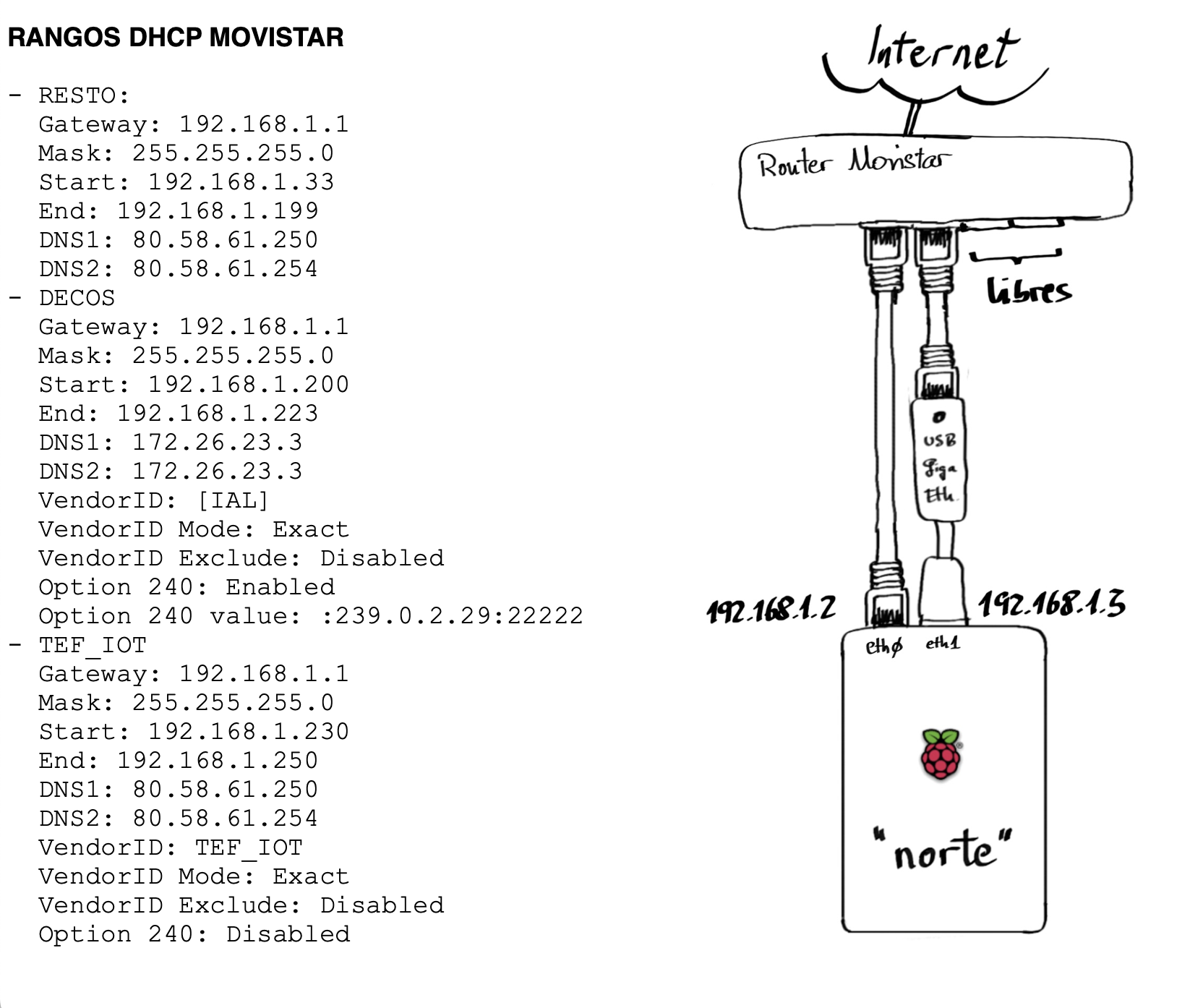
Above you have the connection diagram. I’ve included for informational purposes the ranges that a default Movistar router handles.
North Networking
The IP configuration for north is straightforward. If you look at the dhcpcd.conf below, you’ll see I only configure eth0 with a fixed IP address. The eth1 part I leave without service. The reason I don’t configure it is that I do it later from the script that brings up the Bridge Ethernet Server tunnel.
Although I don’t activate eth1 during boot, for the TP-Link UE300 adapter to work I need to create the following file (it won’t take effect until the next reboot).
To prevent networkd from removing rules or routes set outside its control, I modify the networkd.conf file. One example is if we use RIP (via frr) to receive routes; another example is if we use the ip rule command for policy based routing (in fact, I use it in this post).
/etc/systemd/networkd.conf
[Network]
#SpeedMeter=no
#SpeedMeterIntervalSec=10sec
ManageForeignRoutingPolicyRules=no          # Change to "no" !!!
ManageForeignRoutes=no                      # Change to "no" !!!
#RouteTable=

[DHCPv4]
#DUIDType=vendor
#DUIDRawData=

[DHCPv6]
#DUIDType=vendor
#DUIDRawData=
I activate the new configuration:
# service networking restart
:
# ip a
1: lo: <LOOPBACK,UP,LOWER_UP> mtu 65536 qdisc noqueue state UNKNOWN group default qlen 1000
    link/loopback 00:00:00:00:00:00 brd 00:00:00:00:00:00
    inet 127.0.0.1/8 scope host lo
       valid_lft forever preferred_lft forever
2: eth0: <BROADCAST,MULTICAST,UP,LOWER_UP> mtu 1500 qdisc mq state UP group default qlen 1000
    inet 192.168.1.2/24 brd 192.168.1.255 scope global noprefixroute eth0
       valid_lft forever preferred_lft forever
IPv4 Forwarding
I edit the /etc/sysctl.conf file and modify the following line to enable forwarding. To activate it without rebooting, run sysctl -p
net.ipv4.ip_forward=1
Network Tuning for North
For OpenVPN, WireGuard, etc. tunnels, and when we’ll have significant traffic and delays, I recommend using a “tuned” configuration. You’ll see improvements if you test with iperf3.
/etc/sysctl.d/95-tuning.conf
# /etc/sysctl.d/95-tuning.conf
# Network tuning for tunnels (OpenVPN/WireGuard) and iperf3 tests
# Apply with: sysctl -p /etc/sysctl.d/95-tuning.conf

######## Per-socket buffers (default and max) ########
net.core.rmem_default = 524288
net.core.wmem_default = 524288
net.core.rmem_max     = 4194304
net.core.wmem_max     = 4194304

######## TCP auto-tuning (min, default, max) ########
net.ipv4.tcp_rmem = 4096 87380 4194304
net.ipv4.tcp_wmem = 4096 65536 4194304

######## Backlog / network queues ########
net.core.netdev_max_backlog = 8192

net.core.somaxconn = 4096

######## MTU/PMTU ########
net.ipv4.tcp_mtu_probing = 1

######## Congestion control / qdisc (optional) ########
# net.ipv4.tcp_congestion_control = bbr
# net.core.default_qdisc = fq

######## Other ########
net.ipv4.tcp_slow_start_after_idle = 0

# (Optional – UDP)
#net.ipv4.udp_rmem_min = 16384
#net.ipv4.udp_wmem_min = 16384
I apply it with the following command:
sysctl -p /etc/sysctl.d/95-tuning.conf
NAT and Firewall for North
This device won’t act as a router on the local LAN, but it will switch traffic between tunnels.
These are the Services and Scripts I created:
- /etc/systemd/system/internet_wait.service
- /etc/systemd/system/firewall_1_pre_network.service
- /etc/systemd/system/firewall_2_post_network.service
- /root/firewall/norte_firewall_clean.sh
- /root/firewall/norte_firewall_inames.sh
- /root/firewall/norte_firewall_1_pre_network.sh
- /root/firewall/norte_firewall_2_post_network.sh
- /root/firewall/norte_verifica_conectividad.sh
Additionally, I set up a service that monitors the ethernet bridge tunnel
- /etc/systemd/system/watch_eth_bridge_con_sur.timer
- /etc/systemd/system/watch_eth_bridge_con_sur.service
- /etc/default/watch_eth_bridge_con_sur
- /usr/bin/watch_eth_bridge.sh
I enable the services (they’ll activate on next reboot)
# chmod 755 /root/firewall/*.sh
# chmod 755 /usr/bin/watch_eth_bridge.sh
# systemctl enable internet_wait.service
# systemctl enable firewall_1_pre_network.service
# systemctl enable firewall_2_post_network.service
I don’t reboot yet — I continue configuring.
OpenVPN on north
Certificates
The first thing to do, and it only needs to be done once, is to configure the certificates for the device acting as “server” (north).
- I prepare the easy-rsa working directory
# cp -a /usr/share/easy-rsa /etc/openvpn/easy-rsa
- I start by creating the
varsfile
# cd /etc/openvpn/easy-rsa
# cat vars
set_var EASYRSA_DN           "org"
set_var EASYRSA_REQ_COUNTRY  "ES"
set_var EASYRSA_REQ_PROVINCE "MAD"
set_var EASYRSA_REQ_CITY     "Norte"
set_var EASYRSA_REQ_ORG      "Parchis"
set_var EASYRSA_REQ_EMAIL    "microrreo@gmail.com"
set_var EASYRSA_REQ_OU       "Parchis"
set_var EASYRSA_CA_EXPIRE    10950
set_var EASYRSA_CERT_EXPIRE  10950
- Create the PKI infrastructure
# ./easyrsa init-pki
Note: using Easy-RSA configuration from: /etc/openvpn/easy-rsa/vars
init-pki complete; you may now create a CA or requests.
Your newly created PKI dir is: /etc/openvpn/easy-rsa/pki
- Generate the Certificate Authority (CA) certificate. Specify the Common Name.
# cd /etc/openvpn/easy-rsa
# ./easyrsa build-ca
:
Enter New CA Key Passphrase:
:
Common Name (eg: your user, host, or server name) [Easy-RSA CA]:norte
:
Your new CA certificate file for publishing is at:
/etc/openvpn/easy-rsa/pki/ca.crt
- Generate both the server certificate request and key
# cd /etc/openvpn/easy-rsa
# ./easyrsa gen-req norte nopass
:
Keypair and certificate request completed. Your files are:
req: /root/easy-rsa/pki/reqs/norte.req
key: /root/easy-rsa/pki/private/norte.key
- Sign the
.crtcertificate file that the server needs
# cd /etc/openvpn/easy-rsa
# ./easyrsa sign-req server norte
:
Certificate created at: /root/easy-rsa/pki/issued/norte.crt
- Generate the Diffie-Hellman (DH) parameters needed by the server
# cd /etc/openvpn/easy-rsa
# ./easyrsa gen-dh
:
- Generate the Hash-based Message Authentication Code (HMAC) secret
# cd /etc/openvpn/easy-rsa
# openvpn --genkey secret /etc/openvpn/easy-rsa/pki/ta.key
Preparing certificates for use
- During the process above, the certificates that
northwill use as Access Server and Bridge Ethernet Server have already been created, but we need to place them properly. I copy the certificates and take the opportunity to give them more meaningful names.
# mkdir /etc/openvpn/server/keys
# cd /etc/openvpn/server/keys
# cp /etc/openvpn/easy-rsa/pki/ca.crt norte.ca.crt
# cp /etc/openvpn/easy-rsa/pki/issued/norte.crt .
# cp /etc/openvpn/easy-rsa/pki/private/norte.key .
# cp /etc/openvpn/easy-rsa/pki/dh.pem norte.dh.pem
# cp /etc/openvpn/easy-rsa/pki/ta.key norte.ta.key
- I create the certificates for the
southclient and package them for sending.
# cd /etc/openvpn/easy-rsa
# ./easyrsa build-client-full sur_cliente_de_norte nopass
:
./pki/private/sur_cliente_de_norte.key
./pki/reqs/sur_cliente_de_norte.req
./pki/issued/sur_cliente_de_norte.crt

# cd /etc/openvpn/easy-rsa/pki
# cp ca.crt /tmp/norte.ca.crt
# cp issued/sur_cliente_de_norte.crt /tmp
# cp private/sur_cliente_de_norte.key /tmp
# cp ta.key /tmp/norte.ta.key
# cd /tmp
# tar cvfz sur_cliente_de_norte_keys.tgz norte.ca.crt sur_cliente_de_norte.crt sur_cliente_de_norte.key norte.ta.key

luis@norte~ $ pwd
/home/luis
luis@norte~ $ cp /tmp/sur_cliente_de_norte_keys.tgz .
north as Access Server
Now we’ll configure the Access Server service. I create the main configuration file and a couple of support files to define parameters for my clients (actually I’ll only have one: south).
- /etc/openvpn/server/norte_access_server.conf
- /etc/openvpn/server/ipp.txt
- /etc/openvpn/server/ccd/cliente_sur
Service startup
# systemctl start openvpn-server@norte_access_server
# systemctl enable openvpn-server@norte_access_server
# systemctl status openvpn-server@norte_access_server
● openvpn-server@norte_access_server.service - OpenVPN service for norte_access_server
     Loaded: loaded (/lib/systemd/system/openvpn-server@.service; enabled; vendor preset: enabled)
                                                                  =======
     Active: active (running) since Sat 2014-10-19 11:44:57 CET; 1min 14s ago
             ======
north as Bridge Ethernet Server
The second is the Bridge Ethernet service. I create the main configuration file (.conf) and several fairly self-explanatory support files.
- /etc/openvpn/server/norte_bridge_ethernet_server.conf
- /etc/openvpn/server/norte_bridge_ethernet_server_CONFIG.sh
- /etc/openvpn/server/norte_bridge_ethernet_server_FW_CLEAN.sh
- /etc/openvpn/server/norte_bridge_ethernet_server_UP.sh
- /etc/openvpn/server/norte_bridge_ethernet_server_DOWN.sh
I change permissions on the *.sh files and start the service
# cd /etc/openvpn/server
# chmod 755 norte_bridge_ethernet_server*.sh

# systemctl start openvpn-server@norte_bridge_ethernet_server
# systemctl enable openvpn-server@norte_bridge_ethernet_server
# systemctl status openvpn-server@norte_bridge_ethernet_server
● openvpn-server@norte_bridge_ethernet_server.service - OpenVPN service for norte_bridge_ethernet_server
     Loaded: loaded (/lib/systemd/system/openvpn-server@.service; enabled; vendor preset: enabled)
                                                                  =======
     Active: active (running) since Sun 2014-10-19 13:20:08 CET; 17s ago
             ======

# ip a
2: eth0: <BROADCAST,MULTICAST,UP,LOWER_UP> mtu 1500 qdisc mq state UP group default qlen 1000
    inet 192.168.1.2/24 brd 192.168.1.255 scope global noprefixroute eth0

3: eth1: <BROADCAST,MULTICAST,UP,LOWER_UP> mtu 1492 qdisc pfifo_fast state UP group default qlen 1000
    inet 192.168.1.3/24 metric 300 scope global eth1

6: tun1: <POINTOPOINT,MULTICAST,NOARP,UP,LOWER_UP> mtu 1400 qdisc pfifo_fast state UNKNOWN group default qlen 2000
    link/none
    inet 192.168.224.1/24 scope global tun1

7: tap206: <BROADCAST,MULTICAST,UP,LOWER_UP> mtu 1500 qdisc pfifo_fast master br206 state UNKNOWN group default qlen 1000
    link/ether be:64:00:02:06:02 brd ff:ff:ff:ff:ff:ff
8: br206: <BROADCAST,MULTICAST,UP,LOWER_UP> mtu 1492 qdisc noqueue state UP group default qlen 1000
    link/ether 02:64:00:02:06:02 brd ff:ff:ff:ff:ff:ff
    inet 192.168.206.1/24 brd 192.168.206.255 scope global br206
north on the Internet
To reach north with a public DNS name and IP address, you need to resolve its public DNS name to find out the public IP of the Movistar router. Additionally, the router needs to do Port Forwarding.
DNS Name and Public IP
To access a home router from the internet, it needs a name like myrouter.mydomain.com. Achieving this is very easy using dynamic DNS. You can do it with your own domain (that you’ve purchased) or you can even do it with multiple services out there (like myhomeserver.dnsprovider.com).
In my case, as I mentioned, I have my own domain and use Dynamic DNS to update the public IP whenever it changes. There are several ways to do it and I won’t go into detail — search the internet for options. In this lab and examples you’ll see I’ve documented using the name and ports below. They’re not the real ones but they give you an idea of how to configure your own.
In this lab, it’s the south server that calls north to build both tunnels, so I only need to worry about configuring north with my DNS provider.
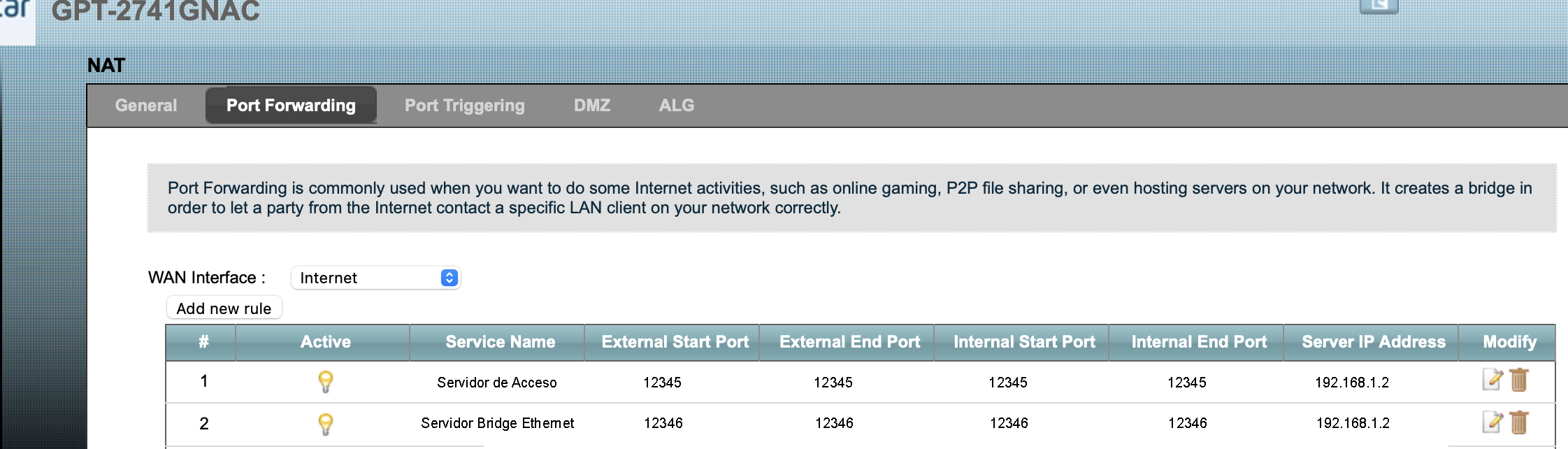
- Access Server Service –>
norte.dominio.com, 12345 (udp) - Bridge Ethernet Server Service –>
norte.dominio.com, 12346 (udp)
Port Forwarding on Movistar Router
I enable Port Forwarding on the Movistar Router where north is located. Here’s a capture of the configuration. Remember to select UDP protocol when adding each entry.
IGMP Proxy
Through north’s Bridge interface br206, multicast join messages from the remote set-top box (south) will arrive. They arrive there, so I need to forward them and act as an intermediary. That’s the function of igmpproxy on north: it listens on the downstream (interface br206) and forwards on its upstream (interface eth1).
I install the software
# apt install -y igmpproxy
I prepare the configuration file.
I enable it to start at boot
# systemctl enable igmpproxy
Fullcone NAT
As I describe in the Video on Demand post, it’s necessary to enable Fullcone NAT for RTSP-type flows (recordings, series, movies, rewind, etc.) to work.
I compile and install on north’s Raspberry Pi OS:
# apt install raspberrypi-kernel-headers
# cd ~/
# wget https://github.com/LuisPalacios/rtsp-linux/archive/refs/heads/master.zip
# unzip master.zip
# rm master.zip
# cd ~/rtsp-linux-master
# make
# make modules_install

# depmod -a

# modprobe nf_nat_rtsp
# lsmod | grep -i rtsp
nf_nat_rtsp            16384  0
nf_conntrack_rtsp      16384  1 nf_nat_rtsp
nf_nat                 49152  3 nf_nat_rtsp,nft_chain_nat,xt_MASQUERADE
nf_conntrack          139264  4 nf_nat,nf_conntrack_rtsp,nf_nat_rtsp,xt_MASQUERADE
- To ensure it always loads at boot, I modify the
/etc/modulesfile
nf_nat_rtsp
- I configure the system to call these modules when detecting RTSP flows. There are two ways to do it, depending on your kernel version.
Automatic: sysctl -w net.netfilter.nf_conntrack_helper=1, only works up to Kernel 5.x.
Manual: iptables -t raw -A PREROUTING -p tcp --dport 554 -j CT --helper rtsp, works with any Kernel version, including 6.x.
Manual check with: iptables -L -n -t raw -v
| Warning! - Now is a good time to reboot north |
# reboot -f
south Server
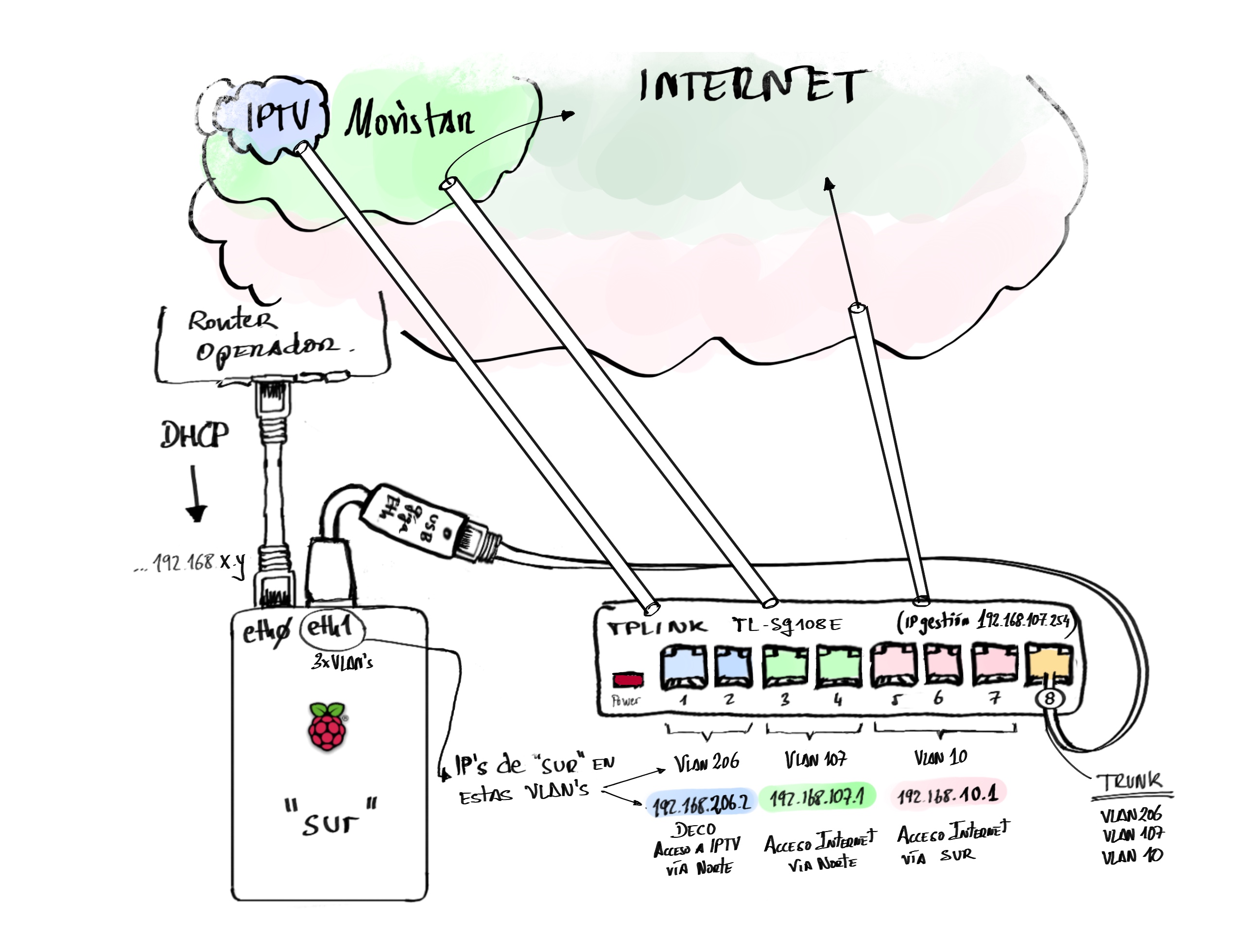
The south server is the one at the remote location. It also has two network cards but for different purposes than we saw before.
South Networking
I configure both interfaces: eth0 (embedded Raspberry Pi port) connected to the provider’s router (dynamic IP, default router, and DNS Server).
The eth1 (usb dongle gigabit ethernet port) connected to my switch with VLAN and IGMP Snooping support. In my lab I used a tp-link TL-SG108E Switch, but any consumer-grade switch with VLAN and IGMP Snooping support will work. At the end of the post you’ll find screenshots with the Switch configuration. On this interface I use the VLANs:
| VLAN | Purpose |
|---|---|
10 | south clients that reach the Internet through south’s local provider |
107 | south clients that reach the Internet through north. |
206 | Set-top box at south to consume IPTV traffic from north. |
I prepare the networking files and activate the new configuration:
For the TP-Link UE300 Gigabit Ethernet dongle to work properly I need to create this file. It won’t be used until the next reboot:
# service networking restart
:
# ip a
:
2: eth0: <BROADCAST,MULTICAST,UP,LOWER_UP> mtu 1500 qdisc mq state UP group default qlen 1000
    inet 192.168.1.82/24 brd 192.168.1.255 scope global dynamic noprefixroute eth0
       valid_lft 3279sec preferred_lft 2829sec
:
4: eth1: <BROADCAST,MULTICAST,UP,LOWER_UP> mtu 1500 qdisc pfifo_fast state UP group default qlen 1000
    link/ether 28:87:ba:12:26:43 brd ff:ff:ff:ff:ff:ff
5: eth1.206@eth1: <BROADCAST,MULTICAST,UP,LOWER_UP> mtu 1492 qdisc noqueue master br206 state UP group default qlen 1000
    link/ether 28:87:ba:12:26:43 brd ff:ff:ff:ff:ff:ff
6: eth1.107@eth1: <BROADCAST,MULTICAST,UP,LOWER_UP> mtu 1500 qdisc noqueue state UP group default qlen 1000
    link/ether 28:87:ba:12:26:43 brd ff:ff:ff:ff:ff:ff
    inet 192.168.107.1/24 brd 192.168.107.255 scope global noprefixroute eth1.107
7: eth1.10@eth1: <BROADCAST,MULTICAST,UP,LOWER_UP> mtu 1500 qdisc noqueue state UP group default qlen 1000
    link/ether 28:87:ba:12:26:43 brd ff:ff:ff:ff:ff:ff
    inet 192.168.10.1/24 brd 192.168.10.255 scope global noprefixroute eth1.10
:
IPv4 Forwarding
I edit the /etc/sysctl.conf file and modify the following line to enable forwarding. To activate it, just run sysctl -p
net.ipv4.ip_forward=1
Network Tuning for South
For OpenVPN, WireGuard, etc. tunnels, and when we’ll have significant traffic and delays, I recommend using a “tuned” configuration. You’ll see improvements if you test with iperf3.
/etc/sysctl.d/95-tuning.conf
# /etc/sysctl.d/95-tuning.conf
# Network tuning for tunnels (OpenVPN/WireGuard) and iperf3 tests
# Apply with: sysctl -p /etc/sysctl.d/95-tuning.conf

######## Per-socket buffers (default and max) ########
net.core.rmem_default = 524288
net.core.wmem_default = 524288
net.core.rmem_max     = 4194304
net.core.wmem_max     = 4194304

######## TCP auto-tuning (min, default, max) ########
net.ipv4.tcp_rmem = 4096 87380 4194304
net.ipv4.tcp_wmem = 4096 65536 4194304

######## Backlog / network queues ########
net.core.netdev_max_backlog = 8192

net.core.somaxconn = 4096

######## MTU/PMTU ########
net.ipv4.tcp_mtu_probing = 1

######## Congestion control / qdisc (optional) ########
# net.ipv4.tcp_congestion_control = bbr
# net.core.default_qdisc = fq

######## Other ########
net.ipv4.tcp_slow_start_after_idle = 0

# (Optional – UDP)
#net.ipv4.udp_rmem_min = 16384
#net.ipv4.udp_wmem_min = 16384
I apply it with the following command:
sysctl -p /etc/sysctl.d/95-tuning.conf
NAT and Firewall for South
This device acts as a router between the different available interfaces and networks, so it’s important to define and configure its NAT and Firewall options.
Services and Scripts you need to create:
- /etc/systemd/system/internet_wait.service
- /etc/systemd/system/firewall_1_pre_network.service
- /etc/systemd/system/firewall_2_post_network.service
- /root/firewall/sur_firewall_clean.sh
- /root/firewall/sur_firewall_inames.sh
- /root/firewall/sur_firewall_1_pre_network.sh
- /root/firewall/sur_firewall_2_post_network.sh
- /root/firewall/sur_verifica_conectividad.sh
Additionally, I set up a service that monitors the ethernet bridge tunnel
- /etc/systemd/system/watch_eth_bridge_con_norte.timer
- /etc/systemd/system/watch_eth_bridge_con_norte.service
- /etc/default/watch_eth_bridge_con_norte
- /usr/bin/watch_eth_bridge.sh
I enable the services (they’ll activate on next reboot)
# chmod 755 /root/firewall/*.sh
# chmod 755 /usr/bin/watch_eth_bridge.sh
# systemctl enable internet_wait.service
# systemctl enable firewall_1_pre_network.service
# systemctl enable firewall_2_post_network.service
I don’t reboot yet — I continue configuring and will do it at the end.
OpenVPN on south
In this section I describe how I configure OpenVPN in client mode to connect to north
Installing south certificates
First I install the certificates as a client of north. I had already prepared and sent them to this device. I prepare a subdirectory for the keys under /etc/openvpn/client and extract the files.
# mkdir -p /etc/openvpn/cliente/keys/sur_cliente_de_norte
# cd /etc/openvpn/client/keys/sur_cliente_de_norte/
# tar xvfz /home/luis/sur_cliente_de_norte_keys.tgz
:
# tree /etc/openvpn/client/
/etc/openvpn/client/
└── keys
    └── sur_cliente_de_norte
        ├── norte.ca.crt
        ├── norte.ta.key
        ├── sur_cliente_de_norte.crt
        └── sur_cliente_de_norte.key
south as Access Server client
Now I configure my service as a client of north’s Access Server. I create the main configuration file and then start the service.
- /etc/openvpn/client/sur_cliente_access_de_norte.conf
- /etc/openvpn/client/sur_cliente_access_de_norte_CONFIG.sh
- /etc/openvpn/client/sur_cliente_access_de_norte_DOWN.sh
- /etc/openvpn/client/sur_cliente_access_de_norte_UP.sh
# systemctl start openvpn-client@sur_cliente_access_de_norte
# systemctl enable openvpn-client@sur_cliente_access_de_norte
# systemctl status openvpn-client@sur_cliente_access_de_norte
● openvpn-client@sur_cliente_access_de_norte.service - OpenVPN service for sur_cliente_access_de_norte
     Loaded: loaded (/lib/systemd/system/openvpn-server@.service; enabled; vendor preset: enabled)
                                                                  =======
     Active: active (running) since Sat 2014-10-19 12:20:07 CET; 1min 14s ago
             ======

# ip a show dev tun1
7: tun1: <POINTOPOINT,MULTICAST,NOARP,UP,LOWER_UP> mtu 1500 qdisc pfifo_fast state UNKNOWN group default qlen 500
    link/none
    inet 192.168.224.2/24 scope global tun1
       valid_lft forever preferred_lft forever

luis@sur$ ping 192.168.224.1
PING 192.168.224.1 (192.168.224.1) 56(84) bytes of data.
64 bytes from 192.168.224.1: icmp_seq=1 ttl=64 time=17.8 ms
64 bytes from 192.168.224.1: icmp_seq=2 ttl=64 time=17.6 ms
64 bytes from 192.168.224.1: icmp_seq=3 ttl=64 time=16.7 ms
^C
south as Bridge Ethernet client
Now I configure the Bridge Ethernet client service for north. I create the main configuration file, the support scripts, and start the service.
/etc/openvpn/client/sur_cliente_bridge_ethernet_de_norte.conf
##
## Fichero /etc/openvpn/client/sur_cliente_bridge_ethernet_de_norte.conf
## En Servidor ‘sur’
##
## Este fichero está relacionado con este apunte:
## https://www.luispa.com/linux/2014/10/19/bridge-ethernet.html
##

# Cliente de un "Bridge Ethernet" OpenVPN
#
# Soy un cliente del servidor:
remote norte.midominio.com 12346
client

# Creo un device de tipo `tap` y uso udp como prortocolo.
proto udp
dev tap206

# Resto de parámetros del servidor
resolv-retry 30
nobind
persist-key
persist-tun

# Mejoras sep'25
pull
sndbuf 512000
rcvbuf 512000
fast-io
# en UDP, el cliente notifica al server al salir
explicit-exit-notify 1

# Mis claves
ca keys/sur_cliente_de_norte/norte.ca.crt
cert keys/sur_cliente_de_norte/sur_cliente_de_norte.crt
key keys/sur_cliente_de_norte/sur_cliente_de_norte.key
# Nivel extra de seguridad, firmo con HMAC el handshake SSL/TLS
tls-auth keys/sur_cliente_de_norte/norte.ta.key 1

# Scripts para activar o desactivar el tunel
script-security 2
up /etc/openvpn/client/sur_cliente_bridge_ethernet_de_norte_UP.sh
down /etc/openvpn/client/sur_cliente_bridge_ethernet_de_norte_DOWN.sh

# Ficheros de log y estado
status /etc/openvpn/client/sur_cliente_bridge_ethernet_de_norte.status.log
log /etc/openvpn/client/sur_cliente_bridge_ethernet_de_norte.log
verb 4
/etc/openvpn/client/sur_cliente_bridge_ethernet_de_norte_CONFIG.sh
#!/bin/bash

##
## Fichero /etc/openvpn/client/sur_cliente_bridge_ethernet_de_norte_CONFIG.sh
## En Servidor ‘sur’
##
## Este fichero está relacionado con este apunte:
## https://www.luispa.com/linux/2014/10/19/bridge-ethernet.html
##

# Este fichero contiene los nombres de las interfaces y parámetros de cada uno de
# ellas. Los utilizan los scripts de arranque y parada del servicio Bridge Ethernet

# Configuración General
export mtu="1492"

# Para el Bridge
export EB_TAP="tap206"     # Nombre del interfaz tap (ver .conf), representa al tunel openvpn y que añadiré al bridge.
export EB_BRIDGE="br206"   # Interfaz virtual Bridge que voy a crear.
export EB_VLAN="eth1.206"  # Interfaz VLAN local que añadiré al bridge

# Configuración para el tunel openvpn (interfaz tapXXX)
# Las direcciones MAC's pueden ser cualquiera, obviamente que no se usen en otro sitio.
export mac_tap="be:64:00:02:06:02"       # MAC privada para el interfaz tap local que asociaré al bridge
export mac_bridge="02:64:00:02:06:02"    # MAC privada para el bridge local
# Configuración para el bridge local (interfaz brXXX)
# El rango puede ser cualquiera, una vez más que no e use en otro sitio
export bridge_ip_rango="192.168.206.0/24" # Rango que voy a usar en el bridge
export bridge_ip_local="192.168.206.2/24" # IP de este servidor en su interfaz brXXX (bridge local)
export bridge_ip_remota="192.168.206.1"   # IP de del servidor remoto en su interfaz brXXX (su propio bridge)

# Acceso a internet vía el proveedor remoto en NORTE
export ifWan="eth0"
export ipWan=`ip addr show dev ${ifWan} | egrep -o 'inet [0-9]{1,3}\.[0-9]{1,3}\.[0-9]{1,3}\.[0-9]{1,3}' | cut -d' ' -f2`
export ifSur="eth1.10"
export ipSurRango="192.168.10.0/24"
export ipSur="192.168.10.1"

# Acceso a internet vía el proveedor local en SUR
export ifNorteTunel="tun1"
export ipNorteTunelRango="192.168.224.0/24"
export ipNorteTunel="192.168.224.2"
export ipNorteTunelRouter="192.168.224.1"
export ifNorteLan="eth1.107"
export ipNorteLanRango="192.168.107.0/24"
export ipNorteLan="192.168.107.1"
/etc/openvpn/client/sur_cliente_bridge_ethernet_de_norte_UP.sh
#!/bin/bash

##
## Fichero /etc/openvpn/client/sur_cliente_bridge_ethernet_de_norte_UP.sh
## En Servidor ‘sur’
##
## Este fichero está relacionado con este apunte:
## https://www.luispa.com/linux/2014/10/19/bridge-ethernet.html
##

# Script que se ejecuta al hacer un `start` del servicio Bridge Ethernet

# Interfaces, rutas + IP y MACs asociaré a las interfaces tap y bridge
. /etc/openvpn/client/sur_cliente_bridge_ethernet_de_norte_CONFIG.sh

# Activo el tunel IPSec
ip link set ${EB_TAP} address ${mac_tap}
ip link set ${EB_TAP} up
ip link set ${EB_TAP} mtu ${mtu}

# SETUP BRIDGE
brctl addbr ${EB_BRIDGE}
brctl stp ${EB_BRIDGE} off                         # HUB: no uso STP
brctl setageing ${EB_BRIDGE} 0                     # HUB: olvidar MAC addresses, be a HUB
brctl setfd ${EB_BRIDGE} 0                         # HUB: elimino el forward delay
#ip link set ${EB_BRIDGE} promisc on              # entregar el paquete en local
ip link set ${EB_BRIDGE} address ${mac_bridge}     # Cada nodo debe tener una distinta
ip link set ${EB_BRIDGE} arp on
ip link set ${EB_BRIDGE} mtu ${mtu}
ip link set ${EB_BRIDGE} up

# Activatar VLAN y cambiar MTU
ip link set ${EB_VLAN} up
ip link set ${EB_VLAN} mtu ${mtu}

# Añadir interfaces al bridge
brctl addif ${EB_BRIDGE} ${EB_TAP}  # Añado tunel ipsec al bridge
brctl addif ${EB_BRIDGE} ${EB_VLAN} # Añado vlan al bridge

# Asignar una IP al Bridge si queremos que vaya todo por el bridge
# IMPORTANTÍSIMO poner /24 o asignará una /32 (no funcionará)
ip addr add ${bridge_ip_local} brd + dev ${EB_BRIDGE}

# === QoS/Offloads/Snooping para IPTV (Sur) ===
ETHTOOL="$(command -v ethtool || echo /sbin/ethtool)"
TC="$(command -v tc || echo /sbin/tc)"
disable_offloads() { "$ETHTOOL" -K "$1" gro off gso off tso off 2>/dev/null || true; }

# IGMP Snooping en el bridge
if [ -e "/sys/class/net/${EB_BRIDGE}/bridge/multicast_snooping" ]; then
  echo 1 > "/sys/class/net/${EB_BRIDGE}/bridge/multicast_snooping"
fi

# Desactivar GRO/GSO/TSO en el path IPTV: bridge, tap, vlan del bridge y WAN
for i in "${EB_BRIDGE}" "${EB_TAP}" "${EB_VLAN}" "${ifWan}"; do
  [ -d "/sys/class/net/$i" ] && disable_offloads "$i"
done

# fq_codel en en interfaz WAN efectiva que me saca a internet
"$TC" qdisc replace dev "${ifWan}" root fq_codel 2>/dev/null || true

# Me aseguro de configurar bien el rp_filter
echo -n 0 > /proc/sys/net/ipv4/conf/${EB_BRIDGE}/rp_filter
echo -n 1 > /proc/sys/net/ipv4/conf/${EB_VLAN}/rp_filter
echo -n 1 > /proc/sys/net/ipv4/conf/${EB_TAP}/rp_filter

# Me aseguro de que el forwarding está funcionando
echo -n 1 > /proc/sys/net/ipv4/ip_forward

# Permito el tráfico
for i in `echo ${EB_TAP} ${EB_VLAN} ${EB_BRIDGE}`; do
    iptables -I INPUT -i ${i} -j ACCEPT
    iptables -I FORWARD -i ${i} -j ACCEPT
    iptables -I OUTPUT -o ${i} -j ACCEPT
done

# Tabla de routing para los Decos
/etc/openvpn/client/sur_cliente_bridge_ethernet_de_norte_RT_UP.sh
/etc/openvpn/client/sur_cliente_bridge_ethernet_de_norte_DOWN.sh
#!/bin/bash

##
## Fichero /etc/openvpn/client/sur_cliente_bridge_ethernet_de_norte_DOWN.sh
## En Servidor ‘sur’
##
## Este fichero está relacionado con este apunte:
## https://www.luispa.com/linux/2014/10/19/bridge-ethernet.html
##

# Script que se ejecuta al hacer un `stop` del servicio Bridge Ethernet

# Interfaces, rutas + IP y MACs asociaré a las interfaces tap y bridge
. /etc/openvpn/client/sur_cliente_bridge_ethernet_de_norte_CONFIG.sh

# Quitar las reglas iptables
for i in `echo ${EB_TAP} ${EB_VLAN} ${EB_BRIDGE}`; do
    iptables -D INPUT -i ${i} -j ACCEPT 2>/dev/null
    iptables -D FORWARD -i ${i} -j ACCEPT 2>/dev/null
    iptables -D OUTPUT -o ${i} -j ACCEPT 2>/dev/null
done

# Eliminar la IP del bridge
ip addr del ${bridge_ip_local} brd + dev ${EB_BRIDGE} 2>/dev/null

# Remove interfaces from the bridge
brctl delif ${EB_BRIDGE} ${EB_VLAN} 2>/dev/null
brctl delif ${EB_BRIDGE} ${EB_TAP} 2>/dev/null

# Destroy interface tunel IPSec
ip link set ${EB_TAP} down 2>/dev/null

# Destroy interface vlan
ip link set ${EB_VLAN} down 2>/dev/null

# Destroy the BRIDGE
ip link set ${EB_BRIDGE} down 2>/dev/null
brctl delbr ${EB_BRIDGE} 2>/dev/null

# Destruir la tabla de routing para los clientes Decos
/etc/openvpn/client/sur_cliente_bridge_ethernet_de_norte_RT_DOWN.sh
/etc/openvpn/client/sur_cliente_bridge_ethernet_de_norte_RT_UP.sh
#!/bin/bash
# Script que se ejecuta al hacer un `start` del servicio Bridge Ethernet

# Interfaces, rutas + IP y MACs asociaré a las interfaces tap y bridge
. /etc/openvpn/client/sur_cliente_bridge_ethernet_de_norte_CONFIG.sh

##
## Equipos (Decos) que llegan a Movistar IPTV
##
# Creo una tabla de routing dedicada
grep -i "^206 Decos" /etc/iproute2/rt_tables > /dev/null 2>&1
if [ "$?" = 1 ]; then
    sudo echo "206 Decos" >> /etc/iproute2/rt_tables
fi
ip route add ${bridge_ip_rango} dev ${EB_BRIDGE} table Decos 2>/dev/null
ip route add default via ${bridge_ip_remota} table Decos 2>/dev/null
# Creo una regla que indica qué equipos deben usar dicha tabla de routing
ip rule add from ${bridge_ip_rango} table Decos 2>/dev/null
/etc/openvpn/client/sur_cliente_bridge_ethernet_de_norte_RT_DOWN.sh
#!/bin/bash
# Script que se ejecuta al hacer un `stop` del servicio Bridge Ethernet

# Interfaces, rutas + IP y MACs asociaré a las interfaces tap y bridge
. /etc/openvpn/client/sur_cliente_bridge_ethernet_de_norte_CONFIG.sh

##
## Equipos (Decos) que llegan a Movistar IPTV
##
ip rule del from ${bridge_ip_rango} table Decos 2>/dev/null
ip route del default via ${bridge_ip_remota} table Decos 2>/dev/null
ip route del ${bridge_ip_rango} dev ${EB_BRIDGE} table Decos 2>/dev/null
Once I have the files above on the device, I start the service:
# cd /etc/openvpn/client
# chmod 755 sur_cliente_bridge_ethernet_de_norte*.sh

# systemctl start openvpn-client@sur_cliente_bridge_ethernet_de_norte
# systemctl enable openvpn-client@sur_cliente_bridge_ethernet_de_norte
# systemctl status openvpn-client@sur_cliente_bridge_ethernet_de_norte
root@sur:/etc/openvpn/client# systemctl status openvpn-client@sur_cliente_bridge_ethernet_de_norte.service
● openvpn-client@sur_cliente_bridge_ethernet_de_norte.service - OpenVPN service for sur_cliente_bridge_ethernet_de_norte
     Loaded: loaded (/lib/systemd/system/openvpn-client@.service; enabled; vendor preset: enabled)
                                                                  =======
     Active: active (running) since Sun 2014-10-19 14:10:18 CET; 17s ago
             ======

# ip a show dev tap206
8: tap206: <BROADCAST,MULTICAST,UP,LOWER_UP> mtu 1500 qdisc pfifo_fast master br206 state UNKNOWN group default qlen 1000
    link/ether be:64:00:02:06:02 brd ff:ff:ff:ff:ff:ff

# ip a show dev br206
9: br206: <BROADCAST,MULTICAST,UP,LOWER_UP> mtu 1492 qdisc noqueue state UP group default qlen 1000
    link/ether 02:64:00:02:06:02 brd ff:ff:ff:ff:ff:ff
    inet 192.168.206.2/24 brd 192.168.206.255 scope global br206
       valid_lft forever preferred_lft forever

# ip a show dev eth1.206
4: eth1.206@eth1: <BROADCAST,MULTICAST,UP,LOWER_UP> mtu 1492 qdisc noqueue master br206 state UP group default qlen 1000
   (No IP address needed)

# brctl show
bridge name bridge id STP enabled interfaces
br206  8000.026400020602 no   eth1.206
                              tap206

# ping 192.168.206.1
PING 192.168.206.1 (192.168.206.1) 56(84) bytes of data.
64 bytes from 192.168.206.1: icmp_seq=1 ttl=64 time=12.8 ms
64 bytes from 192.168.206.1: icmp_seq=3 ttl=64 time=13.0 ms
:
DHCP Server

On south I need to install a DHCP server to serve IPs on its LAN interfaces — actually on its VLANs, including the set-top box and its specific options.
For everything related to DNS and DHCP I’ve been using the Pi-hole project for a while. It uses dnsmasq to provide DNS and DHCP services, although its real secret is that it’s a DNS sinkhole that protects your network devices from unwanted content without needing to install any software on clients.
In this lab I’ll only use the DHCP part (the sinkhole and DNS perhaps in the future). If you want to learn more, I recommend reading the Home Pi-hole post.
I run the Pi-hole installation (for more detail, check the link)
curl -sSL https://install.pi-hole.net | bash
These are the configuration files for the DHCP part:
- /etc/dhnsmasq.d/01-pihole.conf
- /etc/dhnsmasq.d/02-pihole-dhcp.conf
- /etc/dhnsmasq.d/03-pihole-decos.conf
- /etc/dhnsmasq.d/04-pihole-sur.conf
| Warning! - Now is a good time to reboot north |
# reboot -f
Switch on south’s LAN
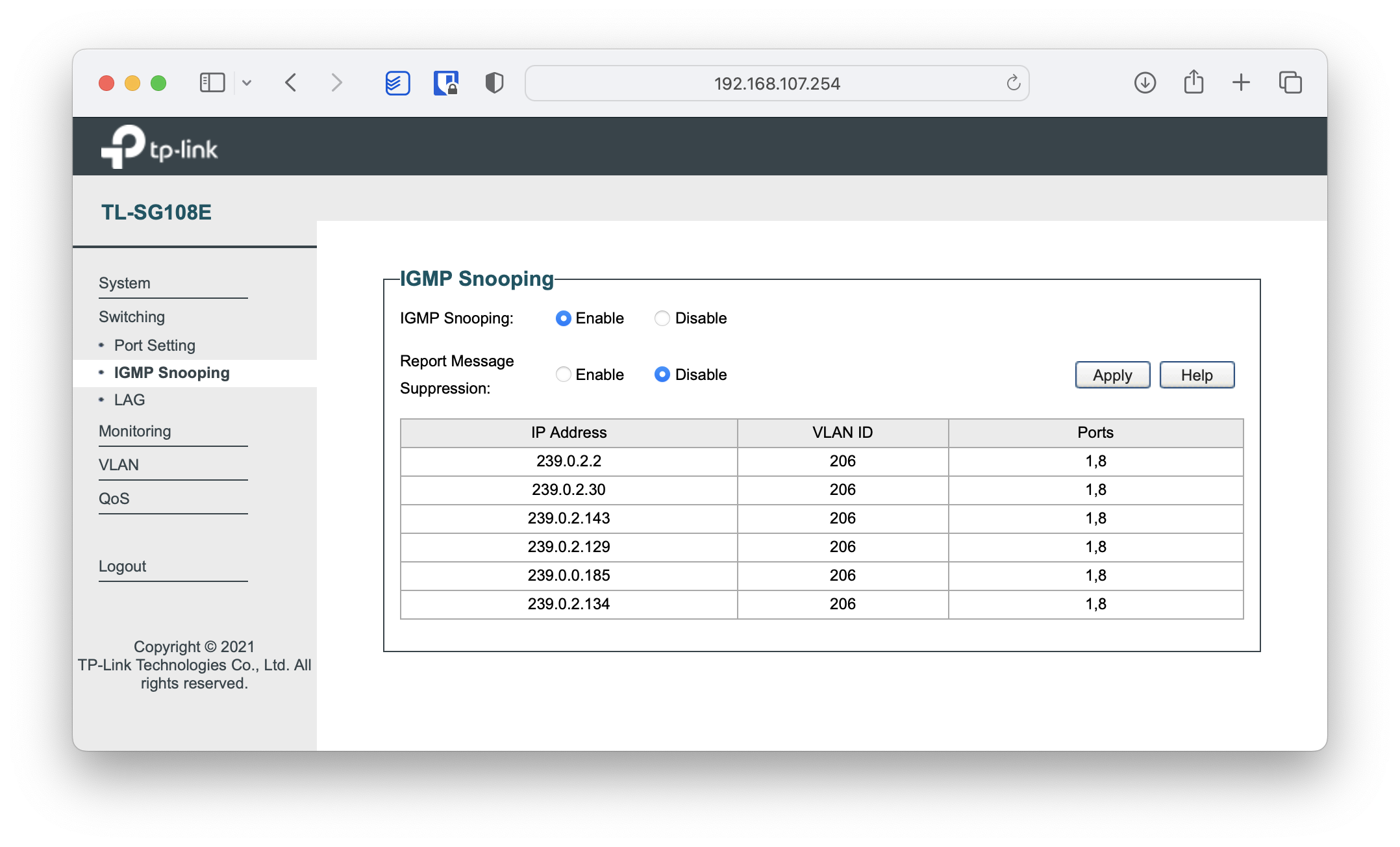
On south’s LAN we need a switch that supports VLANs and IGMP Snooping. In my case I chose the tp-link TL-SG108E.
| Ports | VLAN - Description |
|---|---|
1,2 | VLAN 206. Set-top box connecting to Movistar TV via “bridge-ethernet” tunnel through north |
3,4 | VLAN 107. Clients reaching the Internet via “access” tunnel through north |
5,6,7 | VLAN 10. Clients reaching the Internet through south’s local provider |
8 | TRUNK VLANs 206,107,10. Raspberry Pi to its eth1(usb dongle) |
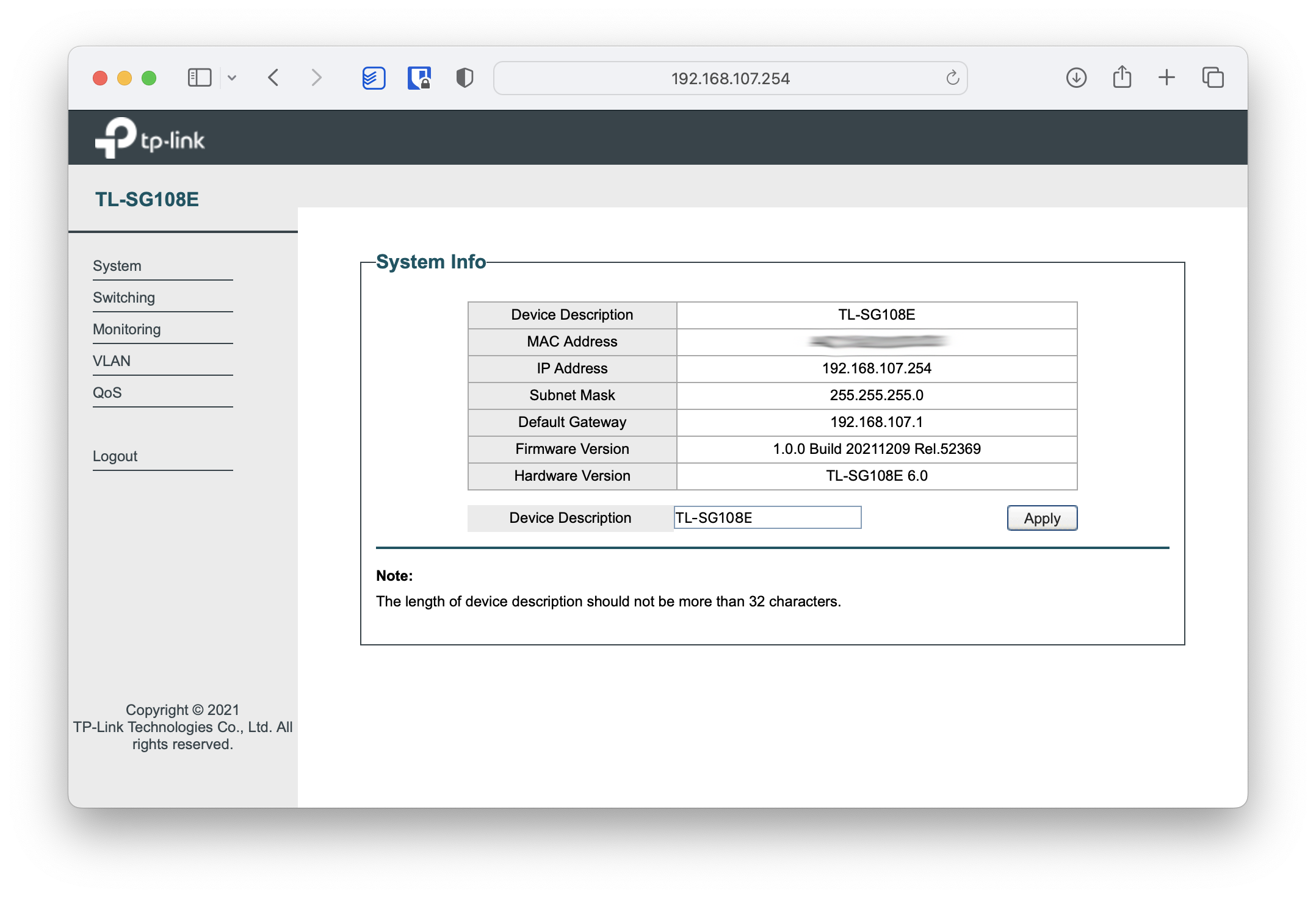
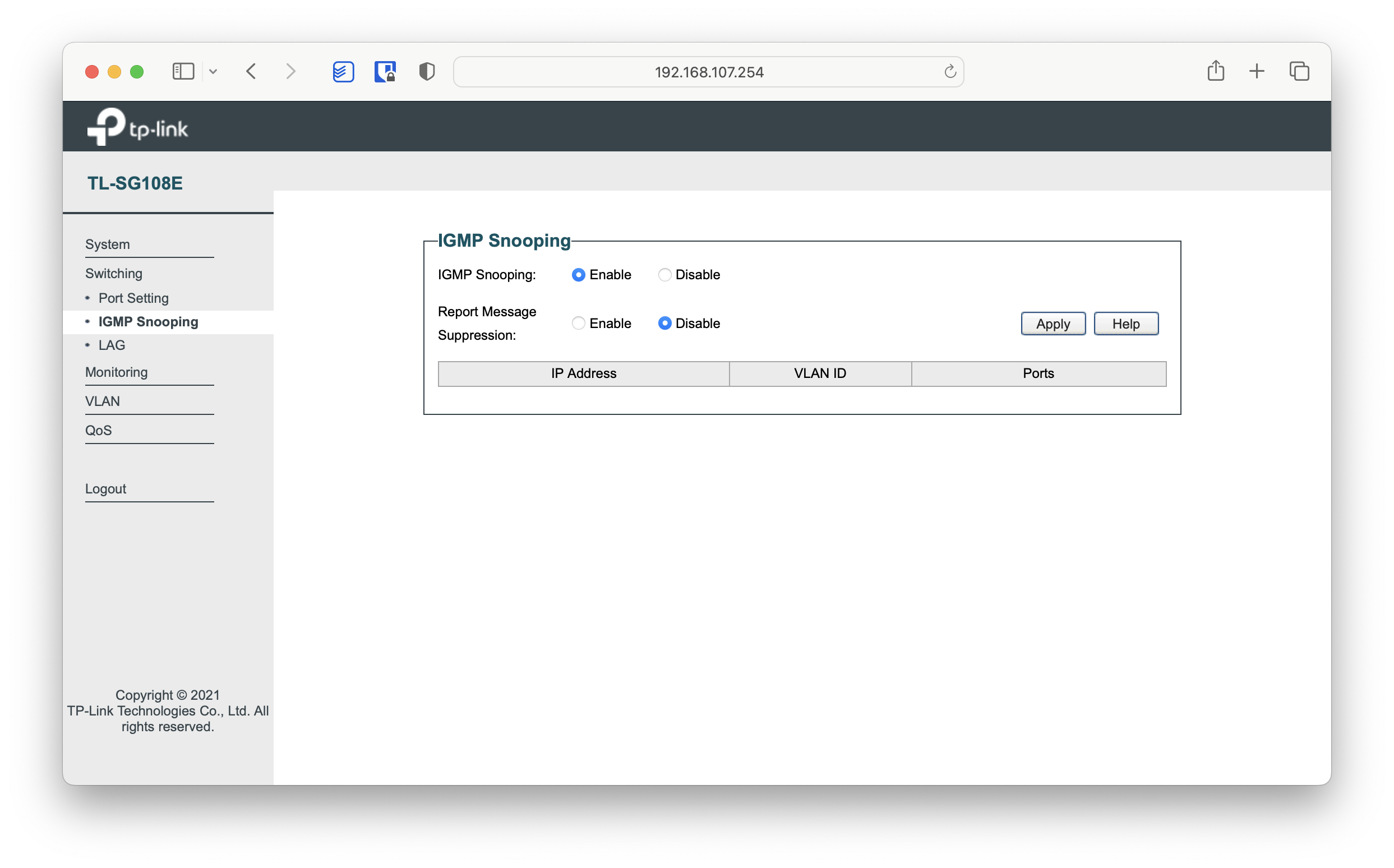
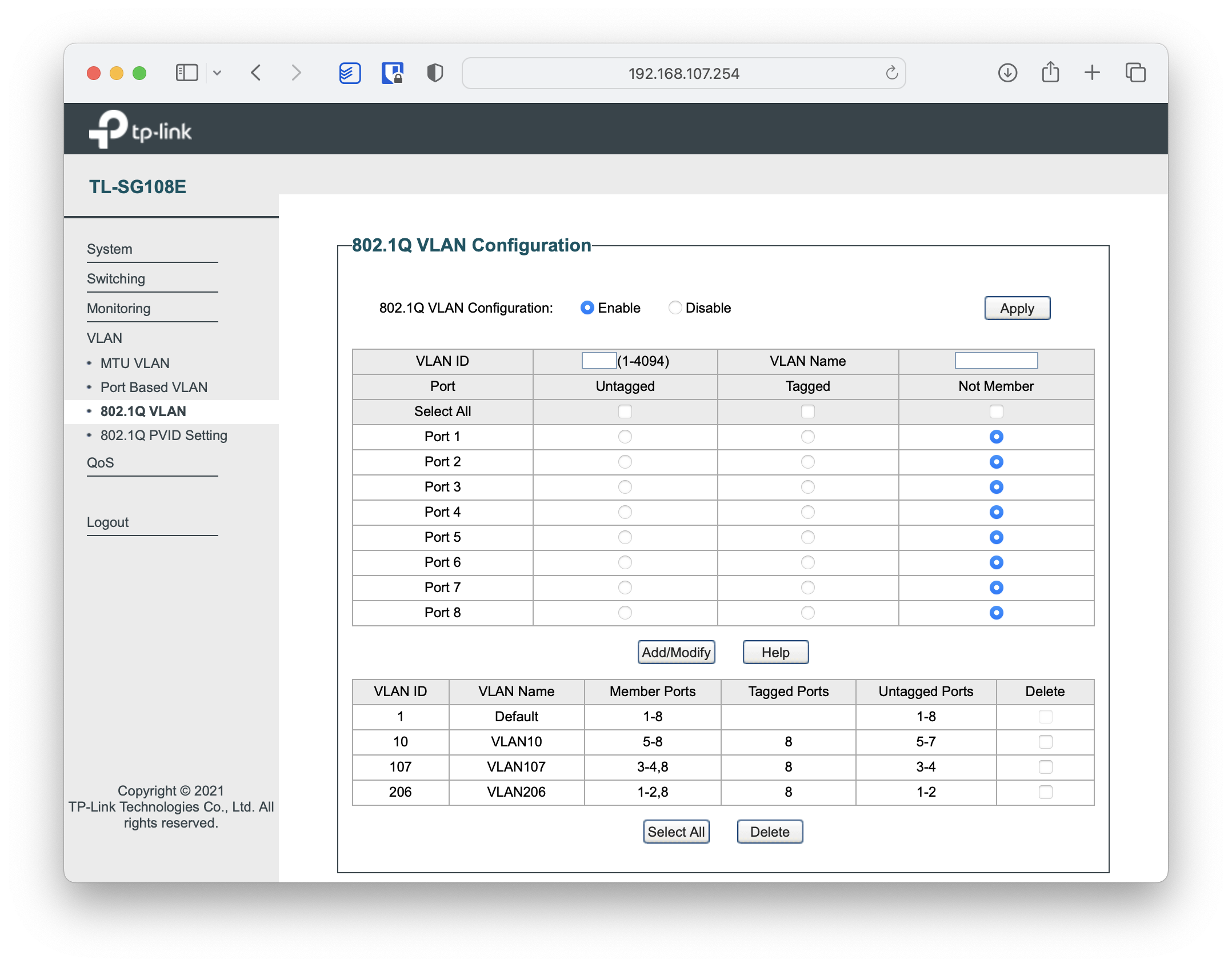
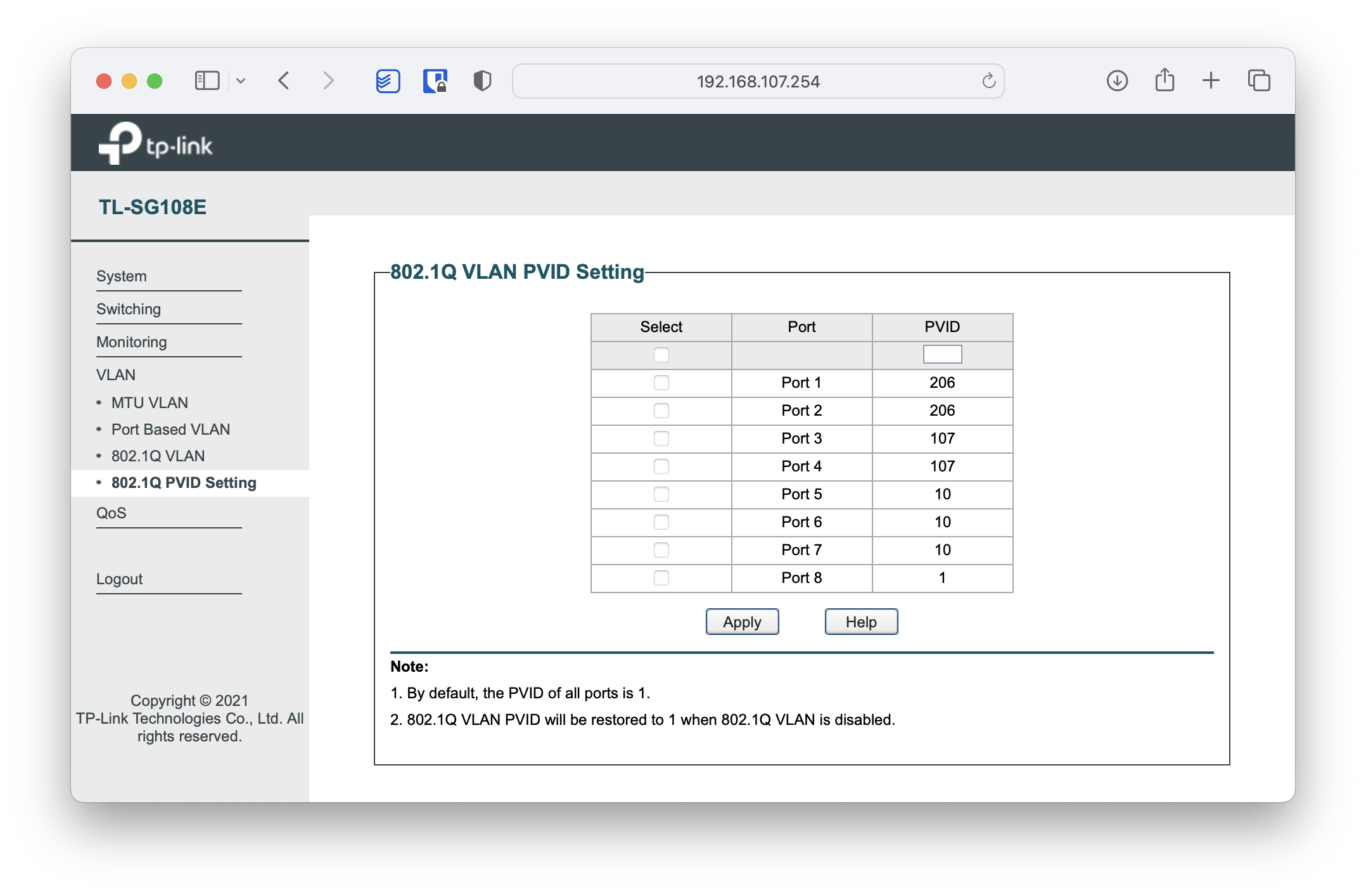
As a curiosity, once everything is up and running we can see the active multicast groups on the switch itself:
Service Health
Here’s a script that verifies the connection health:
North:
root@norte:~/firewall# ./norte_verifica_conectividad.sh
Unit (servicio) firewall_1_pre_network: IPTABLES (pre-net) ...                 [OK]
Unit (servicio) firewall_2_post_network: IPTABLES (post-net) ...               [OK]
Unit (servicio) watch_eth_bridge_con_sur.timer: Vigilante ...                  [OK]
Unit (servicio) sshd.service: SSHD ...                                         [OK]
Probando interface: lo                                                         [OK]
Probando interface: eth0                                                       [OK]
Probando interface: eth1                                                       [OK]
Probando interface: br206                                                      [OK]
Probando interface: tun1                                                       [OK]
Probando IP localhost: localhost (lo) ...                                      [OK] 0.089 ms
Probando IP 192.168.1.1: Router de acceso a Internet ...                       [OK] 0.514 ms
Probando IP 192.168.224.2: Tunel Internet con Sur ...                          [OK] 12.471 ms
Probando IP 192.168.206.2: Tunel IPTV con Sur ...                              [OK] 12.261 ms
Probando IP 10.64.0.1: MOVISTAR IPTV ...                                       [OK] 3.273 ms
Comprobando Kernel: /proc/sys/net/ipv4/ip_forward  (OK=1)                      [OK]
Comprobando Kernel: /proc/sys/net/ipv4/conf/lo/rp_filter  (OK=0)               [OK]
Comprobando Kernel: /proc/sys/net/ipv4/conf/all/rp_filter  (OK=0)              [OK]
Comprobando Kernel: /proc/sys/net/ipv4/conf/default/rp_filter  (OK=1)          [OK]
Comprobando Kernel: /proc/sys/net/ipv4/conf/eth0/rp_filter  (OK=1)             [OK]
Comprobando Kernel: /proc/sys/net/ipv4/conf/eth1/rp_filter  (OK=0)             [OK]
Comprobando Kernel: /proc/sys/net/ipv4/conf/br206/rp_filter  (OK=0)            [OK]
Comprobando Kernel: /proc/sys/net/ipv4/conf/tun1/rp_filter  (OK=1)             [OK]
Comprobando Kernel: /proc/sys/net/ipv4/conf/tun1/forwarding  (OK=1)            [OK]
WAN Interfaz Internet ifWan              : eth0 - 192.168.1.2
LAN IPTV              ifLanIPTV          : eth1 - 192.168.1.3
Tunel Sur             ifTunelSur         : tun1
Bridge IPTV           ifBridgeIPTV       : br206 - 192.168.206.1
INTRANET : 192.168.1.0/24 192.168.206.0/24 192.168.107.0/24 192.168.10.0/24 192.168.224.0/24 192.168.222.0/24
South:
root@sur:~/firewall# ./sur_verifica_conectividad.sh

Unit (servicio) firewall_1_pre_network: IPTABLES (pre-net) ...                 [OK]
Unit (servicio) firewall_2_post_network: IPTABLES (post-net) ...               [OK]
Unit (servicio) watch_eth_bridge_con_norte.timer: Vigilante ...                [OK]
Unit (servicio) sshd.service: SSHD ...                                         [OK]
Probando interface: lo                                                         [OK]
Probando interface: eth0                                                       [OK]
Probando interface: br206                                                      [OK]
Probando interface: eth1.107                                                   [OK]
Probando interface: eth1.10                                                    [OK]
Probando interface: tun1                                                       [OK]
Probando IP localhost: localhost (lo) ...                                      [OK] 0.115 ms
Probando IP 192.168.1.1: Router de acceso a Internet ...                       [OK] 0.269 ms
Probando IP 192.168.107.254: Switch local ...                                  [OK] 2.183 ms
Probando IP 192.168.224.1: Tunel Internet con Norte ...                        [OK] 13.317 ms
Probando IP 192.168.206.1: Tunel IPTV con Norte ...                            [OK] 13.365 ms
Probando IP 10.64.0.1: MOVISTAR IPTV ...                                       [OK] 15.383 ms
Comprobando Kernel: /proc/sys/net/ipv4/ip_forward  (OK=1)                      [OK]
Comprobando Kernel: /proc/sys/net/ipv4/conf/all/rp_filter  (OK=0)              [OK]
Comprobando Kernel: /proc/sys/net/ipv4/conf/default/rp_filter  (OK=1)          [OK]
Comprobando Kernel: /proc/sys/net/ipv4/conf/br206/rp_filter  (OK=0)            [OK]
Comprobando Kernel: /proc/sys/net/ipv4/conf/eth1.107/rp_filter  (OK=1)         [OK]
Comprobando Kernel: /proc/sys/net/ipv4/conf/eth1.10/rp_filter  (OK=1)          [OK]
Comprobando Kernel: /proc/sys/net/ipv4/conf/tun1/rp_filter  (OK=1)             [OK]
Comprobando Kernel: /proc/sys/net/ipv4/conf/tun1/forwarding  (OK=1)            [OK]
Comprobando Kernel: /proc/sys/net/ipv4/conf/lo/rp_filter  (OK=0)               [OK]
Comprobando Kernel: /proc/sys/net/ipv4/conf/eth0/rp_filter  (OK=1)             [OK]
Comprobando Kernel: /proc/sys/net/ipv4/conf/lo/rp_filter  (OK=0)               [OK]
WAN Interfaz Internet         : eth0 - 192.168.1.82
Bridge IPTV                   : br206 - 192.168.206.2
LAN Acceso Internet Via Norte : eth1.107 - 192.168.107.1
LAN Acceso Internet Via Sur   : eth1.10 - 192.168.10.1
INTRANET : 192.168.206.0/24 192.168.107.0/24 192.168.10.0/24 192.168.224.0/24 192.168.222.0/24