
Having a DVD player is so 90’s. Nowadays it’s possible to combine everything into a single home Media Center with one remote to watch streaming internet channels, DTT or Satellite channels, Movistar TV, movies from your DVDs or series, home videos, listen to your music, or browse your photo collection.
It sounds easy but it actually has its tricks — there are too many commercial or free solutions with their advantages and also their drawbacks. Until recently I had it half-solved, or so I thought, with a Plex Server + a Chromecast (+Plex Client) connected to each TV in the house. It’s a good solution — it needs a machine running 24/7 with the Plex Media Server (PMS) (can be Linux, Mac, Windows, or NAS), each Chromecast costs 35 euros and it works very well.
The drawbacks
You end up with multiple remotes (the TV one, the Movistar set-top box, the phone for controlling Plex on the Chromecast) and switching HDMI ports constantly. Another issue is that Chromecast uses Wi-Fi b/n/g and can’t handle bitrates above 4Mbps — it forces the server to transcode, and even with certain movies (very high bitrate) it sometimes suffers intermittent audio or video pauses. The last drawback is that I can’t integrate satellite TV sources from an external tuner.
Still, if you have a dedicated Linux box or NAS, the Plex solution is very good — its interface and user experience are simply “exceptional.”
Raspberry Pi with XBMC
I decided to try something different and started with the Raspberry Pi 1.2 B+ along with the OpenElec distribution (XBMC), capable of supporting all my home multimedia needs (if you want something more powerful, check out Vero (~220 euros)). Important: In early February 2015, the Raspberry Pi team released version 2: Raspberry Pi 2 Model B v1.1 which is currently on offer at the same price as the previous version (Raspberry Pi 1.2 B+ approx. 35 euros)
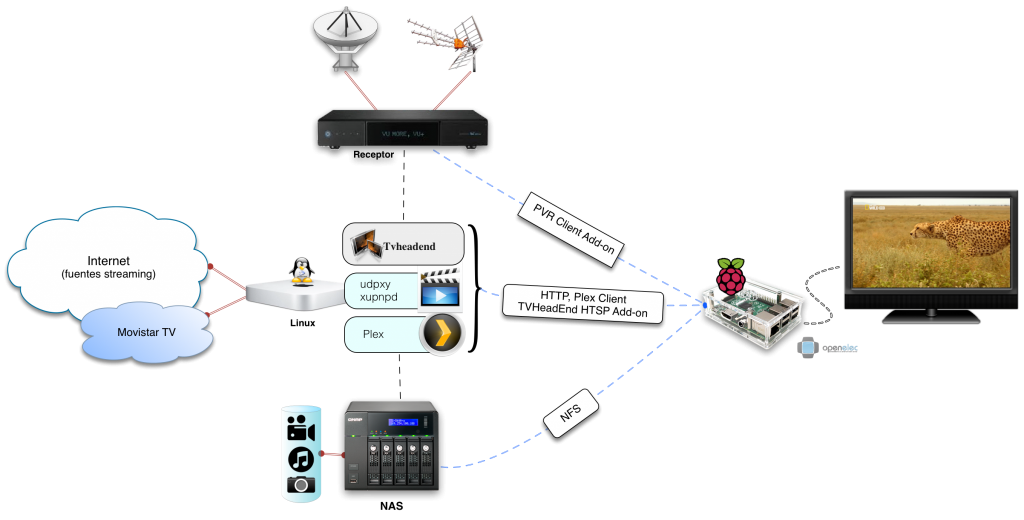
The Raspberry Pi is a very cheap “general purpose computer” (starting at ~35 euros, you can get to 80-90 euros adding power supply, HDMI cable, USB, heatsinks, case, etc.). The idea is to connect one to each TV and get a highly extensible “multi-purpose” multimedia manager. It can connect via ethernet (recommended), also supports Wi-Fi, and its sources are multiple: music, photos, home videos (SD or HD), movies (SD or HD), TV receivers (SD or HD) with DTT, Satellite, or IPTV tuning.
The Raspberry Pi 1.2 B+ (I’ll call it version 1) supports videos of approximately ~40Mbps — higher bitrates give it trouble. I recommend using “openelec” version 4.0.2, which can be downloaded via NOOBs on the Raspberry website (newer versions haven’t given me as good results).
The Raspberry Pi 2 Model B v1.1 (version 2) supports videos at the same bitrates since the LAN card is the same as the previous version (~40Mbps). If you want more information, I recommend checking out the post (Media Center Pi+KODI/XBMC), where I go into detail with usage examples.