
Pi-hole is a DNS (and DHCP) server that protects your devices from unwanted content, without needing to install any software on the clients in your network. Its use case is to act as a sinkhole for the advertising that floods today’s networks. Yes, a small Linux PC with Pi-hole on your home network to prevent tons of ads from reaching you while you browse.
On a Raspberry Pi 4B, I set up Raspberry Pi OS GNU/Linux 10 (buster) and Pi-Hole. I performed the installation at home, where I have a Movistar router (but any internet provider would work). I disabled the router’s DNS/DHCP Server and switched to using both services on Pi-Hole. Excluding the Raspbian installation, the entire process is very simple and takes less than ten minutes.
Before we begin, Pi-hole advantages taken from their own website.
- Easy to install: the installer guides you through the process and takes less than ten minutes
- Effective: ads are blocked not only in the browser, but also in mobile apps and smart TVs
- Responsive: speeds up the feel of daily browsing thanks to DNS query caching
- Lightweight: runs smoothly with minimal hardware and software requirements — I installed it on a Pi4B but you can use a less powerful one
- Robust: a quality command-line interface ensures interoperability
- Smart: a responsive web interface dashboard to view and control your Pi-hole
- Versatile: can optionally function as a DHCP server, ensuring all devices are automatically protected
- Scalable: capable of handling hundreds of millions of queries if installed on a powerful server
- Modern: blocks ads on both IPv4 and IPv6
- Free: open source software, runs on DONATIONS, which I recommend you make.
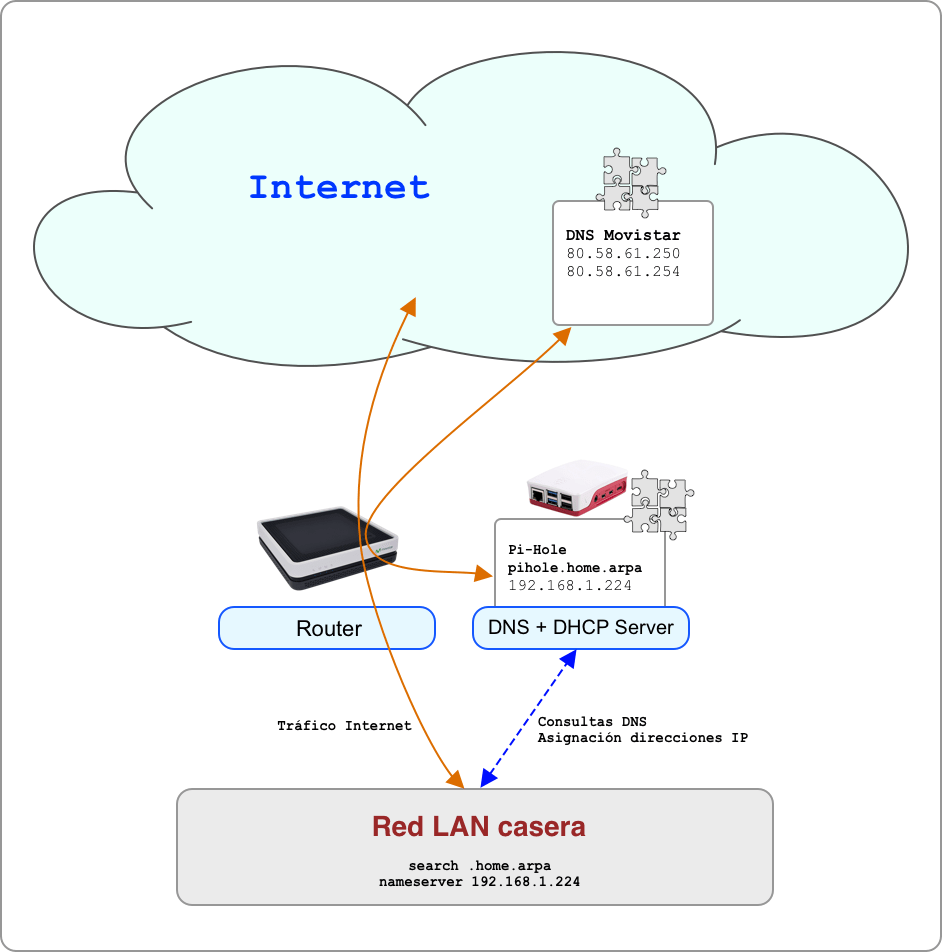
How does it work? Similarly to a firewall, ads and “trackers” are blocked for all devices on your home network. When they make a DNS query to Pi-hole, it will block the names on its blacklist.
Installation
I checked the Pi-hole requirements and prepared the hardware (Raspberry Pi), downloaded the Operating System (Raspbian OS, documented here), version (Raspberry Pi OS Lite, from May 7, 2021) and copied it to an 8GB memory card using balenaEtcher.

After booting I finished configuring Raspbian OS
Login: pi
Password: raspbian

$ sudo raspi-config
- Change the 'pi' user password
- Change the hostname to 'pihole'
- Enable SSH
- Localization -> Locale: es_ES.UTF-8 UTF-8  and mark it as Default
- Localization -> Timezone -> Europe/Madrid
- Localization -> Keyboard -> Spanish
- Localization -> WLAN Country -> ES
- Advance -> Network -> Predictable Interface Name: Yes
Via SSH I continue with the Pi-hole installation. I connect using the IP address received from the DHCP Server on my network (the ISP router) which I’ll replace later, once I assign a static IP.
- I connect to the Raspberry Pi and run the installation script.
luis @ idefix ➜  ~  ssh pi@192.168.1.150

pi@pihole:~ $ curl -sSL https://install.pi-hole.net | bash

  [i] Root user check
  [i] Script called with non-root privileges
      The Pi-hole requires elevated privileges to install and run
      Please check the installer for any concerns regarding this requirement
      Make sure to download this script from a trusted source

  [✓] Sudo utility check

  [✓] Root user check

        .;;,.
        .ccccc:,.
         :cccclll:.      ..,,
          :ccccclll.   ;ooodc
           'ccll:;ll .oooodc
             .;cll.;;looo:.
                 .. ','.
                .',,,,,,'.
              .',,,,,,,,,,.
            .',,,,,,,,,,,,....
          ....''',,,,,,,'.......
        .........  ....  .........
        ..........      ..........
        ..........      ..........
        .........  ....  .........
          ........,,,,,,,'......
            ....',,,,,,,,,,,,.
               .',,,,,,,,,'.
                .',,,,,,'.
                  ..'''.

  [i] Update local cache of available packages...
  [✓] Update local cache of available packages

  [✓] Checking apt-get for upgraded packages... 23 updates available
  [i] It is recommended to update your OS after installing the Pi-hole!

  [i] Installer Dependency checks...
  [✓] Checking for dhcpcd5
  [i] Checking for git (will be installed)
  [✓] Checking for iproute2
  [✓] Checking for whiptail
  [i] Checking for dnsutils (will be installed)
  [i] Processing apt-get install(s) for: git dnsutils, please wait...
  :
  :
- As Upstream DNS Provider I choose
customand configure my ISP’s (in the case of Movistar they are 80.58.61.250 and 80.58.61.254) - I select the StevenBlack List
- I select to block ads on IPv4 and IPv6.
- I specify I want to use a static IP address on the Ethernet interface
eth0, I’ll change it manually later - I indicate I do want the Web Admin Interface
- I indicate I do want the Web Server
- I indicate I do want to enable LOG
- I select privacy mode for FTL: Show Everything
Once it finishes I note down important data
- Configure your devices to use the Pi-hole as their DNS server:
192.168.1.150 - View the web interface at:
http://192.168.1.150/admin - Your Admin Webpage login password is:
zaXxhC2K(I’ll change it later)
Configuration
I update the system and finish manually configuring some aspects
 sudo apt update
 sudo apt upgrade -y
- I configure a static IP address, I decide to use
.224(192.168.1.224)
pi@pihole:~ $ sudo cat /etc/dhcpcd.conf
hostname
clientid
persistent
option rapid_commit
option domain_name_servers, domain_name, domain_search, host_name
option classless_static_routes
option interface_mtu
require dhcp_server_identifier
slaac private
#
#  THE FOLLOWING IS VERY IMPORTANT. ALWAYS USE A STATIC IP !!!!
#  Until now we had .150 which was assigned by DHCP and I asked
#  to keep as static, but that was just to create the following lines.
#  I set the final IP here:
#
interface eth0
        static ip_address=192.168.1.224/24
        static routers=192.168.1.1
        static domain_name_servers=80.58.61.250 80.58.61.254
- I completely disable WiFi and Bluetooth (I won’t be using them).
pi@pihole:~ $ sudo nano /boot/config.txt
:
:
dtoverlay=disable-wifi
dtoverlay=disable-bt
- I set the final IP in two files
pi@pihole:~ $ sudo nano /etc/pihole/local.list
192.168.1.224 pihole           <=== IMPORTANT !!!!
192.168.1.224 pi.hole          <=== IMPORTANT !!!!

pi@pihole:~ $ sudo nano /etc/pihole/setupVars.conf
PIHOLE_INTERFACE=eth0
IPV4_ADDRESS=192.168.1.224/24        <=== IMPORTANT !!!!
IPV6_ADDRESS=
PIHOLE_DNS_1=80.58.61.250
PIHOLE_DNS_2=80.58.61.254
QUERY_LOGGING=true
INSTALL_WEB_SERVER=true
INSTALL_WEB_INTERFACE=true
LIGHTTPD_ENABLED=true
CACHE_SIZE=10000
WEBPASSWORD=8940218ea6c56cdafba82de7029e5fe0dcdcecc0dfbbe29e7579f88fe381a1d9
BLOCKING_ENABLED=true
- Reboot the machine
pi@pihole:~ $ sudo reboot
- Once it boots up, I SSH in and change the Pi-hole admin password
pi@pihole:~ $ sudo pihole -a -p
- I continue with web-based administration
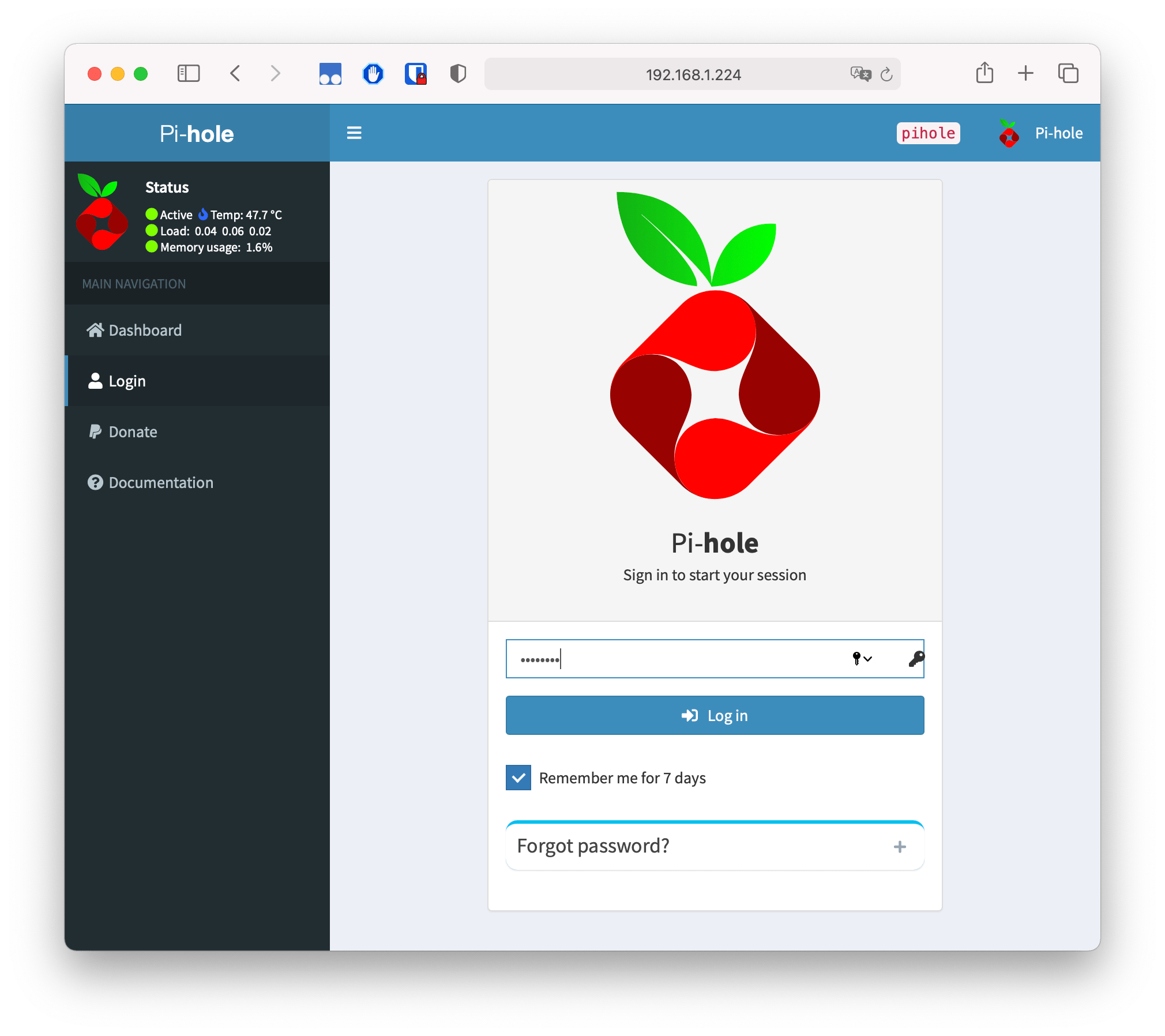
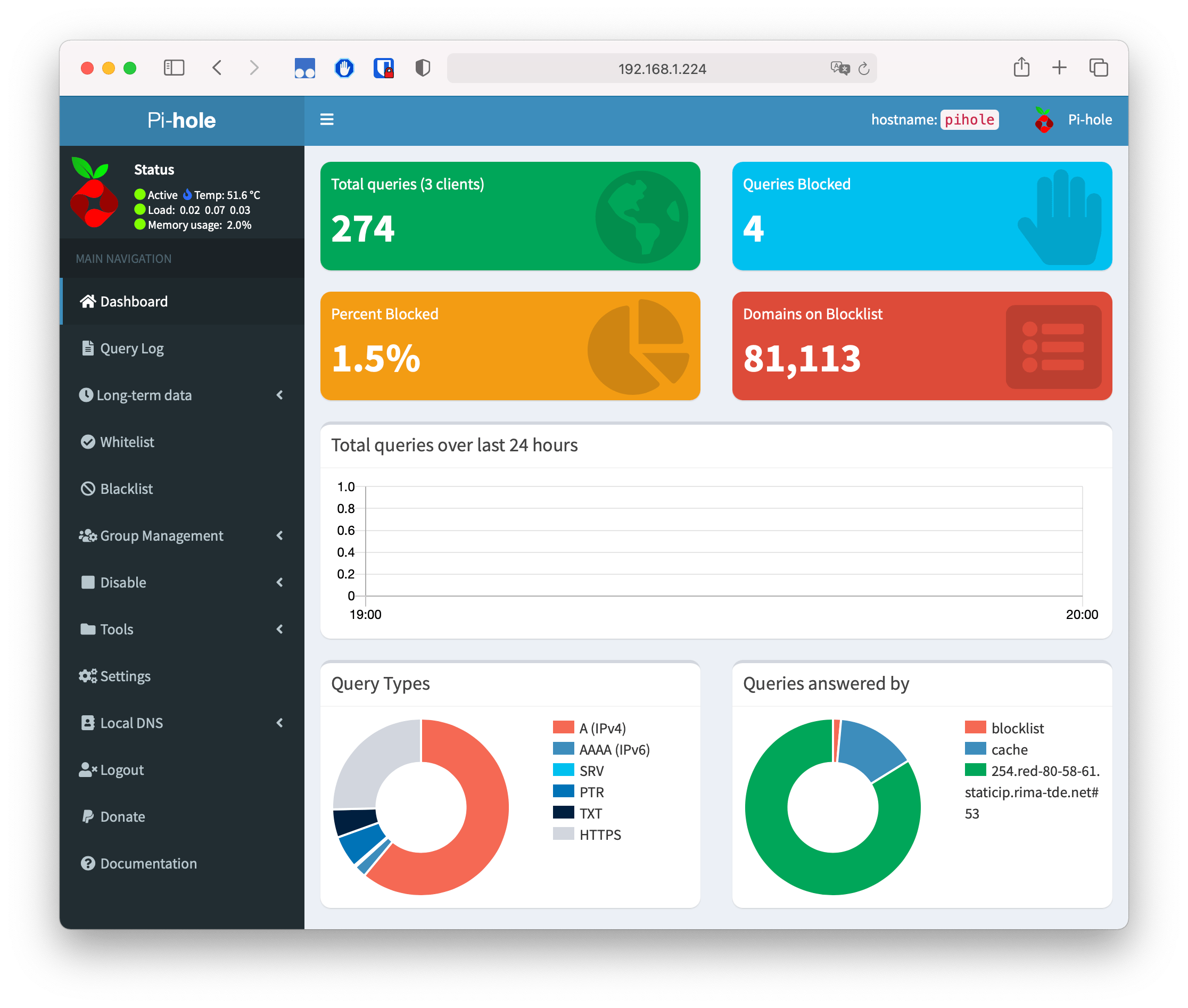
Web interface:
http://192.168.1.224/adminIMPORTANT: I disable the DHCP Server that was previously on the same LAN. It was configured on the Movistar router; I accessed its configuration and disabled it.
I enable the Pi-Hole DHCP Server
   Settings -> DHCP -> Enable DHCP Server
  From: 192.168.1.50
  To: 192.168.1.220
  Router: 192.168.1.1
  Domain: home.arpa
  Lease time in hours: 1
Pi-hole Administration
From this point on:
Via SSH
ssh pi@pihole.home.arpaorpi@192.168.1.224. The password is the one I set with raspi-config at the beginning.Admin: http://pihole.home.arpa/admin (or Admin: http://192.168.1.224/admin)
My network’s DNS server from now on:
192.168.1.224My network’s DHCP server from now on:
192.168.1.224
Customization
The system should already be operational, however in my case I went a bit further and made some changes manually to the configuration files.
$ sudo cat /etc/dnsmasq.d/01-pihole.conf
addn-hosts=/etc/pihole/local.list
addn-hosts=/etc/pihole/custom.list
localise-queries
no-resolv
cache-size=10000
log-queries
log-facility=/var/log/pihole.log
local-ttl=2
log-async
server=80.58.61.250
server=80.58.61.254
interface=eth0
server=/use-application-dns.net/
dhcp-name-match=set:hostname-ignore,wpad
dhcp-name-match=set:hostname-ignore,localhost
dhcp-ignore-names=tag:hostname-ignore
$ sudo cat /etc/dnsmasq.d/02-pihole-dhcp.conf
dhcp-authoritative
dhcp-range=192.168.1.50,192.168.1.251,1h
dhcp-option=option:router,192.168.1.1
dhcp-leasefile=/etc/pihole/dhcp.leases
domain=home.arpa
local=/home.arpa/   <=== Later change
- An example of how to assign IPs via static DHCP
$ sudo cat /etc/dnsmasq.d/04-pihole-static-dhcp.conf
dhcp-host=52:22:01:AA:01:00,vlan100,192.168.1.1,router.home.arpa
dhcp-host=00:08:22:37:0E:A1,vlan100,192.168.1.2,static.home.arpa

dhcp-host=38:34:D3:3E:DA:31,vlan100,192.168.1.50,node1.home.arpa
dhcp-host=38:F9:34:B7:36:96,vlan100,192.168.1.51,node2.home.arpa
- An example of how to assign static DNS names to IP addresses.
$ sudo cat /etc/pihole/custom.list
192.168.1.1 router.home.arpa
192.168.1.2 static.home.arpa
:
192.168.1.50 node1.home.arpa
192.168.1.51 node2.home.arpa
:
192.168.1.224 pihole.home.arpa
- If you modify files manually, don’t forget to restart pihole
sudo pihole restartdns
Adlists and Whitelists
This is my configuration for both:
- Adlists: Group Management -> Adlists
I have three lists configured, I started with StevenBlack’s and in subsequent updates the following two were added.
https://raw.githubusercontent.com/StevenBlack/hosts/master/hosts
https://s3.amazonaws.com/lists.disconnect.me/simple_tracking.txt
https://s3.amazonaws.com/lists.disconnect.me/simple_ad.txt
sudo pihole -g
- Whitelists. I’ve gathered these from different sources and these are the ones I use (and how I configure them from scratch)…
#
# REGEX:

# Google Ads
pihole --white-regex "(\.|^)dartsearch\.net$"
pihole --white-regex "(\.|^)googleadservices\.com$"
pihole --white-regex "(\.|^)googleads\.g\.doubleclick\.net$"
pihole --white-regex "(\.|^)google-analytics\.com$"
pihole --white-regex "(\.|^)ad\.doubleclick\.net$"
pihole --white-regex "(\.|^)adservice\.google\.com$"
pihole --white-regex "(\.|^)adservice\.google\.es$"

# iOS - Ubiquiti WifiMan
# Symptom: Red warning stating ip-api.com cannot be reached.
pihole --white-regex "(\.|^)pro\.ip-api\.com$"
pihole --white-regex "(\.|^)reports\.crashlytics\.com$"

# Other Regex
pihole --white-regex "(\.|^)symcb\.com$"

#
# Exact:


# NVIDIA GeForce
pihole -w gfwsl.geforce.com

# GooglePay android updates
pihole -w android.clients.google.com

# Captive-portal tests
# These domains are checked by the operating systems when connecting via wifi, and if they don't get the response they expect, they may try to open a wifi login page or similar as they believe they are located behind a captive portal.
# Android/Chrome
pihole -w connectivitycheck.android.com android.clients.google.com clients3.google.com connectivitycheck.gstatic.com

# Windows/Microsoft
pihole -w msftncsi.com www.msftncsi.com ipv6.msftncsi.com


# Google Maps and other Google services
pihole -w clients4.google.com
pihole -w clients2.google.com

# YouTube history
pihole -w s.youtube.com
pihole -w video-stats.l.google.com

# Google Play
# pihole -w android.clients.google.com

# Google Keep
pihole -w reminders-pa.googleapis.com firestore.googleapis.com

# Gmail (Google Mail)
pihole -w googleapis.l.google.com

# Google Chrome (to update on ubuntu)
pihole -w dl.google.com

# Microsoft (Windows, Office, Skype, etc)
# Windows uses this to verify connectivity to Internet
pihole -w www.msftncsi.com

# Microsoft Web Pages (Outlook, Office365, Live, Microsoft.com 685...)
pihole -w outlook.office365.com products.office.com c.s-microsoft.com i.s-microsoft.com login.live.com login.microsoftonline.com

# Backup bitlocker recovery key to Microsoft account
pihole -w g.live.com

# Microsoft Store (Windows Store)
pihole -w dl.delivery.mp.microsoft.com geo-prod.do.dsp.mp.microsoft.com displaycatalog.mp.microsoft.com

# Windows 10 Update
pihole -w sls.update.microsoft.com.akadns.net fe3.delivery.dsp.mp.microsoft.com.nsatc.net

# Xbox Live
# This domain is used for sign-ins, creating new accounts, and recovering existing Microsoft accounts on your (confirmed by Microsoft)
pihole -w clientconfig.passport.net

# These domains are used for Xbox Live Achievements (confirmed by Microsoft)
pihole -w v10.events.data.microsoft.com
pihole -w v20.events.data.microsoft.com

# Used for Xbox Live Messaging (post)
pihole -w client-s.gateway.messenger.live.com

# There are several domains discovered initially on Reddit 385 and /r/xboxone 319, which were also confirmed by Microsoft as being required by Xbox Live for full functionality.
pihole -w xbox.ipv6.microsoft.com device.auth.xboxlive.com www.msftncsi.com title.mgt.xboxlive.com xsts.auth.xboxlive.com title.auth.xboxlive.com ctldl.windowsupdate.com attestation.xboxlive.com xboxexperiencesprod.experimentation.xboxlive.com xflight.xboxlive.com cert.mgt.xboxlive.com xkms.xboxlive.com def-vef.xboxlive.com notify.xboxlive.com help.ui.xboxlive.com licensing.xboxlive.com eds.xboxlive.com www.xboxlive.com v10.vortex-win.data.microsoft.com settings-win.data.microsoft.com

# Skype
# See the GitHub Topic 596 on these domains.
pihole -w s.gateway.messenger.live.com client-s.gateway.messenger.live.com ui.skype.com pricelist.skype.com apps.skype.com m.hotmail.com

# Microsoft Office
# Reddit link - r/pihole - MS Office issues 440
pihole -w officeclient.microsoft.com

# Others
pihole -w mobile.pipe.aria.microsoft.com
pihole -w self.events.data.microsoft.com
pihole -w pixel.wp.com
pihole -w analytics.google.com

# Apple
# Here's the full list published by Apple:
# https://support.apple.com/en-us/HT210060

# Apple various REGEX
pihole --white-regex *.apps.apple.com *.amazonaws.com *.cdn-apple.com *.digicert.com deimos3.apple.com *.symcb.com *.symcd.com

# Apple various Exact
pihole -w www.appleiphonecell.com gnf-mdn.apple.com gnf-mr.apple.com  gsp1.apple.com swpost.apple.com ocsp.verisign.net

# Apple Device setup
pihole -w albert.apple.com captive.apple.com gs.apple.com humb.apple.com static.ips.apple.com sq-device.apple.com tbsc.apple.com time-ios.apple.com time.apple.com time-macos.apple.com

# Apple Device management
pihole --white-regex *.push.apple.com
pihole -w deviceenrollment.apple.com deviceservices-external.apple.com gdmf.apple.com identity.apple.com iprofiles.apple.com mdmenrollment.apple.com setup.icloud.com vpp.itunes.apple.com

# Apple Apple Business Manager and Apple School Manager
pihole --white-regex *.business.apple.com *.school.apple.com *.itunes.apple.com *.mzstatic.com *.vertexsmb.com
pihole -w appleid.cdn-apple.com idmsa.apple.com api.ent.apple.com api.edu.apple.com statici.icloud.com www.apple.com upload.appleschoolcontent.com ws-ee-maidsvc.icloud.com

# Apple Business Essentials device management
pihole -w axm-adm-enroll.apple.com axm-adm-mdm.apple.com axm-adm-scep.apple.com axm-app.apple.com icons.axm-usercontent-apple.com
pihole --white-regex *.apple-mapkit.com

# Apple Classroom and Schoolwork
pihole -w s.mzstatic.com play.itunes.apple.com ws-ee-maidsvc.icloud.com ws.school.apple.com pg-bootstrap.itunes.apple.com cls-iosclient.itunes.apple.com cls-ingest.itunes.apple.com

# Apple macOS, iOS, iPadOS, watchOS, and tvOS
pihole -w appldnld.apple.com configuration.apple.com gdmf.apple.com gg.apple.com gs.apple.com ig.apple.com mesu.apple.com ns.itunes.apple.com oscdn.apple.com  osrecovery.apple.com skl.apple.com swcdn.apple.com swdist.apple.com swdownload.apple.com swscan.apple.com updates-http.cdn-apple.com updates.cdn-apple.com xp.apple.com

# App Store
pihole --white-regex *.itunes.apple.com *.apps.apple.com *.mzstatic.com
pihole -w itunes.apple.com ppq.apple.com

# Apple Carrier updates
pihole -w appldnld.apple.com appldnld.apple.com.edgesuite.net itunes.com itunes.apple.com updates-http.cdn-apple.com updates.cdn-apple.com

# Apple Content caching
pihole -w lcdn-registration.apple.com suconfig.apple.com xp-cdn.apple.com lcdn-locator.apple.com serverstatus.apple.com

# Apple App features
pihole -w api.apple-cloudkit.com
pihole --white-regex *.appattest.apple.com

# Apple Feedback Assistant
pihole -w bpapi.apple.com cssubmissions.apple.com fba.apple.com

# Apple diagnostics
pihole -w diagassets.apple.com

# Apple Domain Name System resolution
pihole -w doh.dns.apple.com

# Apple Certificate validation
pihole -w certs.apple.com crl.apple.com crl.entrust.net crl3.digicert.com crl4.digicert.com ocsp.apple.com ocsp.digicert.cn ocsp.digicert.com ocsp.entrust.net ocsp2.apple.com valid.apple.com

# Apple ID
pihole -w appleid.apple.com appleid.cdn-apple.com idmsa.apple.com  gsa.apple.com

# Apple iCloud
pihole --white-regex *.apple-cloudkit.com *.apple-livephotoskit.com *.cdn-apple.com *.gc.apple.com *.icloud.com *.icloud.apple.com *.icloud-content.com *.iwork.apple.com
pihole -w mask-api.icloud.com

# Apple Siri and Search
pihole -w guzzoni.apple.com
pihole --white-regex *.smoot.apple.com

# Apple Associated Domains
pihole -w app-site-association.cdn-apple.com app-site-association.networking.apple

# Apple Tap to Pay on iPhone
pihole -w pos-device.apple.com humb.apple.com phonesubmissions.apple.com

# Apple Additional content
pihole -w audiocontentdownload.apple.com devimages-cdn.apple.com download.developer.apple.com playgrounds-assets-cdn.apple.com playgrounds-cdn.apple.com sylvan.apple.com
iCloud Private Relay
PiHole blocks access to the domains mask.icloud.com and mask-h2.icloud.com by default. The goal is to block access to the iCloud Private Relay service to prevent Apple devices from bypassing PiHole entirely. The PiHole team implemented this following Apple’s own recommendations (you can check it here)
If you want to allow your Apple devices to use iCloud Private Relay and completely bypass PiHole, you must set BLOCK_ICLOUD_PR=false in the /etc/pihole/pihole-FTL.conf file and restart pihole-FTL (sudo service pihole-FTL restart).
Recursive DNS server
It’s possible to configure Pi-Hole as a recursive DNS server. A recursive DNS server traverses the complete path (starting from root) of the requested name. That is, it navigates through the domain being queried across the Internet to deliver the response. It won’t use any intermediary DNS servers — it will be slower at first but avoids potential spoofing.
If you want your Pi-Hole server to also act as a recursive DNS server, then you need to install additional software. A recommended one is unbound, an open-source secure recursive DNS server primarily developed by NLnet Labs, VeriSign Inc, Nominet, and Kirei.
At the following link you’ll find the entire process explained
Future updates
In the future, if I want to update Raspbian OS and/or Pi-hole, I do the following:
- Updating Raspbian OS
sudo apt-get update
sudo apt-get upgrade -y
sudo apt-get dist-upgrade -y
sudo apt autoremove -y
- Updating Pi-hole
pihole -up
References
- Interesting thread: Commonly Whitelisted Domains
- Interesting tool to study: pihole5-list-tool