
It was about time I played with Open vSwitch (OVS). I’m going to take advantage of setting up a new server with Ubuntu Server, KVM, Virtual Machines, and VLANs to build everything with Open vSwitch instead of the traditional Linux Bridge.
OVS is a virtual bridge from which I’ll manage all network connections for both the server itself and its virtual machines. Some VMs will receive a Trunk interface while the majority will connect in Access mode to a specific VLAN.
Introduction
Open vSwitch (OVS) is an open-source virtual bridge. It’s geared toward automation and improving switching in virtual machine environments. Take a look at the OVS Wikipedia page for an introduction.
- It can work on a single Hypervisor or in a distributed fashion across several.
- It’s considered the most popular implementation of OpenFlow, a controller/protocol for managing hardware switches (that support OpenFlow), where the network can be programmed by software, independent of the hardware vendor. My installation will be standalone, without an external controller (I don’t use OpenFlow).
- It supports standard management interfaces and protocols (e.g., NetFlow, sFlow, IPFIX, RSPAN, CLI, LACP, 802.1ag).
- It’s designed to distribute switching across multiple physical servers, similar to VMware’s
vNetwork distributed vswitchor Cisco’sNexus 1000V. - It supports many more features — here is the full list.
I’d like to note that I won’t be using TUN / TAP interfaces. As a reminder, these are virtual network devices that reside in the kernel — TUN operates at layer 3 (routing) and TAP at layer 2 (bridges/switching). They work using sockets in user space. They have traditionally been used with the standard Linux kernel bridge and with KVM/QEMU.
With Open vSwitch I only use its own Internal Ports instead of TAP interfaces. Be careful with the dozens of documents and examples on the internet that use tap with Open vSwitch. In this post (and in my production setup) with KVM/QEMU and OVS, I only use Internal Ports.
Open vSwitch can work with TAP but treats them like a regular interface — meaning it doesn’t open them via sockets (the standard way), and that implies certain limitations. I recommend reading Q: I created a tap device tap0, configured an IP address on it, and added it to a bridge…: in the OVS Common Configuration Issues.
Components
The main components are:
ovs-vswitchd: The OVS daemon (core) along with theopenvswitch_mod.kokernel module. Both handle switching, VLANs, bonding, and monitoring. The first packet is handled by the daemon in user-space, while the rest of the switching is handled by the kernel module.ovsdb-server: The second-in-command — a lightweight database server that stores the OVS configuration.
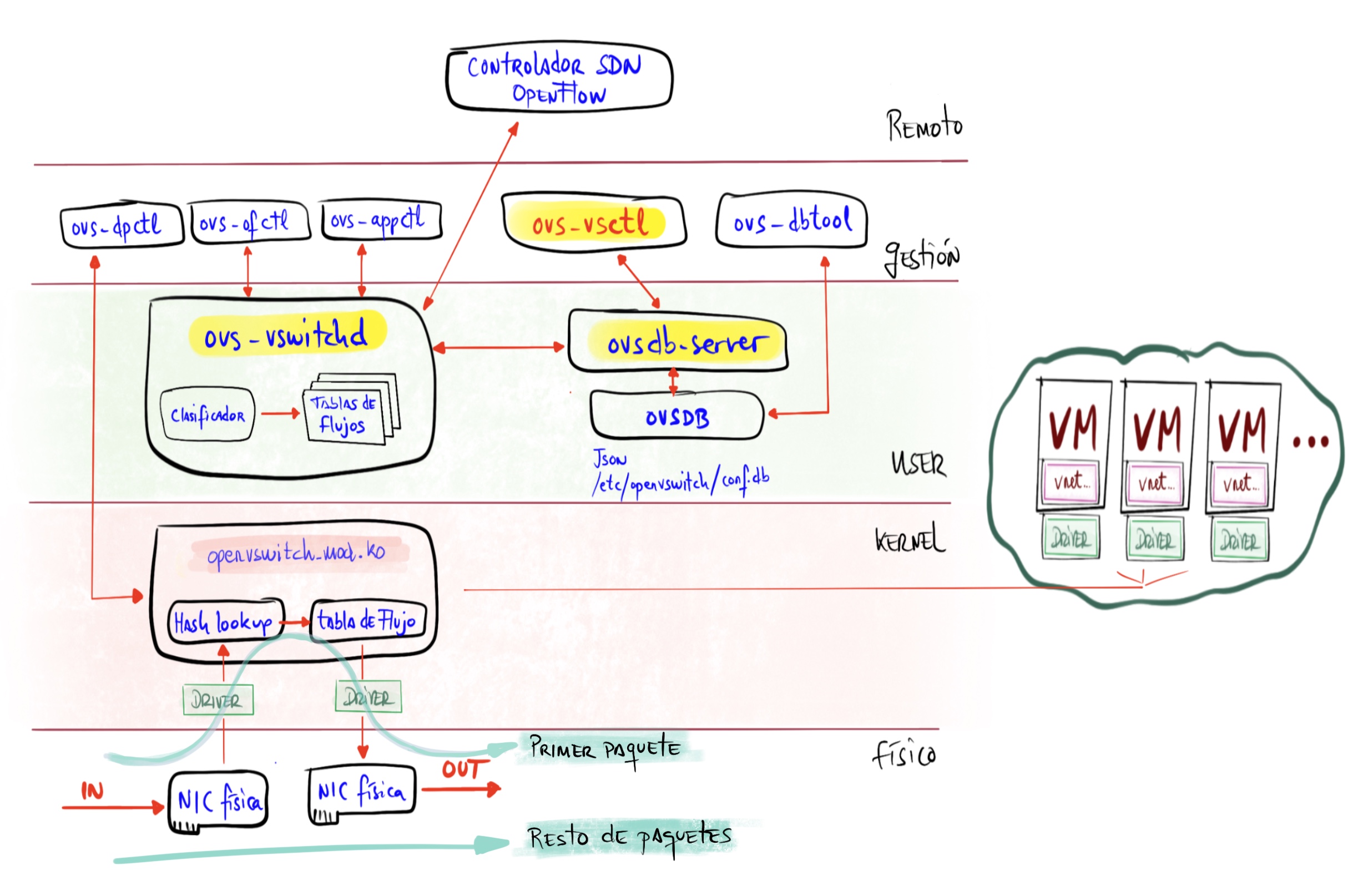
OVS Installation
After installing Ubuntu Server LTS 22.04.1:
- I install OVS
root@maclinux:~# apt install openvswitch-switch
- Ubuntu enables and starts the
openvswitch-switch.servicewhich in turn starts the two daemons mentioned above.
root@maclinux:~# ps -ef | grep ovs
root        1179       1  0 13:29 ?        00:00:00 ovsdb-server /etc/openvswitch/conf.db -vconsole:emer -vsyslog:err -vfile:info --remote=punix:/var/run/openvswitch/db.sock --private-key=db:Open_vSwitch,SSL,private_key --certificate=db:Open_vSwitch,SSL,certificate --bootstrap-ca-cert=db:Open_vSwitch,SSL,ca_cert --no-chdir --log-file=/var/log/openvswitch/ovsdb-server.log --pidfile=/var/run/openvswitch/ovsdb-server.pid --detach
root        1238       1  0 13:29 ?        00:00:00 ovs-vswitchd unix:/var/run/openvswitch/db.sock -vconsole:emer -vsyslog:err -vfile:info --mlockall --no-chdir --log-file=/var/log/openvswitch/ovs-vswitchd.log --pidfile=/var/run/openvswitch/ovs-vswitchd.pid --detach
- I install VLAN support and some useful tools
root@maclinux:~# apt install net-tools nmap vlan
Server Networking
Before installing KVM, I’ll set up the OVS bridge.
Adding the OVS Bridge
Commands entered with ovs-vsctl are persistent (remember the database).
| Be careful if you’re connected via SSH. Since I’m starting from a freshly installed Ubuntu, where the physical NIC is called eno1 and is connected to the IP stack, as soon as I start making changes I can break that connection; so it’s important to have console access to the machine just in case. |
- I create a bridge called
solbr
root@maclinux:~# ovs-vsctl add-br solbr
root@maclinux:~# ip link set solbr up
root@maclinux:~# ovs-vsctl show
f283cd6c-17e8-4bf3-be1a-b50904e91fc3
    Bridge solbr
        Port solbr
            Interface solbr
                type: internal
    ovs_version: "2.17.3"
root@maclinux:~# ip link show dev solbr
5: solbr: <BROADCAST,MULTICAST,UP,LOWER_UP> mtu 1500 qdisc noqueue state UNKNOWN mode DEFAULT group default qlen 1000
    link/ether a2:35:10:40:0f:4c brd ff:ff:ff:ff:ff:ff
Static Configuration
Next I’ll configure several very static options to keep the examples clear. Later in this same post we’ll see how to make it a bit more dynamic by leveraging the integration between Libvirt (from QEMU) and Open vSwitch.
To start, these are the options:
- The server receives
eth0in Trunk mode - The server receives
vlan100in Access mode directly connected to its TCP/IP stack and of course with an assigned IP. Later I switch to the dynamic version (vnetNNN, next section). - The server instantiates several virtual interfaces
vnetNNNthrough the OVS switch that can be consumed locally by the server itself or by VMs in Access mode.- The ones I call
vnet192andvnet500will be used by the server with its own IP.
- The ones I call
- Guests (VMs) connect to one of those virtual interfaces (a VLAN).
- Guests (VMs) can receive a Trunk port with one or more VLANs.
From now on, whenever you modify the Netplan file, remember to run netplan apply.
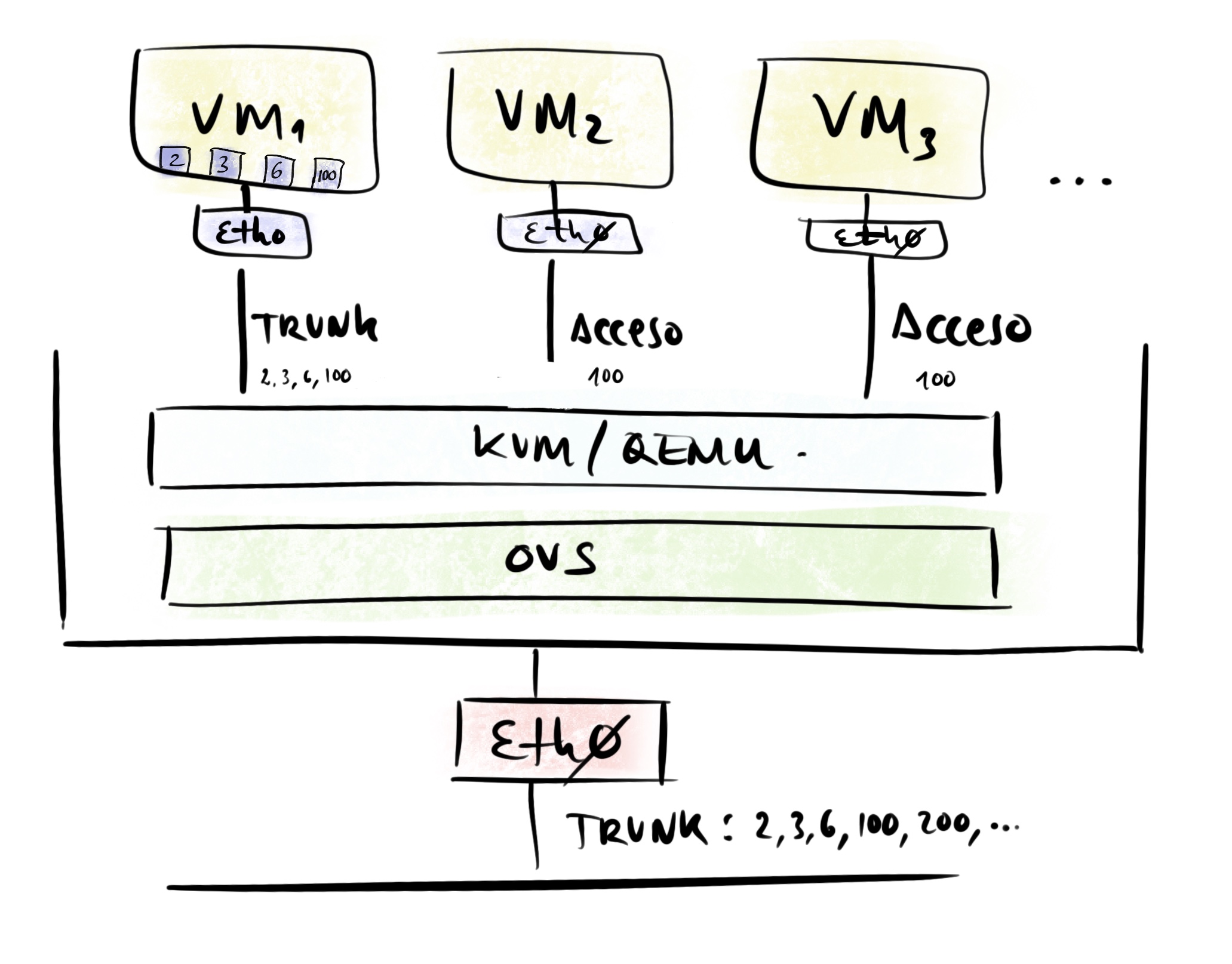
Later in this post you’ll see the complete /etc/netplan/00-installer-config.yaml configuration and the ovs-vsctl commands I used to configure OVS.
Server receives eth0 in Trunk mode
- I add the
eth0port to thesolbrbridge as a Trunk port. Nothing special needed — physical ports are added in Trunk mode by default.
root@maclinux:~# ovs-vsctl add-br solbr
root@maclinux:~# ovs-vsctl add-port solbr eth0
eth0section of/etc/netplan/00-installer-config.yaml
network:
  version: 2
  ethernets:
    # Main interface
    eth0:
      # Search mac,original,new to avoid errors in future matches
      match:
        macaddress: "3c:07:54:59:aa:cb"
        name: enp2s0f0
        name: eth0
      set-name: eth0
      dhcp4: no
:
- I apply the new configuration
root@maclinux:~# netplan apply
Testing the server receives VLAN100 directly
If I want to connect the server’s TCP/IP stack directly to VLAN100:
- Check and if missing, install VLAN support with
apt list vlanandapt install vlan vlan100section of/etc/netplan/00-installer-config.yaml
network:
  version: 2
  ethernets:
  :
  vlans:
    # Direct access to VLAN100 from this Server
    # In addition to creating the Internal Port for vlan100, I create this
    # just in case... so I have direct access from the IP Stack
    host100:
      id: 100
      link: eth0
      addresses: [192.168.100.33/24]
      gateway4: 192.168.100.1
      nameservers:
        addresses: [192.168.100.224]
        search: [yourdomain.com]
:
| Note: In the end I didn’t go with this option. I need to share my VLAN100 access with the virtual machines, so I preferred to use only vnet100 below… |
Server instantiates multiple vnetNNN virtual interfaces via OVS
- I want the server to instantiate several
vnetNNNvirtual interfaces through the OVS switch that can be consumed locally by the server itself or by VMs in Access mode. Three of them,vnet100,vnet192, andvnet500, will be used by the server with their own IPs. Reminder: contrary to what might seem normal, I must not use TAP ports — instead I must use Internal Port type ports configured as access ports; they behave exactly like virtual TAP ports. - I create the ports and connect them to the bridge.
root@maclinux:~# ovs-vsctl add-port solbr vnet006 tag=006 -- set Interface vnet006 type=internal
root@maclinux:~# ovs-vsctl add-port solbr vnet100 tag=100 -- set Interface vnet100 type=internal
root@maclinux:~# ovs-vsctl add-port solbr vnet192 tag=192 -- set Interface vnet192 type=internal
root@maclinux:~# ovs-vsctl add-port solbr vnet221 tag=221 -- set Interface vnet221 type=internal
root@maclinux:~# ovs-vsctl add-port solbr vnet300 tag=300 -- set Interface vnet300 type=internal
root@maclinux:~# ovs-vsctl add-port solbr vnet400 tag=400 -- set Interface vnet400 type=internal
root@maclinux:~# ovs-vsctl add-port solbr vnet500 tag=500 -- set Interface vnet500 type=internal
Netplan Configuration Summary and Full ovs-vsctl Command List
- Complete Netplan file:
# Config LuisPa

network:

  version: 2

  ethernets:

    # Main interface
    eth0:
      # Search mac,original,new to avoid errors in future matches
      match:
        macaddress: "3c:07:54:59:aa:cb"
        name: enp2s0f0
        name: eth0
      set-name: eth0
      dhcp4: no

    # Main OVS bridge for this server
    # 'sol': server name. 'br': bridge
    solbr:
      dhcp4: no

    # `Internal` Ports for VLAN Access, consumable locally or by VMs
    # Created with:
    #  ovs-vsctl add-port solbr vlanNNN tag=NNN -- set Interface vlanNNN type=internal
    # I configure all of them to activate (UP) even those without an IP.
    vnet006:
      dhcp4: no
    vnet100:
      addresses: [192.168.100.33/24]
      gateway4: 192.168.100.1
      nameservers:
        addresses: [192.168.100.224]
        search: [yourdomain.com]
    vnet192:
      addresses: [192.168.1.3/24]
    vnet221:
      dhcp4: no
    vnet300:
      dhcp4: no
    vnet400:
      dhcp4: no
    vnet500:
      addresses: [192.168.101.3/24]

#  vlans:
#
#    # Direct access to VLAN100 from this Server
#    # I'm using the vnet100 option, but I'm documenting
#    # how it would be done via direct access from the IP Stack
#    host100:
#      id: 100
#      link: eth0
#      addresses: [192.168.100.33/24]
#      gateway4: 192.168.100.1
#      nameservers:
#        addresses: [192.168.100.224]
#        search: [yourdomain.com]
#
ovs-vsctlcommands:
root@maclinux:~# ovs-vsctl add-br solbr
root@maclinux:~# ovs-vsctl show
root@maclinux:~# ovs-vsctl add-port solbr eth0
root@maclinux:~# ovs-vsctl add-port solbr vnet006 tag=006 -- set Interface vnet006 type=internal
root@maclinux:~# ovs-vsctl add-port solbr vnet100 tag=100 -- set Interface vnet100 type=internal
root@maclinux:~# ovs-vsctl add-port solbr vnet192 tag=192 -- set Interface vnet192 type=internal
root@maclinux:~# ovs-vsctl add-port solbr vnet221 tag=221 -- set Interface vnet221 type=internal
root@maclinux:~# ovs-vsctl add-port solbr vnet300 tag=300 -- set Interface vnet300 type=internal
root@maclinux:~# ovs-vsctl add-port solbr vnet400 tag=400 -- set Interface vnet400 type=internal
root@maclinux:~# ovs-vsctl add-port solbr vnet500 tag=500 -- set Interface vnet500 type=internal
- Ports
root@maclinux:~# ip link
1: lo: <LOOPBACK,UP,LOWER_UP> mtu 65536 qdisc noqueue state UNKNOWN mode DEFAULT group default qlen 1000
    link/loopback 00:00:00:00:00:00 brd 00:00:00:00:00:00
2: eth0: <BROADCAST,MULTICAST,UP,LOWER_UP> mtu 1500 qdisc mq master ovs-system state UP mode DEFAULT group default qlen 1000
    link/ether 3c:07:54:59:aa:cb brd ff:ff:ff:ff:ff:ff
3: ovs-system: <BROADCAST,MULTICAST> mtu 1500 qdisc noop state DOWN mode DEFAULT group default qlen 1000
    link/ether c2:f0:e9:97:37:0d brd ff:ff:ff:ff:ff:ff
4: vnet100: <BROADCAST,MULTICAST,UP,LOWER_UP> mtu 1500 qdisc noqueue state UNKNOWN mode DEFAULT group default qlen 1000
    link/ether 5e:55:9f:41:64:06 brd ff:ff:ff:ff:ff:ff
5: vnet221: <BROADCAST,MULTICAST,UP,LOWER_UP> mtu 1500 qdisc noqueue state UNKNOWN mode DEFAULT group default qlen 1000
    link/ether 92:f9:ca:3f:35:e3 brd ff:ff:ff:ff:ff:ff
6: vnet500: <BROADCAST,MULTICAST,UP,LOWER_UP> mtu 1500 qdisc noqueue state UNKNOWN mode DEFAULT group default qlen 1000
    link/ether ee:c6:17:b8:5c:6e brd ff:ff:ff:ff:ff:ff
7: vnet192: <BROADCAST,MULTICAST,UP,LOWER_UP> mtu 1500 qdisc noqueue state UNKNOWN mode DEFAULT group default qlen 1000
    link/ether b6:9b:94:2e:7b:82 brd ff:ff:ff:ff:ff:ff
8: vnet300: <BROADCAST,MULTICAST,UP,LOWER_UP> mtu 1500 qdisc noqueue state UNKNOWN mode DEFAULT group default qlen 1000
    link/ether ae:aa:8c:07:9a:53 brd ff:ff:ff:ff:ff:ff
9: vnet006: <BROADCAST,MULTICAST,UP,LOWER_UP> mtu 1500 qdisc noqueue state UNKNOWN mode DEFAULT group default qlen 1000
    link/ether ca:f3:c8:15:0a:a8 brd ff:ff:ff:ff:ff:ff
10: vnet400: <BROADCAST,MULTICAST,UP,LOWER_UP> mtu 1500 qdisc noqueue state UNKNOWN mode DEFAULT group default qlen 1000
    link/ether 76:0c:7d:c8:46:53 brd ff:ff:ff:ff:ff:ff
11: solbr: <BROADCAST,MULTICAST,UP,LOWER_UP> mtu 1500 qdisc noqueue state UNKNOWN mode DEFAULT group default qlen 1000
    link/ether 3c:07:54:59:aa:cb brd ff:ff:ff:ff:ff:ff
- OVS Bridge
root@maclinux:~# ovs-vsctl show
83506d0f-e81b-4d47-be11-e25821d08d9a
    Bridge solbr
        Port vnet100
            tag: 100
            Interface vnet100
                type: internal
        Port solbr
            Interface solbr
                type: internal
        Port eth0
            Interface eth0
        Port vnet192
            tag: 192
            Interface vnet192
                type: internal
        Port vnet300
            tag: 300
            Interface vnet300
                type: internal
        Port vnet400
            tag: 400
            Interface vnet400
                type: internal
        Port vnet500
            tag: 500
            Interface vnet500
                type: internal
        Port vnet006
            tag: 6
            Interface vnet006
                type: internal
        Port vnet221
            tag: 221
            Interface vnet221
                type: internal
    ovs_version: "2.13.3"
Adding KVM/QEMU
- I install
KVM/QEMUandvirt-manager. The installation is relatively straightforward — at the beginning of the post about Vagrant with Libvirt KVM I explain how to do it.
root@maclinux:~# apt install qemu qemu-kvm libvirt-clients \
                   libvirt-daemon-system virtinst
root@maclinux:~# apt install virt-manager
| Note: I don’t install bridge-utils (Linux Ethernet Bridge utilities) because we don’t need them — we’re using OVS. |
- I add my user to the
libvirtandkvmgroups… andrebootso thatqemu-system-x86_64works later.
root@maclinux:~# adduser luis libvirt
root@maclinux:~# adduser luis kvm
root@maclinux:~# systemctl reboot -f
Static Configuration with OVS + Libvirt + QEMU/KVM
First let’s look at the traditional configuration approach. It consists of registering virtual interfaces (vNICs) in our OVS bridge, assigning them a name, and configuring them “manually and statically” from virt-manager.
But first things first — I remove the default network configuration that comes with KVM.
- I disable the default KVM bridge from starting. We’re using Open vSwitch, so I don’t need the traditional Linux Bridge. Note: to re-enable it, just run
# virsh net-autostart default.
root@maclinux:~# virsh net-autostart --disable default
- I download Alpine Linux for testing. In the Downloads section > VIRTUAL > Slimmed down kernel. Optimized for virtual systems, I download the ISO for x86_64 (only 52MB) — the most compact version possible.
luis@maclinux:~$ wget https://dl-cdn.alpinelinux.org/alpine/v3.15/releases/x86_64/alpine-virt-3.15.0-x86_64.iso
luis@maclinux:~$ wget https://dl-cdn.alpinelinux.org/alpine/v3.15/releases/x86_64/alpine-virt-3.15.0-x86_64.iso.sha256
luis@maclinux:~$ sha256sum -c alpine-virt-3.15.0-x86_64.iso.sha256
alpine-virt-3.15.0-x86_64.iso: OK
luis@maclinux:~$ ls -hl alpine-virt-3.15.0-x86_64.iso
-rw-rw-r-- 1 luis luis 52M nov 24 09:23 alpine-virt-3.15.0-x86_64.iso
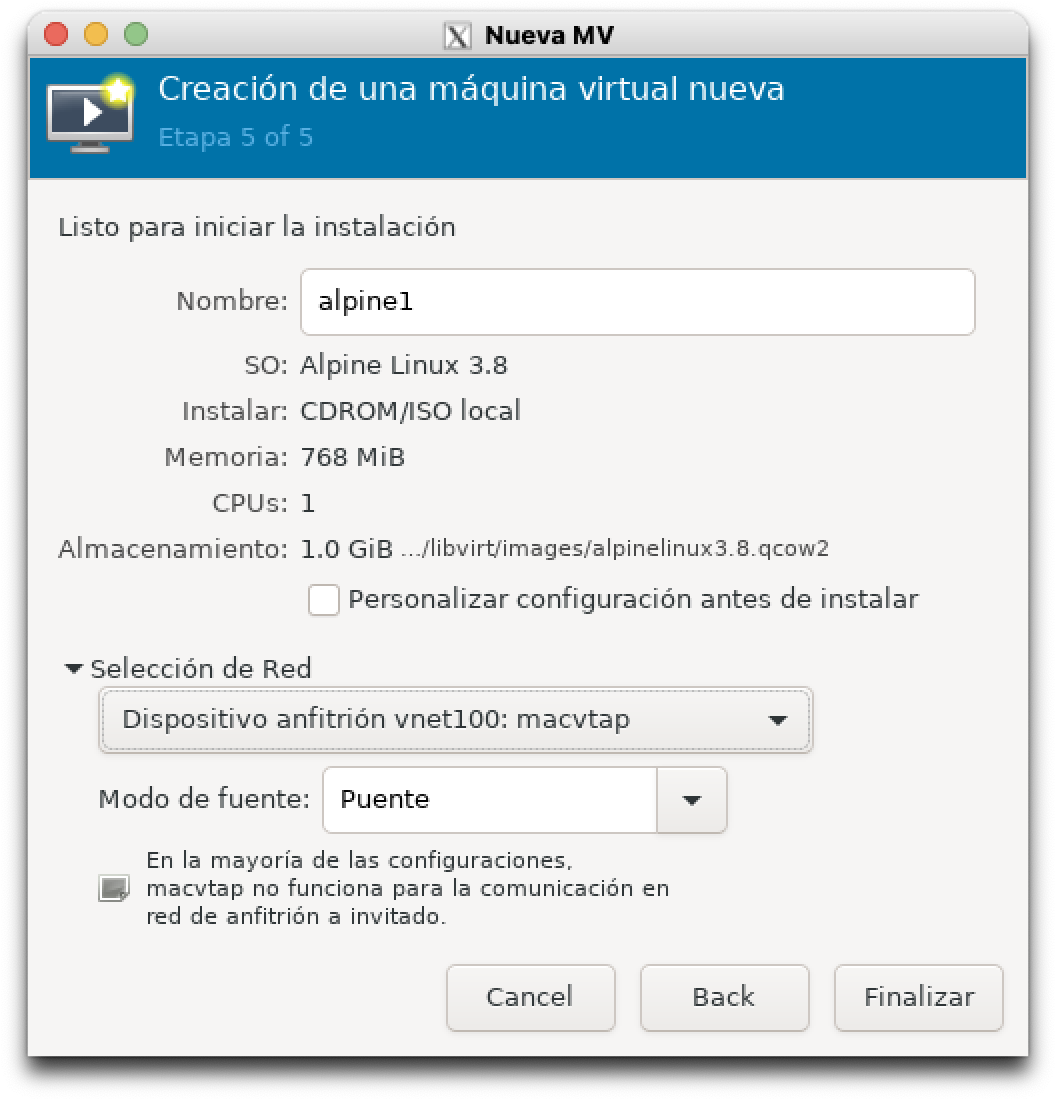
- I create a small VM from
virt-manager: 768MB of RAM, 1 CPU, 1GB disk, using the image:alpine-virt-3.15.0-x86_64.iso, I name italpine1and for the virtual network I usevnet100.
luis@maclinux:~$ virt-manager
- I run the Alpine setup (more info in this guide).
localhost login: root
:
# setup-alpine
- I select DHCP for my eth0 interface. Hostname
alpine1, Disksda, modesys, everything else default. - When finished, I reboot.
# poweroff.
- When it reboots, I log in as root, test ping, and install
iproute2which will be useful for testing.
# apk add iproute2
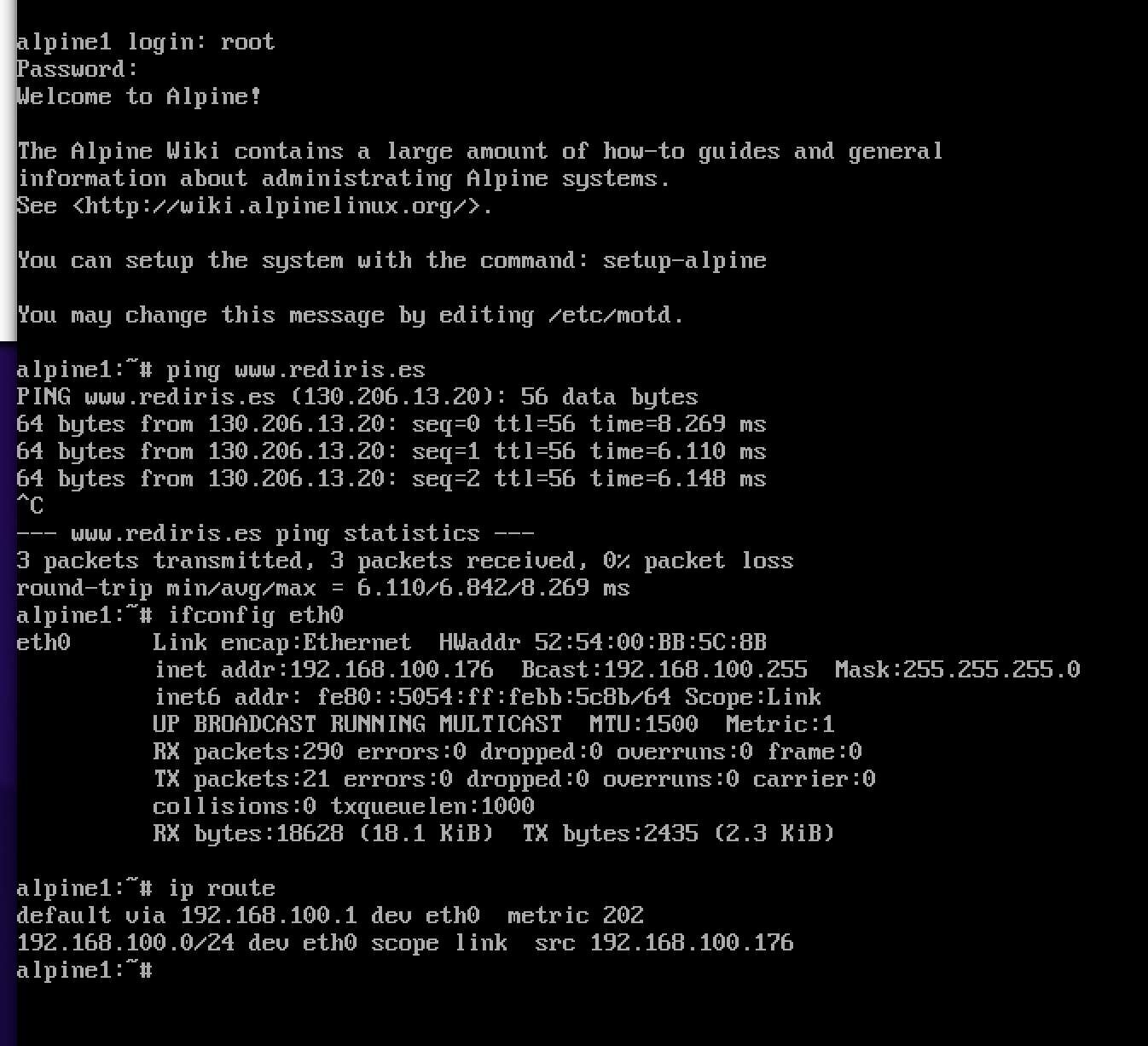
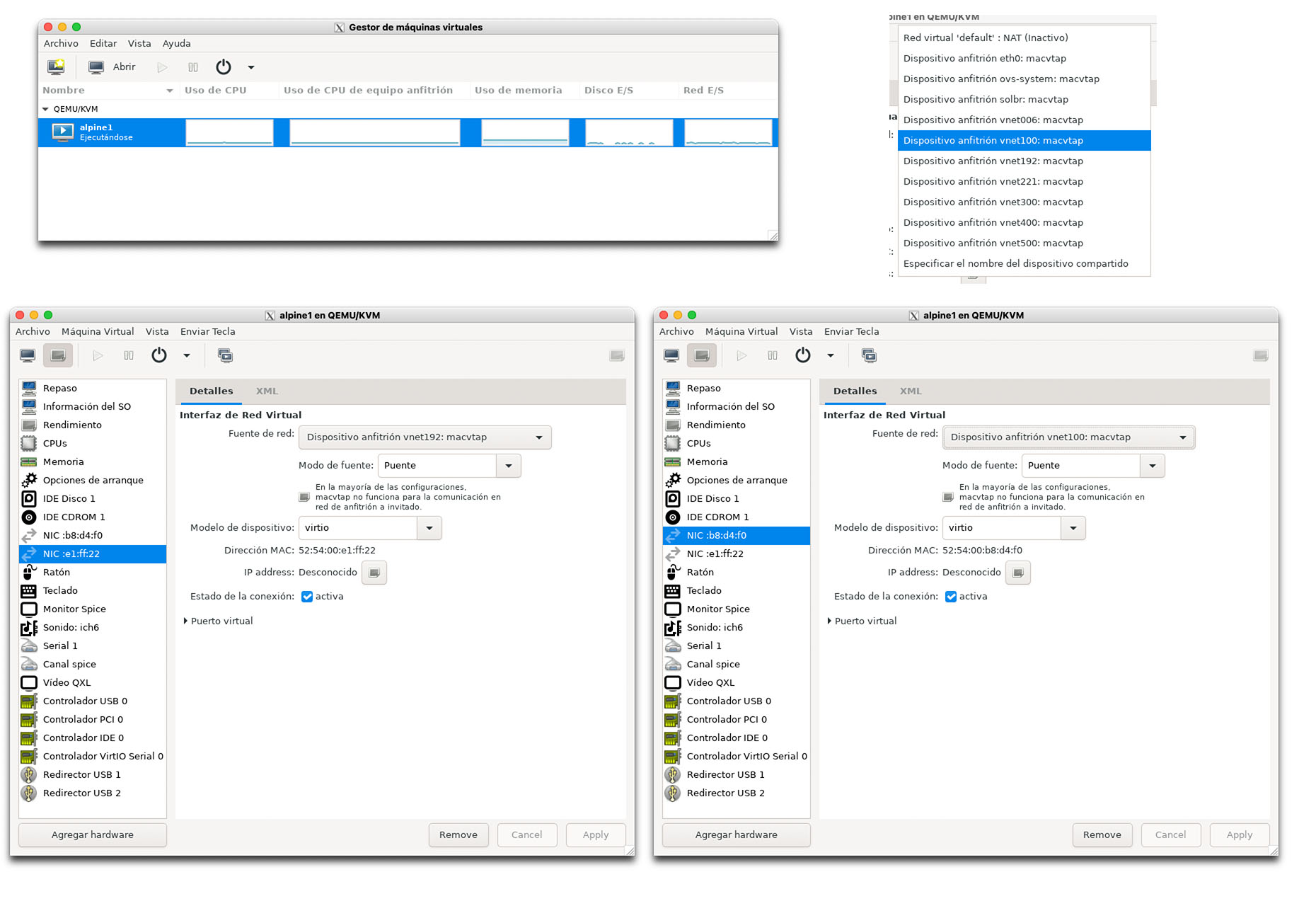
- Above, more tests — I add another interface and note that I use the
virtiodriver, the most recommended one.
More Complex Example with Multiple Static Interfaces
Below you can see a more complex configuration. In this example I’ll create several interfaces in my Open vSwitch pointing to different VLANs.
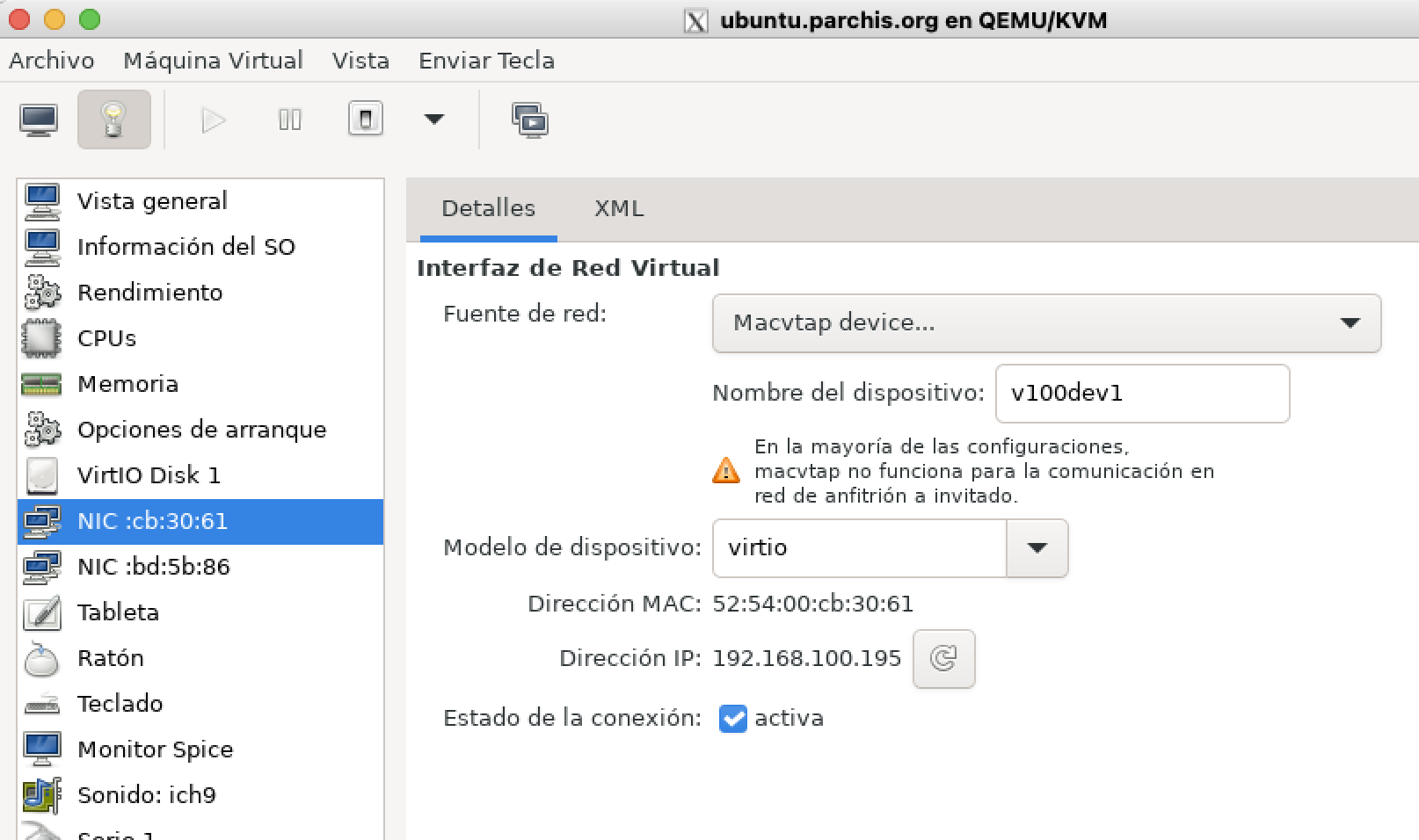
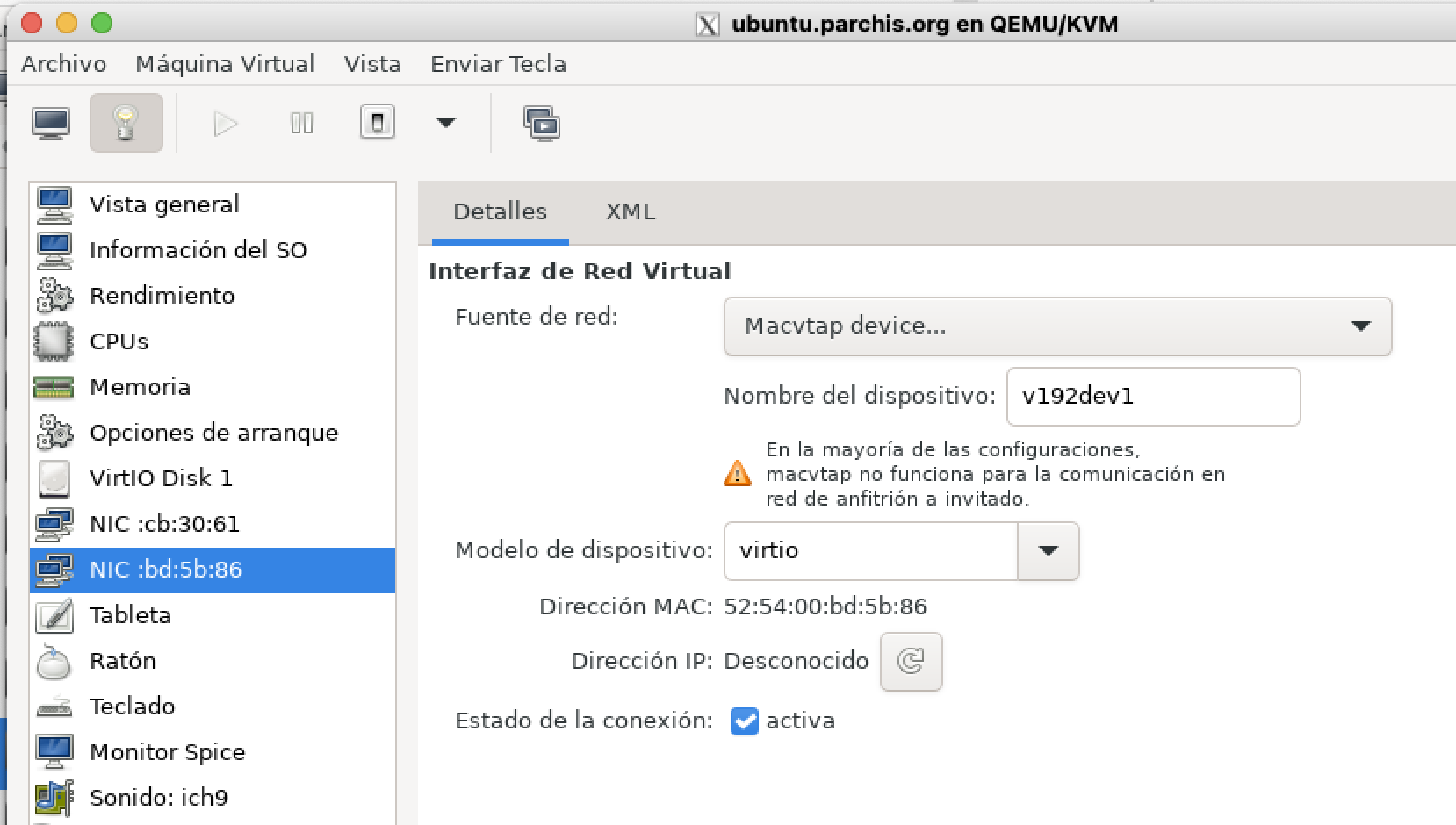
ovs-vsctl add-port solbr v100dev1 tag=100 -- set Interface v100dev1 type=internal
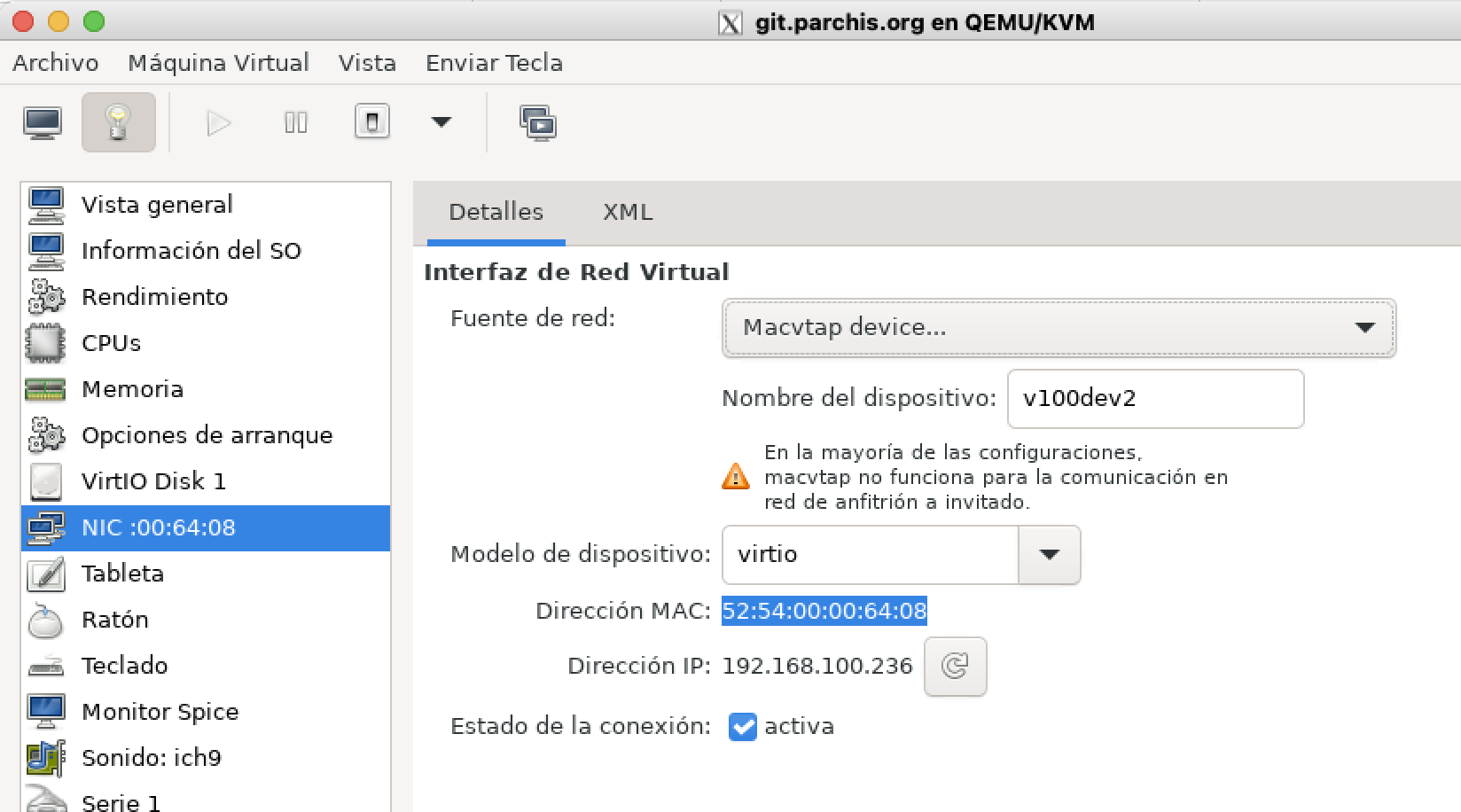
ovs-vsctl add-port solbr v100dev2 tag=100 -- set Interface v100dev2 type=internal
ovs-vsctl add-port solbr v100dev3 tag=100 -- set Interface v100dev3 type=internal
ovs-vsctl add-port solbr v192dev1 tag=192 -- set Interface v192dev1 type=internal
ovs-vsctl add-port solbr v300dev1 tag=300 -- set Interface v300dev1 type=internal
Next I assign them in the virtual machines. Here are three examples:
On another VM…
Dynamic Configuration with OVS + Libvirt + QEMU/KVM
Let’s change gears and take advantage of the integration between Libvirt and Open vSwitch to avoid such static configurations. We’ll let libvirt call ovs-vsctl to create (when starting a VM) and destroy (when stopping a VM) the switch ports.
Open vSwitch Integration with Libvirt
Open vSwitch supports the networks managed by libvirt in bridged mode (not NAT). More information here.
- I’ll create a persistent network in Libvirt from an XML file
/root/switch-solbr.xml
<!-- Example XML file to create a persistent virtual network within Libvirt.
-->

<network>
  <name>switch-solbr</name>
  <forward mode='bridge'/>
  <bridge name='solbr'/>
  <virtualport type='openvswitch'/>
  <portgroup name='Sin vlan'>
  </portgroup>
  <portgroup name='Trunk Core'>
    <vlan trunk='yes'>
      <tag id='6'/>
      <tag id='100'/>
      <tag id='192'/>
      <tag id='221'/>
      <tag id='300'/>
      <tag id='400'/>
      <tag id='500'/>
    </vlan>
  </portgroup>
  <portgroup name='Vlan 6'>
    <vlan>
      <tag id='6'/>
    </vlan>
  </portgroup>
  <portgroup name='Vlan 100' default='yes'>
    <vlan>
      <tag id='100'/>
    </vlan>
  </portgroup>
  <portgroup name='Vlan 192'>
    <vlan>
      <tag id='192'/>
    </vlan>
  </portgroup>
  <portgroup name='Vlan 221'>
    <vlan>
      <tag id='221'/>
    </vlan>
  </portgroup>
  <portgroup name='Vlan 300'>
    <vlan>
      <tag id='300'/>
    </vlan>
  </portgroup>
  <portgroup name='Vlan 400'>
    <vlan>
      <tag id='400'/>
    </vlan>
  </portgroup>
  <portgroup name='Vlan 500'>
    <vlan>
      <tag id='500'/>
    </vlan>
  </portgroup>
</network>
- I activate it from Libvirt
root@maclinux:~# virsh net-define switch-solbr
(Creates the file /etc/libvirt/qemu/networks/switch-solbr.xml)

root@maclinux:~# virsh net-start switch-solbr
Network switch-solbr started

root@maclinux:~# virsh net-autostart switch-solbr
Network switch-solbr marked as autostarted

root@maclinux:~# virsh net-list
 Name        State    Autostart   Persistent
----------------------------------------------
 switch-solbr   active   yes         yes
- From my VMs I’ll see the new options when selecting the Network
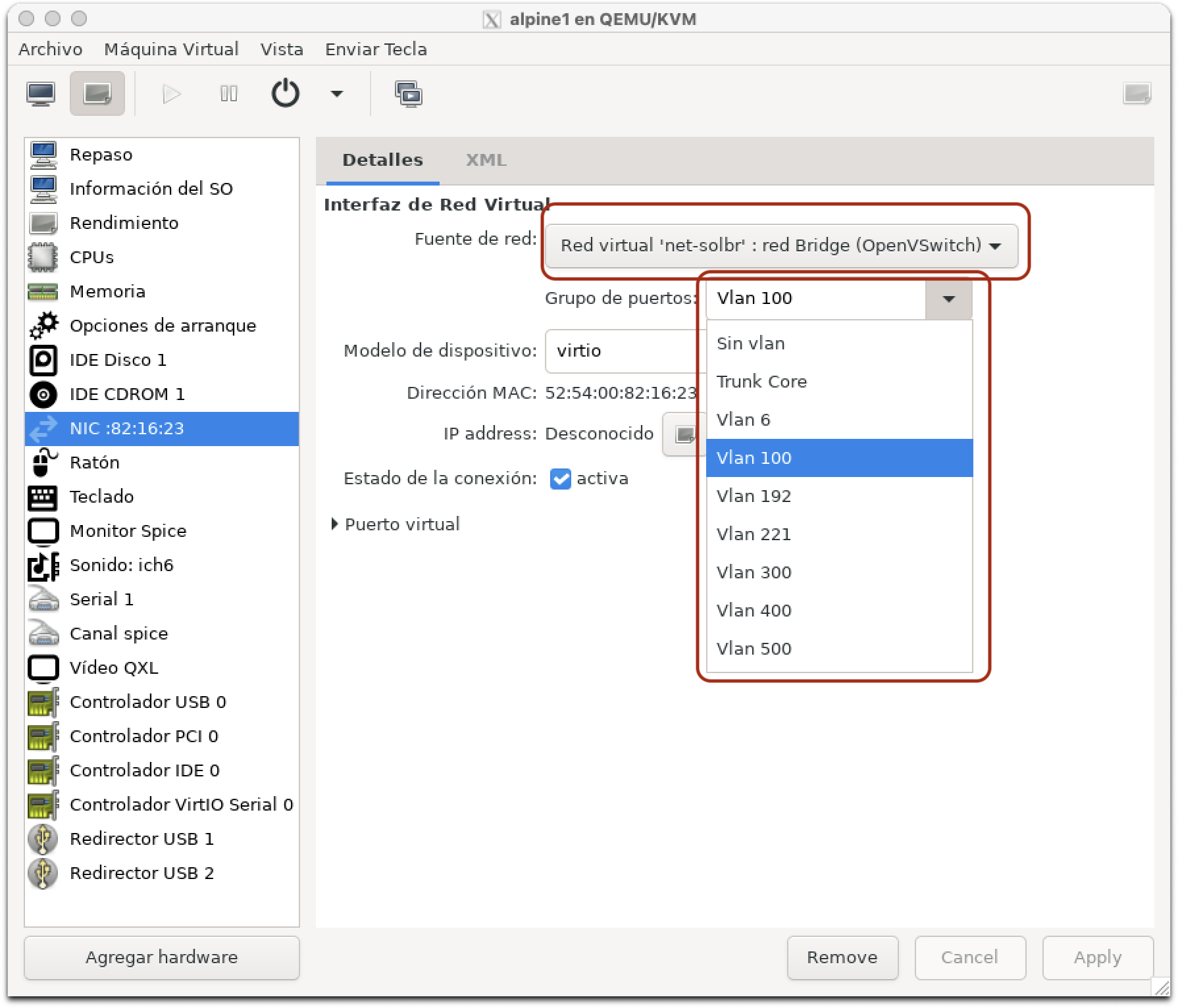
- The best part is yet to come. Once the VM starts, a new interface called vnetN will be dynamically created with the configuration I set in the XML. In this example we selected VLAN100, which in the XML has
tag id='100', so it will create an internal virtual port withtag: 100.
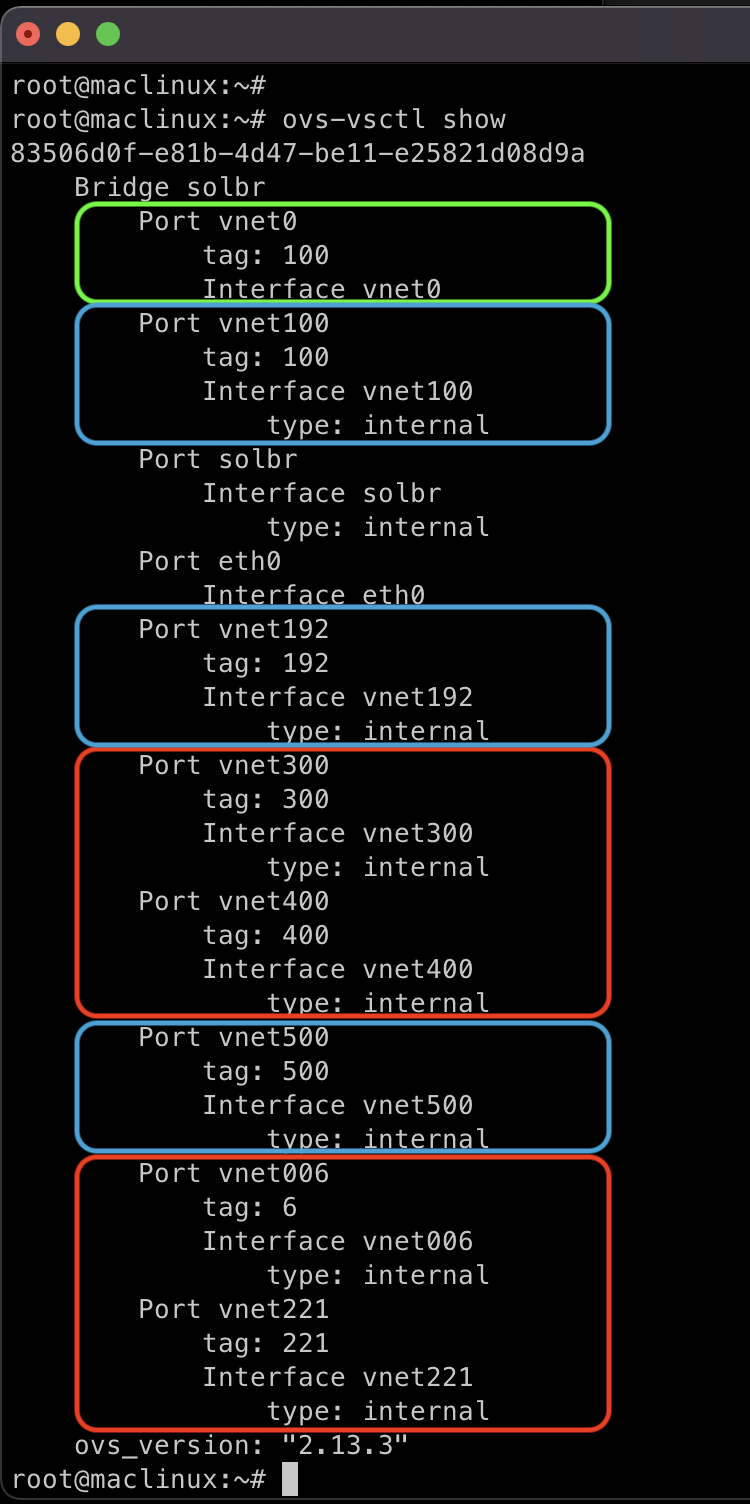
In the image above I’ve highlighted the active virtual interfaces after starting the VM.
- vnet0 in green: It was created and associated with my OVS bridge dynamically. It was assigned to OVS VLAN100. When the VM shuts down, the interface will disappear.
- In blue: These are static interfaces I want to keep in both OVS (its database) and Netplan. I’ll consume them from the Host with their own IPs and from VMs.
- In red: These are static interfaces I no longer need, so I’ll delete them from both OVS and Netplan, in favor of using their dynamic version from virt-manager.
I delete the static ports
root@maclinux:~# ovs-vsctl del-port solbr vnet300
root@maclinux:~# ovs-vsctl del-port solbr vnet400
root@maclinux:~# ovs-vsctl del-port solbr vnet221
root@maclinux:~# ovs-vsctl del-port solbr vnet006
Final Configuration
In the end I made some changes, created more VMs, removed vlan500 from netplan (leaving it only for testing between VMs), etc. This is how my configuration ended up:
- Server base configuration, before starting VMs:
# Config LuisPa
network:
  version: 2
  ethernets:

    # Main interface
    eth0:
      # I rename it searching by MAC or Original-Name or New-Name,
      # This way it never fails or gives warnings...
      match:
        macaddress: "3c:07:54:59:aa:cb"
        name: enp2s0f0
        name: eth0
      set-name: eth0
      dhcp4: no

    # Main OVS bridge for this server
    solbr:
      dhcp4: no

    # Internal ports for VLAN access, consumable from the Host and/or VMs
    vnet100:
      addresses: [192.168.100.33/24]
      gateway4: 192.168.100.1
      nameservers:
        addresses: [192.168.100.224]
        search: [yourdomain.com]
    vnet192:
      addresses: [192.168.1.3/24]
root@maclinux:~# ovs-vsctl show
83506d0f-e81b-4d47-be11-e25821d08d9a
    Bridge solbr
        Port solbr
            Interface solbr
                type: internal
        Port eth0
            Interface eth0
        Port vnet100
            tag: 100
            Interface vnet100
                type: internal
        Port vnet192
            tag: 192
            Interface vnet192
                type: internal
    ovs_version: "2.13.3"
- After starting several VMs, Libvirt instantiates
vnetsto support: A VM connected to vlan100, another connected to vlan100 and vlan500 (internal for testing), and a third connected to the Trunk:
luis@maclinux:~$ s
root@maclinux:~# ovs-vsctl show
83506d0f-e81b-4d47-be11-e25821d08d9a
    Bridge solbr
        Port solbr
            Interface solbr
                type: internal
        Port eth0
            Interface eth0
        Port vnet100
            tag: 100
            Interface vnet100
                type: internal
        Port vnet192
            tag: 192
            Interface vnet192
                type: internal
        Port vnet0
            tag: 500
            Interface vnet0
        Port vnet1
            tag: 100
            Interface vnet1
        Port vnet2
            trunks: [6, 100, 192, 221, 300, 400]
            Interface vnet2
    ovs_version: "2.13.3"
Command Reference
Here are some useful reference commands (source):
- Database:
ovs-vsctl list open_vswitch
ovs-vsctl list interface vnet100
ovs-vsctl --columns=options list interface vnet2
ovs-vsctl --columns=ofport,name list Interface
ovs-vsctl --columns=ofport,name --format=table list Interface
ovs-vsctl -f csv --no-heading --columns=ofport,name list Interface
ovs-vsctl -f csv --no-heading -d bare --columns=name,tag,trunk list port
ovs-vsctl --format=table --columns=name,mac_in_use find Interface name=vnet100
- Flows:
ovs-ofctl dump-flows solbr
ovs-appctl bridge/dump-flows solbr

ovs-ofctl dump-flows solbr | cut -d',' -f3,6,7-
ovs-ofctl -O OpenFlow13 dump-flows solbr | cut -d',' -f3,6,7-

ovs-appctl dpif/show
ovs-ofctl show solbr
ovs-ofctl show solbr | egrep "^ [0-9]"

ovs-dpctl dump-flows
ovs-appctl dpctl/dump-flows
ovs-appctl dpctl/dump-flows system@ovs-system
ovs-appctl dpctl/dump-flows netdev@ovs-netdev
References
- OVS Common Configuration Issues
- Open vSwitch with Libvirt
- Libvirt networking
- Libvirt network XML format
- OVS Deep Dive
- Alpine linux networking