
In this post I describe how to install Alpine Linux in a virtual machine on my QEMU/KVM server and how to install Docker on it. I needed, for proof-of-concept and home services, the ability to run containers on a Docker host that takes up “very little” space. Can you install a Docker Host on top of a Virtual Machine? The answer is a resounding yes — in fact, it’s an excellent place to do so, especially in lab environments, home setups, and small deployments.
Introduction
I needed to set up microservices on top of Docker (it had been a while since I played with Docker). I hesitated between adding Docker to my server where I have KVM, dedicating an old PC to Docker, or thinking of something more creative…
In the end I opted for the third option: setting up virtual machines dedicated to Docker containers running on my KVM server. My powerful little System76 Meerkat server is where I have all my VMs, and some of them will support microservices on top of Docker.
The second option (adding Docker to my server with KVM) would have been a networking nightmare (openvswitch + docker switches + iptables), so I chose to isolate and contain Docker problems/troubleshooting in dedicated VMs. My VM server setup is as follows:
- Hardware: System76 Meerkat
- Software: Pop!_OS, Ubuntu Server LTS.
- Networking: Open vSwitch
- QEMU/KVM with Hypervisor
- Several guests with virtual machines running Linux (Ubuntu Server LTS) and services.
- Several guest appliances like Umbrella or vWLC from Cisco.
- Several guests with virtual machines running Alpine Linux with Docker and containers for services (git, nodered, …).
Where to Run Docker?
The first thing I needed to decide was which OS to run Docker on, considering that:
- I’m going to run Docker inside a Virtual Machine on my QEMU/KVM server.
- The guest OS will only run Docker — I don’t need a huge distribution.
- I’m looking for something small, easy to maintain, and robust.
Among the different options I found out there, I chose Alpine Linux.
Virtual Machine with Alpine Linux
Let’s look at an example creating a VM.
- I download Alpine Linux from Downloads > VIRTUAL > Slimmed down kernel. Optimized for virtual systems, x86_64 (only 52MB) — the most compact version possible.
luis@sol:~/kvm/base$ wget https://dl-cdn.alpinelinux.org/alpine/v3.15/releases/x86_64/alpine-virt-3.15.3-x86_64.iso
luis@sol:~/kvm/base$ wget https://dl-cdn.alpinelinux.org/alpine/v3.15/releases/x86_64/alpine-virt-3.15.3-x86_64.iso.sha256
luis@sol:~/kvm/base$ sha256sum -c alpine-virt-3.15.3-x86_64.iso.sha256
alpine-virt-3.15.3-x86_64.iso: La suma coincide
- I create a
staticport on my virtual switch (more info here: Open vSwitch and KVM).
luis@sol:~/kvm/base$ sudo ovs-vsctl list-br
solbr
luis@sol:~/kvm/base$ sudo ovs-vsctl list-ports solbr
eth0
:
v100vnet12  (I check which was the last one I had registered)
:
luis@sol:~$ sudo ovs-vsctl add-port solbr v100vnet13 tag=100 -- set Interface v100vnet13 type=internal
- I create the directory where I’ll place the virtual machine file.
luis@sol:~/kvm$ mkdir docker
- I create a virtual machine from
virt-managerwith 1GB of RAM, 1 CPU, 4GB disk, and a virtio NIC, using the image:alpine-virt-3.15.3-x86_64.iso. I name itdocker.yourdomain.comand for the network configuration I use the interface I just createdv100vnet13.
luis@sol:~$ virt-manager
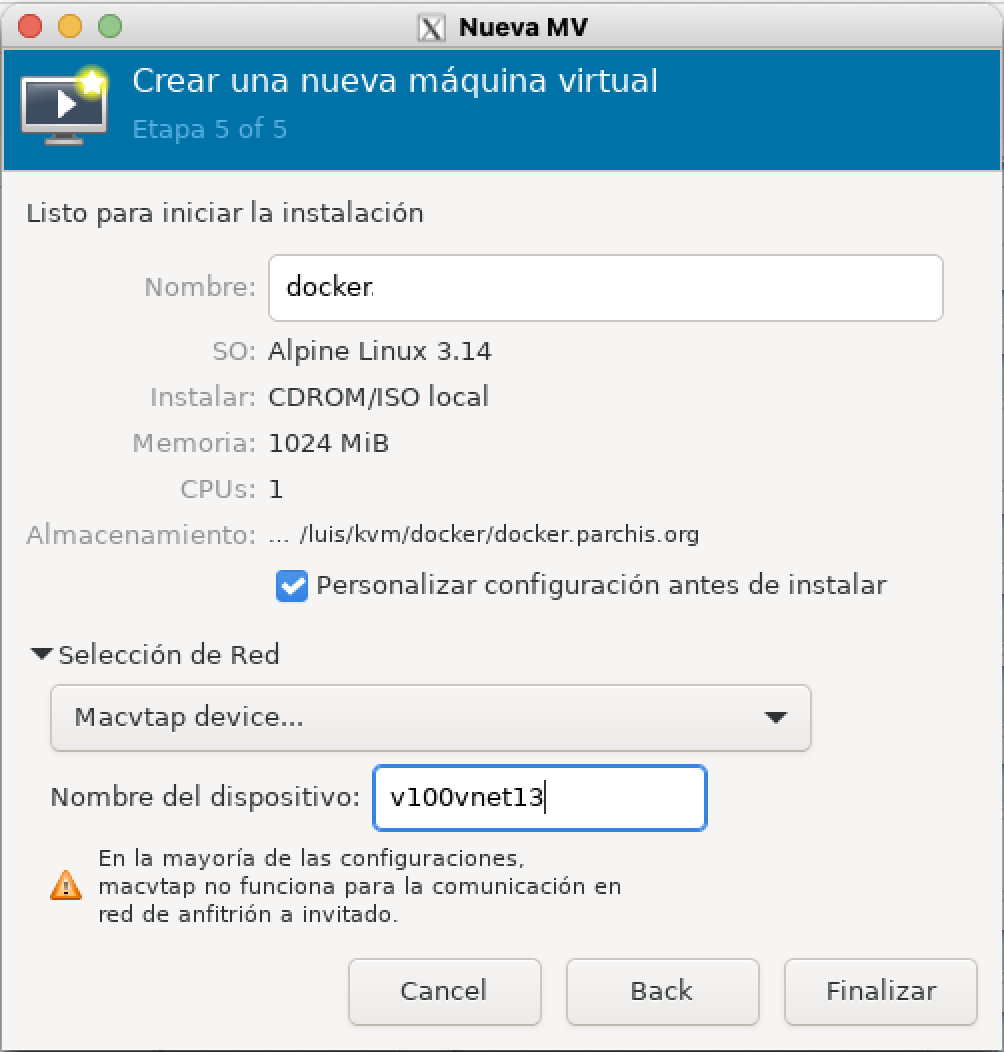
- I start the VM and enter the Alpine setup (more info in this guide).
luis@sol:~/kvm/gitea-traefik-docker$ virsh console docker.yourdomain.com
localhost login: root
Welcome to Alpine!
:
localhost:~#
:
# export SWAP_SIZE=0
# setup-alpine
Select keyboard layout: [none] es
Select variant (or 'abort'): es
Enter system hostname (fully qualified form, e.g. 'foo.example.org') [localhost] docker
Available interfaces are: eth0.
Which one do you want to initialize? (or '?' or 'done') [eth0]
Ip address for eth0? (or 'dhcp', 'none', '?') [dhcp] 192.168.100.225/24
Gateway? (or 'none') [none] 192.168.100.1
Do you want to do any manual network configuration? (y/n) [n] n
DNS domain name? (e.g 'bar.com') yourdomain.com
DNS nameserver(s)? 192.168.100.224
Changing password for root
Which timezone are you in? ('?' for list) [UTC] Europe/Madrid
HTTP/FTP proxy URL? (e.g. 'http://proxy:8080', or 'none') [none]
Enter mirror number (1-71) or URL to add (or r/f/e/done) [1]
Which SSH server? ('openssh', 'dropbear' or 'none') [openssh]
Which disk(s) would you like to use? (or '?' for help or 'none') [none] vda
How would you like to use it? ('sys', 'data', 'crypt', 'lvm' or '?' for help) [?] sys
WARNING: Erase the above disk(s) and continue? (y/n) [n] y
Installation is complete. Please reboot.
docker:~# reboot
- I log in as root and install a few useful tools.
docker:~# apk add iproute2 nano tzdata
docker:~# cp /usr/share/zoneinfo/Europe/Madrid /etc/localtime
docker:~# echo "Europe/Madrid" >  /etc/timezone
docker:~# apk del tzdata
- I create my
luisuser and configure SSH.
docker:~# addgroup -g 1000 luis
docker:~# adduser -h /home/luis -s /bin/ash -G luis --u 1000 luis
docker:~# adduser luis wheel
docker:~# su - luis
docker:~$
docker:~$ ssh-keygen -t rsa -b 2048 -C "luis@docker.yourdomain.com"
:
docker:~$ exit
- I create
authorized_keys(post about SSH in Linux) - I modify SSH to work only with public/private key authentication.
docker:~$ su -
Password:
docker:~# cat /etc/ssh/sshd_config
# Config LuisPa
Port 22
PubkeyAuthentication yes
PasswordAuthentication no
AuthenticationMethods publickey
AllowAgentForwarding yes
AllowTcpForwarding yes
GatewayPorts yes
AddressFamily inet
PrintMotd no
Subsystem sftp /usr/lib64/misc/sftp-server
AcceptEnv LANG LC_*
docker:~# service sshd restart
- I create the
/etc/nanorcfile (source here) for thenanoeditor. - I speed up boot time to about 5 seconds.
docker:~# cat /boot/extlinux.conf
# Generated by update-extlinux 6.04_pre1-r9
#DEFAULT menu.c32                        # I comment out this line
DEFAULT virt                             # Added, virt = name below
PROMPT 0
MENU TITLE Alpine/Linux Boot Menu
MENU HIDDEN
MENU AUTOBOOT Alpine will be booted automatically in # seconds.
TIMEOUT 30
LABEL virt
  MENU LABEL Linux virt
  LINUX vmlinuz-virt
  INITRD initramfs-virt
  APPEND root=UUID=bff03f67-29ee-4525-96d9-3096a1799fc7 modules=sd-mod,usb-storage,ext4 quiet rootfstype=ext4
MENU SEPARATOR
Docker and Docker Compose Installation
- I enable the Community repository
git:~# cat /etc/apk/repositories
#/media/cdrom/apks
http://dl-cdn.alpinelinux.org/alpine/v3.15/main
http://dl-cdn.alpinelinux.org/alpine/v3.15/community   <== Uncomment this line
- I add the following line to the
/etc/sudoersfile
# User rules for luis
luis ALL=(ALL) NOPASSWD:ALL
- I create a couple of helper scripts
nodered:~# cat > /usr/bin/e
#!/bin/ash
/usr/bin/nano "${*}"
nodered:~# chmod 755 /usr/bin/e
:
nodered:~# cat > /usr/bin/confcat
#!/bin/ash
# By LuisPa 1998
# confcat: strips comment lines, very useful as a substitute
# for "cat" to view content without comments.
#
grep -vh '^[[:space:]]*#' "$@" | grep -v '^//' | grep -v '^;' | grep -v '^$' | grep -v '^!' | grep -v '^--'
nodered:~# chmod 755 /usr/bin/confcat
:
nodered:~# cat > /usr/bin/s
#!/bin/ash
/usr/bin/sudo -i
nodered:~# chmod 755 /usr/bin/s
- I update the system and install very useful tools along with docker and docker-compose.
docker:~# apk update
docker:~# apk upgrade --available
docker:~# apk add bash-completion procps util-linux
docker:~# apk add readline findutils sed coreutils sudo
docker:~# apk add docker docker-bash-completion docker-compose docker-compose-bash-completion docker-cli-compose
docker:~# rc-update add docker boot
docker:~# service docker start
- I add my user to the docker group and reboot…
git:~# addgroup luis docker
git:~# reboot -f
- I test Docker (with the latest alpine image, which is tiny…)
docker:~$ docker pull alpine:latest
docker:~$ docker images
REPOSITORY   TAG       IMAGE ID       CREATED      SIZE
alpine       latest    76c8fb57b6fc   3 days ago   5.57MB
docker:~$ docker create -t -i  --name myalpine alpine:latest
5f1fefa539848f9e0fe995bf2e9c426def69ca48bfacc51bdb509197939c041e
docker:~$ docker start myalpine
/ # exit
docker:~$ docker exec -it myalpine /bin/ash
docker:~$ docker stop myalpine
docker:~$ docker rm myalpine
- Don’t be surprised that
docker stop myalpinetakes a while to stop. Here is the explanation.