In this post I describe how I’ve evolved my home DHCP and DNS server. Until now I had a PiHole dedicated on the network to DHCP, DNS and ad sinkhole. I’ve decided to migrate to a different configuration, move both DNS and DHCP services to the home router (Linux).
I realized that when PiHole went down, the rest of the home services would spiral out of control, despite having the router and internet working, so I’m leaving PiHole exclusively as the ad sinkhole.
Introduction
Among the different options for DNS server (bind, unbound, powerDns, dnsmasq) and for DHCP server (ISC, Kea, DHCPD, dnsmasq) I opted for dnsmasq, which is lightweight and simple, combining DNS and DHCP services. It’s ideal for small networks, and migrating the DHCP part from my PiHole is almost immediate, since it also uses dnsmasq under the hood.
To understand the examples in this post, at home I serve two local domains: .parchis.org and .home.arpa (RFC 8375), to which I’m gradually migrating. The two important servers in this example are:
cortafuegix.parchis.org: This is the internet router, running Linux in a VM with Ubuntu, uses PPPoE to connect to the internet and has the address192.168.100.1on the intranet.pihole.parchis.org: Currently the DNS and DHCP based on PiHole software, also running in a VM with Ubuntu, its address is192.168.100.224on the intranet.
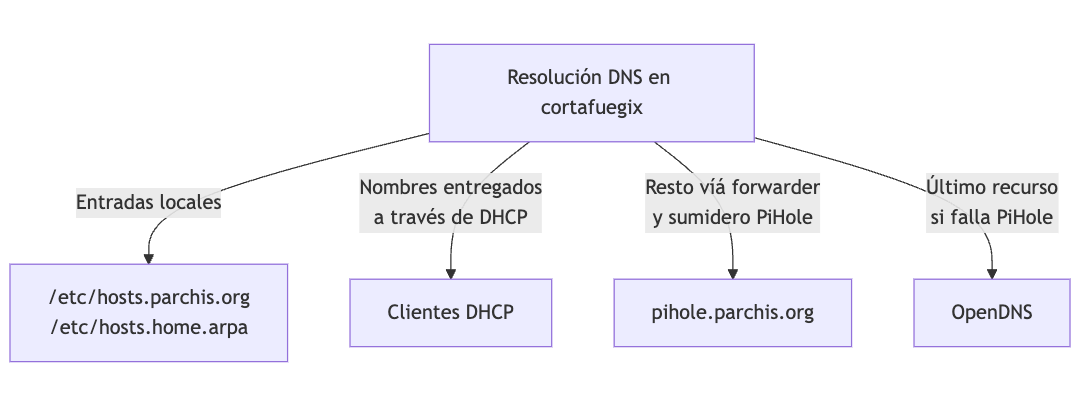
| Note: cortafuegix will resolve both domains (parchis.org, home.arpa), and forward the rest of queries to PiHole which also acts as an ad sinkhole; if PiHole goes down, the router will in strict order move on to resolve through the next upstream forwarder on the internet (OpenDNS in my case), and when PiHole comes back it will start using it automatically. |
I reconfigure PiHole to only handle DNS requests (I disable DHCP). Its forwarder will be the same pair of upstream DNS servers (OpenDNS). If someone inside my network queries PiHole about my local domains, I’ve configured it to in turn query the router cortafuegix (very useful during migration).

Warning
This type of installation works exceptionally well, however, after a couple of months in production I realized it has a problem. The problem arises when doing troubleshooting from PiHole, for example to identify where DNS requests in your home network are coming from. Everything comes from the router, so it’s impossible.
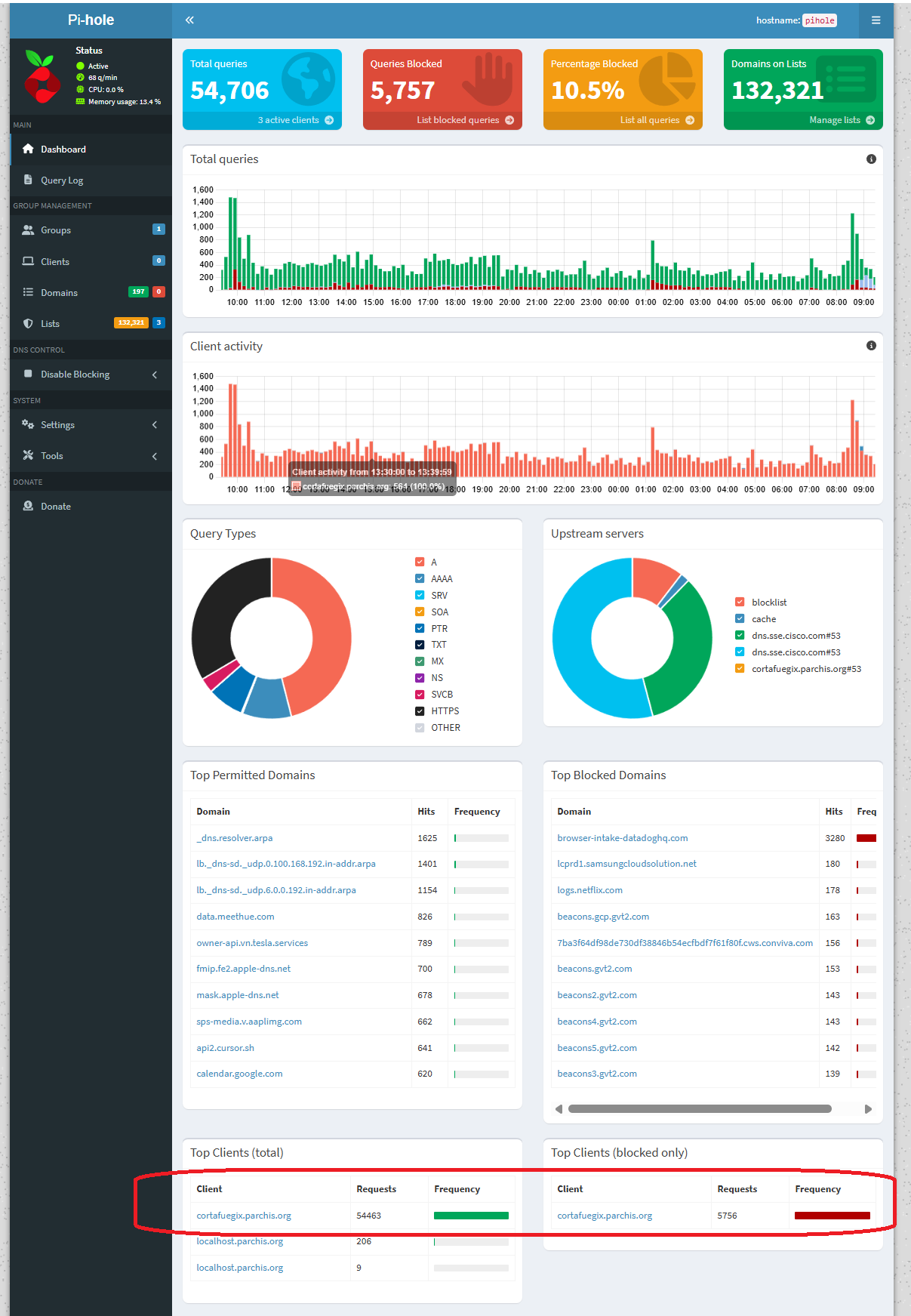
In that case you have to go to the router and use CLI commands. Not cool. This is what my PiHole looks like. I’m leaving this post as a reference, but I’ve already started working on a new version: Router with PiHole
Installation
I update and install dnsmasq on my router (cortafuegix)
apt update -y && apt upgrade -y && apt full-upgrade -y
apt install -y dnsmasq dnsutils ldnsutils
It will try to start the service and fail. Ignore it for now, it’s because there’s already a service listening on port 53, systemd-resolved, I’ll resolve it later.
Configuration
Below I show the configuration files with examples
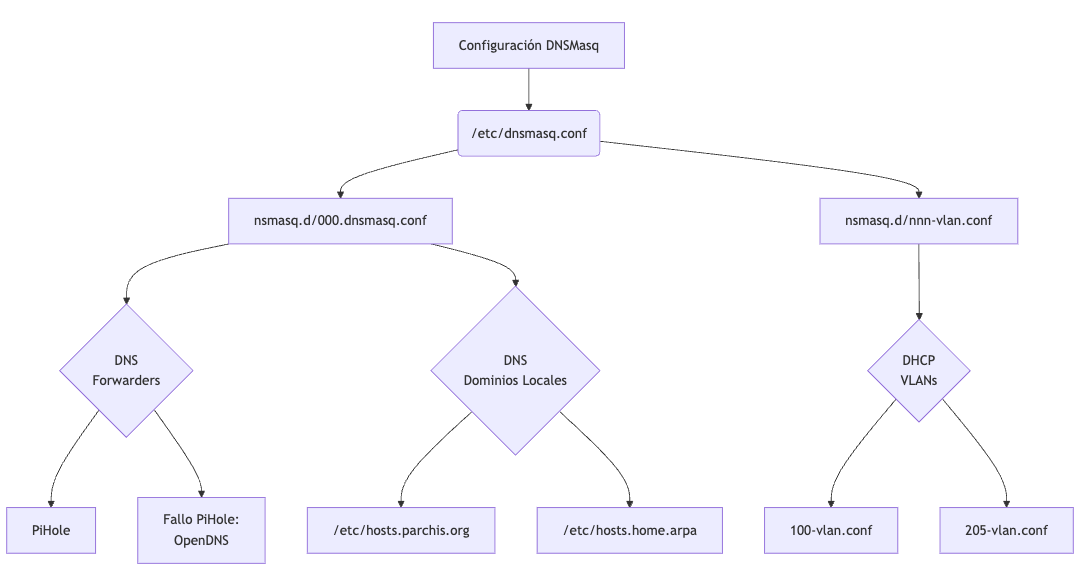
I start with /etc/dnsmasq.conf, leaving only one line to tell it to load any file found under /etc/dnsmasq.d
$ cat /etc/dnsmasq.conf
conf-dir=/etc/dnsmasq.d
I create files under /etc/dnsmasq.d. Note that I have a couple of VLANs, 100 and 205, I ask it to listen on specific IP addresses. I indicate that its first forwarder is PiHole’s IP (which will be the only one used, due to strict-order mode, only if it goes down will it move to the next ones, OpenDNS)
File: /etc/dnsmasq.d/000.dnsmasq.conf
# Main dnsmasq configuration

# Never forward names without a dot or domain part.
domain-needed

# DNS Forwarders configuration: First PiHole, then upstream in case of failure.
strict-order
server=192.168.100.224
server=208.67.222.222
server=208.67.220.220

# Add local domains. Queries to these domains will be answered
# only from /etc/hosts.* or DHCP.
local=/parchis.org/
local=/home.arpa/

# Specify which IPs to listen on. Better than using interface= when
# having dynamic interfaces (that activate after dnsmasq)
listen-address=192.168.100.1
listen-address=192.168.205.2
listen-address=127.0.0.1

# If using interface= instead of listen-address= I would enable the following
# option so dnsmasq really binds only to the configured interfaces. I don't use
# it because as I said, one of my interfaces (where I have .205.2) is dynamic.
#bind-interfaces

# Expand simple names from the hosts file by automatically adding the domain.
expand-hosts

# Domain configuration. This allows:
# 1) Giving fully qualified domain names to DHCP hosts, as long as
#    the domain matches this configuration.
# 2) Setting the "domain" option in DHCP, establishing the domain for all
#    systems configured by DHCP.
# 3) Providing the domain part for "expand-hosts".
domain=parchis.org
# Still testing migration to home.arpa...
#domain=home.arpa

# DHCP Configuration
# Set the DHCP server in authoritative mode to avoid long wait times
# when a device connects to a new network.
dhcp-authoritative

# Specify the log file location.
log-facility=/var/log/dnsmasq.log

# DEBUG only: log every DNS query.
#log-queries

# DEBUG only: additional information about DHCP transactions.
#log-dhcp

# Allow dnsmasq to continue running without being blocked by syslog.
log-async

# Maximum cache size.
cache-size=10000

# Don't resolve anything in /etc/hosts. See addn-hosts
no-hosts

# Use these additional files for name resolution.
addn-hosts=/etc/hosts.home.arpa
addn-hosts=/etc/hosts.parchis.org

# Configuration for EDNS packets.
edns-packet-max=1232

# RFC 6761 configuration for special domains
# According to RFC 6761, cache DNS servers should not attempt to resolve
# "test", "localhost" and "invalid" names on authoritative DNS servers.
# These entries are configured so dnsmasq doesn't try to look up NS records
# or make unnecessary queries for these domains.
server=/test/
server=/localhost/
server=/invalid/

# The same RFC states that certain reverse network addresses should
# not be resolved, such as private IPv4 subnets indicated in 10.in-addr.arpa
# and specific ranges in 172.in-addr.arpa and 192.168.in-addr.arpa.
# Never forward addresses in non-routed address spaces.
bogus-priv

# OpenWRT implements additional rules to block "bind"
# and "onion" domains, used in specific contexts, like local networks or Tor.
# More information at OpenWRT and IANA links:
# - https://git.openwrt.org/?p=openwrt/openwrt.git;a=blob_plain;f=package/network/services/dnsmasq/files/rfc6761.conf;hb=HEAD
# - https://www.iana.org/assignments/special-use-domain-names/special-use-domain-names.xhtml
# Note: ".local" is not explicitly included, as it could cause conflicts.
server=/bind/
server=/onion/
I create the file /etc/dnsmasq.d/100-vlan.conf which will be loaded and interpreted, to configure DHCP. Below I show some example entries:
$ cat /etc/dnsmasq.d/100-vlan.conf
:
####
#### Example for Access Points
#### Note: any string can be used as TAG, here I use "capwap"
dhcp-option=set:capwap,option:router,192.168.100.1
dhcp-option=set:capwap,option:dns-server,192.168.100.1
dhcp-option=set:capwap,option:netmask,255.255.252.0
dhcp-option=set:capwap,43,192.168.252.238
dhcp-host=set:capwap,12:34:56:78:16:10,ap-paso.parchis.org,192.168.100.220
dhcp-host=set:capwap,12:34:56:78:57:48,ap-buhardilla.parchis.org,192.168.100.221
dhcp-host=set:capwap,12:34:56:78:35:F8,ap-cuartos.parchis.org,192.168.100.222

####
#### Example of dynamic ranges
####
#### Note: any string can be used as TAG, here I use "vlan100"
dhcp-range=set:vlan100,192.168.100.100,192.168.100.199,1h
dhcp-option=set:vlan100,option:netmask,255.255.252.0
dhcp-option=set:vlan100,option:router,192.168.100.1
dhcp-option=set:vlan100,option:dns-server,192.168.100.1
dhcp-option=set:vlan100,option:ntp-server,192.168.100.1

####
#### Example of static assignments
####
dhcp-host=set:vlan100,12:34:56:77:0E:A1,192.168.100.2,panoramix.parchis.org
dhcp-host=set:vlan100,12:34:56:70:49:ED,192.168.100.3,idefix.parchis.org
dhcp-host=set:vlan100,12:34:56:75:0d:20,192.168.100.4,idefix-wifi.parchis.org
dhcp-host=set:vlan100,12:34:56:75:df:41,192.168.100.5,kymera.parchis.org
:
For all devices that receive an IP via DHCP (static by MAC or dynamic) you don’t need to add them to /etc/hosts.*. The server will resolve their names from DHCP information. Therefore, you only need to add to /etc/hosts.* those devices that are configured manually (for example servers, routers, switches, etc).
All network devices will have a DNS name and both forward (by name) and reverse (by IP) resolution will work perfectly.
Let’s see some examples of specific DNS entries, those that won’t receive their name/address via DHCP.
$ sudo cat /etc/hosts.home.arpa
192.168.100.1   cortafuegix.home.arpa
192.168.100.12  asterix.home.arpa
:
$ sudo cat /etc/hosts.parchis.org

# Special IPs
130.206.13.20   rediris

# Names configured manually without DHCP
192.168.100.1   cortafuegix.parchis.org
192.168.100.1   pnpntpserver.parchis.org
192.168.100.1   pbx.parchis.org
192.168.100.2   panoramix.parchis.org
:
Importantly, I configure cortafuegix to make its DNS queries to itself (127.0.0.1, to its dnsmasq process). I modify the netplan file so its nameserver is itself, and I also disable the search domain that arrives via vlan3 through DHCP.
$ cat /etc/netplan/netplan.yaml
:
      # Movistar VoIP
      vlan3:
:
        dhcp4-overrides:
          use-routes: false
          use-dns: false
          use-domains: false
:
      # Main Vlan
      vlan100:
        id: 100
        link: eth0
        macaddress: "62:54:55:44:01:30"
        addresses:
        - 192.168.100.1/21
        nameservers:
          addresses:
          - 127.0.0.1
          search:
          - parchis.org
:
I reconfigure systemd-resolved so it doesn’t bind to port 53. In principle it’s not necessary (because it listens on 127.0.0.53), but this way I prevent cortafuegix from making double queries to 127.0.0.53:53 and 127.0.0.1:53 when it needs to resolve.
$ cat /etc/systemd/resolved.conf
[Resolve]
DNSStubListener=no

$ systemctl restart systemd-resolved
I can now start the service and check the status. Note: just before this step I changed my PiHole configuration to stop serving DHCP on the network and deleted all local DNS entries it had. Remember that you must not have two DHCP servers on the same network.
systemctl start dnsmasq.service
systemctl status dnsmasq.service
● dnsmasq.service - dnsmasq - A lightweight DHCP and caching DNS server
     Loaded: loaded (/lib/systemd/system/dnsmasq.service; enabled; vendor preset: enabled)
     Active: active (running) since Tue 2024-12-24 16:40:01 CET; 2min 13s ago
    Process: 5591 ExecStartPre=/etc/init.d/dnsmasq checkconfig (code=exited, status=0/SUCCESS)
    Process: 5599 ExecStart=/etc/init.d/dnsmasq systemd-exec (code=exited, status=0/SUCCESS)
    Process: 5608 ExecStartPost=/etc/init.d/dnsmasq systemd-start-resolvconf (code=exited, status=0/SUCCESS)
    :
I verify that dnsmasq is listening on port 53 on vlan100 and loopback (lo). I check that the systemd-resolved service has stopped listening on 127.0.0.53:53.
# netstat -tulpn |grep 53
[root]@cortafuegix:~#  netstat -tulpn | grep 53
tcp        0      0 127.0.0.1:53            0.0.0.0:*               LISTEN      41744/dnsmasq
tcp        0      0 192.168.100.1:53        0.0.0.0:*               LISTEN      41744/dnsmasq
udp        0      0 127.0.0.1:53            0.0.0.0:*                           41744/dnsmasq
udp        0      0 192.168.100.1:53        0.0.0.0:*                           41744/dnsmasq
I verify that its own queries will go to itself:
[root]@cortafuegix:/etc/dnsmasq.d# resolvectl
Global
         Protocols: -LLMNR -mDNS -DNSOverTLS DNSSEC=no/unsupported
  resolv.conf mode: foreign
Current DNS Server: 127.0.0.1
       DNS Servers: 127.0.0.1
        DNS Domain: parchis.org
:
For any other query it will forward to its forwarder, server=192.168.100.224 defined in /etc/dnsmasq.d/000.dnsmasq.conf, so everything will continue working.
$ nslookup ibm.com
Server:         127.0.0.1
Address:        127.0.0.1#53

Non-authoritative answer:
Name:   ibm.com
Address: 23.217.255.169
:
Resolution from Clients
Any network client should resolve hosts with or without the parchis.org suffix.
Example: both nslookup luix-wifi and nslookup luix-wifi.parchis.org should return the same IP.
If the client doesn’t automatically add the suffix, resolution fails. The responsibility for expanding luix-wifi to luix-wifi.parchis.org is always the client’s own.
Options:
- DHCP: the Pi-hole server should announce the DNS search domain. In my configuration it already does.
- Static IP: the client must configure it manually.
Recommendation: always use DHCP with MAC reservations for fixed nodes. If you need statics:
macOS: Network Preferences > DNS > add
parchis.orgin Search Domains.Linux: in
/etc/resolv.conforsystemd-resolvedconfiguration, add:search parchis.orgWindows 11:
- GUI:
ncpa.cpl> adapter > Properties > IPv4 > Advanced > DNS tab > set DNS suffix for this connection =parchis.org.
Set-DnsClient -InterfaceAlias "Ethernet" -ConnectionSpecificSuffix "parchis.org" Get-DnsClient | Format-Table InterfaceAlias, ConnectionSpecificSuffix- GUI:
I verify that forward and reverse DNS resolution are correct. As you can see I don’t need to add the domain name, which auto-completes on its own. I’ve verified it with Windows, Mac, Linux clients and mobile devices.
luis@kymeraw:~ ❯ nslookup.exe luix-wifi
Server:  cortafuegix.parchis.org
Address:  192.168.100.1

Name:    luix-wifi.parchis.org
Address:  192.168.100.15

luis@kymeraw:~ ❯
luis@kymeraw:~ ❯
luis@kymeraw:~ ❯ nslookup.exe 192.168.100.15
Server:  cortafuegix.parchis.org
Address:  192.168.100.1

Name:    luix-wifi.parchis.org
Address:  192.168.100.15
Log Rotation
The dnsmasq log is extremely useful, but unfortunately it doesn’t offer rotation. There’s a package, dnsmasq-logrotate that will ensure logs are created and then managed by logrotate.
I install the dnsmasq-logrotate package on Ubuntu.
add-apt-repository ppa:m-grant-prg/utils
apt update
apt-get install dnsmasq-logrotate
Once installed it’s already configured by default and rotation will start working, no further action needed.
Useful Commands
Enable log-queries in the file /etc/dnsmasq.d/000.dnsmasq.conf when you want to debug DNS queries. Enable log-dhcp for much more information about the DHCP service.
With those options active, what I use most when troubleshooting is:
Monitor DNS queries
sudo tail -n 1000 -f /var/log/dnsmasq.log | grep -i query
Monitor DHCP
sudo tail -n 1000 -f /var/log/dnsmasq.log | grep -i dhcp
The dnsmasq program maintains an in-memory cache and it’s possible to ask the process to dump it to the log file, simply by sending the USR1 signal. In one session you can be watching the log and in another send the signal.
sudo tail -f /var/log/dnsmasq.log
proceso=$(ps --no-headers -C dnsmasq -o pid | sed 's/ //g') && kill -s SIGUSR1 $proceso

# another way is to use the logrotate tool I installed
dnsmasq-postrotate -l -v -p
Other interesting commands to query the cache through DNS requests of class CHAOS.
[root]@cortafuegix:~#    dig +short chaos txt cachesize.bind @127.0.0.1
"10000"
[root]@cortafuegix:~#    dig +short chaos txt hits.bind @127.0.0.1
"6621"
[root]@cortafuegix:~#    dig +short chaos txt misses.bind @127.0.0.1
"4472"
Fault Tolerance
Given the criticality of the dnsmasq service and how sensitive it is to configuration errors or because an interface is not yet available, I like to modify the dnsmasq.service file to restart the service if a failure has occurred. That doesn’t mean it will fix the failures but in certain cases it can be useful.
This is a copy of my /etc/systemd/system/dnsmasq.service file
[Unit]
Description=dnsmasq - A lightweight DHCP and caching DNS server
Requires=network.target
Wants=nss-lookup.target
Before=nss-lookup.target
After=network.target
[Service]
Type=forking
PIDFile=/run/dnsmasq/dnsmasq.pid
ExecStartPre=/etc/init.d/dnsmasq checkconfig
ExecStart=/etc/init.d/dnsmasq systemd-exec
ExecStartPost=/etc/init.d/dnsmasq systemd-start-resolvconf
ExecStop=/etc/init.d/dnsmasq systemd-stop-resolvconf
ExecReload=/bin/kill -HUP $MAINPID
# Two lines to restart on failure
Restart=on-failure
RestartSec=15
[Install]
WantedBy=multi-user.target
The original is at /etc/systemd/system/multi-user.target.wants/dnsmasq.service