
Regular Movistar TV channels travel over Multicast/UDP, but everything you ask for
yourself (a movie from the video store, rewinding what is currently on, a cloud recording)
travels over Unicast, and that is where a home-made Linux router chokes. In this post I
explain how that traffic works today, measured with the TV switched on, and what you need to
put on the router to make it play. There is a surprise: not everything uses RTSP anymore.
More than a decade ago I wrote Video on Demand for Movistar,
the first time I wrestled with this on my Linux router.
Recently I felt like checking whether igmpproxy and the kernel RTSP helper were still
needed, I took another look at the whole thing, and this post is the result. Yes, I was bored
and decided to do an academic study.
There is no single “video on demand”, there are three
For years everything that was not a live channel worked the same way: the set-top box requested
the video over RTSP and received a raw MPEG-TS stream over UDP. Today that is no longer
true, and it is worth knowing before fighting the router, because it explains why sometimes
the kernel helper seems to “do nothing”.
I measured it path by path, resetting the firewall rule counter to zero before each test and launching each thing from the remote:
| What you ask for from the remote | How it travels today | Does the router need help? |
|---|---|---|
| A movie from the video store | HTTP over TCP 80, in chunks | No |
| Rewinding the live channel | RTSP + MPEG-TS over UDP | Yes |
| A cloud recording | RTSP + MPEG-TS over UDP | Yes |
The video store has moved to OTT-style delivery: the set-top box opens a bunch of short HTTP connections and requests the video in chunks, just like Netflix or YouTube do. That goes through any router without help, because it is ordinary traffic: a request goes out, a response comes back.
The other two still use the classic method, and that is the one that causes trouble.

Watch out for a trap. If you look at the firewall rule counter and it is at zero, it is very tempting to conclude that the helper is no longer good for anything. It happened to me: I had been 13 hours with the TV on and zero packets. It did not mean the helper was unnecessary, it meant that in those 13 hours nobody had rewound or opened a recording. As soon as I rewound, the counter started climbing.
The problem
Imagine you phone a company to order a package. During the call you tell them: “send it to building entrance number 27392”. You hang up, and a while later the courier shows up at that entrance.
The intercom at your building’s door (the router, doing NAT) has a simple rule: it only lets in whoever comes to answer something that went out from inside. And here is the problem: the entrance number was said out loud, inside the conversation. The doorman did not listen to the call, so when the courier shows up he has no idea who he is or who he is looking for, and slams the door in his face.
Result: the recording “does not start” and the set-top box shows you a generic error.
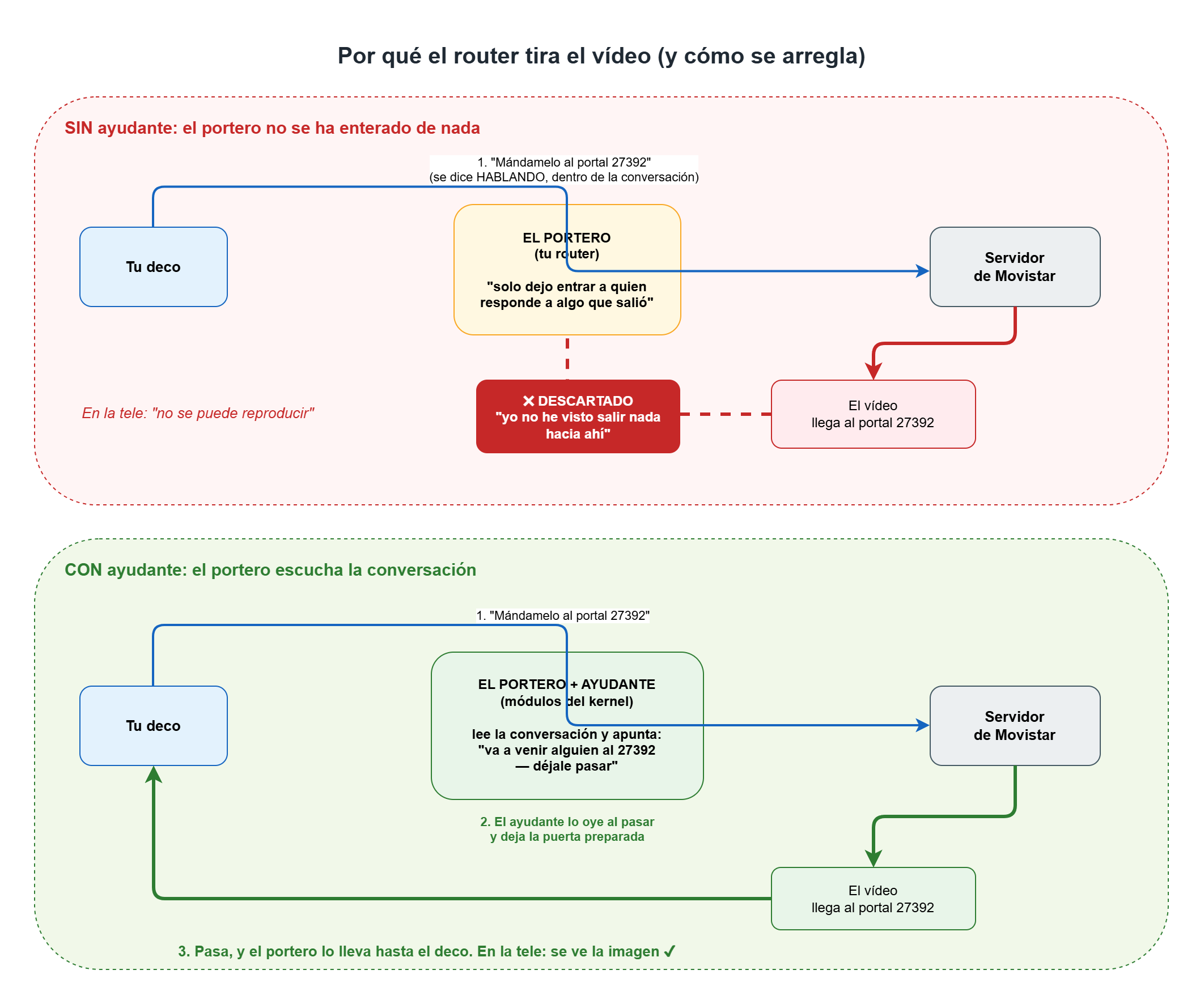
The solution is to teach the doorman to listen to the conversation. That is exactly what the
two kernel modules this post is about do: they read the RTSP dialogue, find out the entrance
number and leave the door ready before the courier arrives.
What the conversation looks like, step by step
When you press “Play” on a recording, this is what happens:
The set-top box asks Movistar’s DNS (
172.26.23.3) who serves that content.It opens an RTSP conversation with that server, on port TCP 554.
It requests the video with a
SETUPmessage carrying this line:Transport: MP2T/H2221/UDP;unicast;client_port=27392There is the entrance number: 27392.
The server answers, and here comes the first interesting detail:
Transport: MP2T/H2221/UDP;unicast;destination=<your IP>;server_port=49980;client_port=27392Look at
server_port=: the server tells you which port it is going to stream from. It did not use to say that.The server starts sending the
MPEG-TSoverUDPto that port 27392, and the picture shows up.The set-top box keeps the conversation alive with
GET_PARAMETERmessages every now and then, and sendsTEARDOWNwhen it finishes.

The surprise: the video comes from the same place
For years, the explanation of why this was hard went: “the set-top box talks to a control server, but the video is sent by a different machine, with an IP your router does not know”. That is where the reputation that you needed full cone NAT came from, which means opening the door wide open.
Today that is no longer the case. I have verified it in three separate sessions, comparing
who answers on 554 with who sends the UDP:
| Session | RTSP server | Who sends the video | Same one? |
|---|---|---|---|
| Rewind, 1st | 172.26.83.a | 172.26.83.a | yes |
| Rewind, 2nd | 172.26.83.b | 172.26.83.b | yes |
| Recording | 172.26.83.c | 172.26.83.c | yes |
Movistar has put both things on the same machine, and on top of that announces it in
server_port=. That makes the problem easier than it used to be… and also more fragile,
as I explain at the end.
How it is implemented on Linux
It is done with two kernel modules, nf_conntrack_rtsp and nf_nat_rtsp, which are the
“doorman who listens”. The first one follows the conversation and takes note that “a UDP packet
is going to arrive at entrance 27392, let it through”; the second one takes care of the
translation when there is NAT in between. They are the same modules from that 2014 post, only
today they are installed and enabled in a different way.
Compiling and installing
The important thing today is not to install them by hand. A hand-compiled kernel module stops existing as soon as you upgrade the kernel, and you lose your recordings silently: live TV keeps working, so you do not notice until someone tries to watch something.
The sources are in my rtsp-linux repository on GitHub,
the same one from 2014. I still have to upload the new version, with the improvements from these
tests and the DKMS configuration, together with an improved igmpproxy as well. The right way
to install them is DKMS, which recompiles them on its own every time a new kernel comes in,
during apt itself:
# Register the package and build it for the current kernel
sudo dkms add    ./rtsp-helper
sudo dkms build  rtsp-helper/<version>
sudo dkms install rtsp-helper/<version>

# Check that it went well
dkms status
# rtsp-helper/<version>, 6.x.y-generic, x86_64: installed
From then on you forget about it. I have seen it work for real: between installing it and rebooting, the machine upgraded its kernel, and DKMS had rebuilt the modules for the new one without me doing anything.
Loading them at boot
On Debian/Ubuntu, add to the file /etc/modules:
nf_nat_rtsp
That one is enough: it pulls in the other one as a dependency.
Telling the kernel to use them
Having the modules loaded is not enough: you have to tell the kernel to apply the helper to
RTSP conversations. This step always gets forgotten and it is the one that costs the most
debugging time. There are two ways, depending on the kernel version:
# Kernel < 6 (already deprecated)
sysctl -w net.netfilter.nf_conntrack_helper=1

# Kernel >= 6: the only one that works today
iptables -t raw -A PREROUTING -p tcp --dport 554 -j CT --helper rtsp
On modern kernels automatic helper assignment no longer exists, so the raw rule is not
optional. Remember to run it at boot, and not twice from two different places.
And the traffic from the set-top boxes towards Movistar has to go out masqueraded:
iptables -t nat -A POSTROUTING -o <IPTV interface> -j MASQUERADE
What if I pause for half an hour?
This was my big doubt, and it looked every bit like the weak spot of the setup.
The reasoning was: while playing, the video keeps arriving and the router keeps the “this UDP
goes to the set-top box” entry fresh. But if you pause, the video stops arriving, the entry
expires after 30 seconds, and the permission that opened the door was single use: it was
consumed by the first packet. On resume, the set-top box does not ask for permission again (it
sends a plain PLAY over the conversation it already had), so the video would arrive at a
closed door.
Sounds airtight. Well, it does not happen. I paused one recording for six minutes, and another for eight, and in both the picture came back instantly.
I found the reason by measuring every 5 seconds how much life the router’s entry had left:
09:07:04   119 s left
09:08:05   119 s left   ← renewed
09:09:05   118 s left   ← again
09:10:06   118 s left   ← every 60 seconds, like clockwork
Something was renewing it every minute. Capturing with a window wider than that minute, the culprit showed up:
09:12:04 IP <your router>.27392 > <server>.49980: UDP, length 3
It is the set-top box itself. While paused it sends a 3-byte packet every 60 seconds to the server, over the same port pair as the video. It is a classic trick: keeping the door open by sticking your foot in it every now and then.
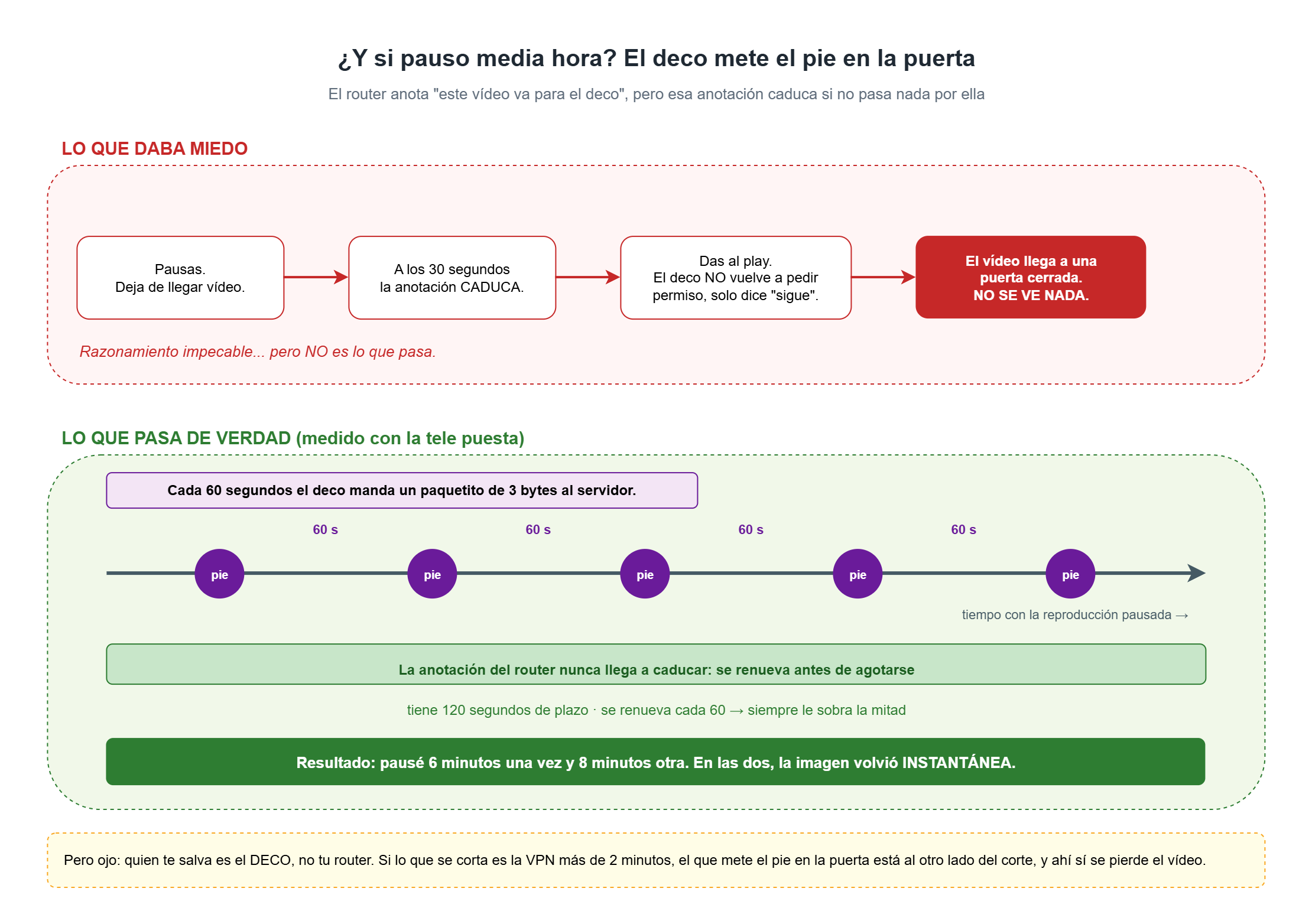
It has a nice side effect: since there is now traffic in both directions, the router stops treating it as a “half-open conversation” and raises the timeout from 30 to 120 seconds. So the margin is even bigger.
Practical conclusion: you can pause as long as you want. But it is worth knowing that the one saving you is the set-top box, not your router. A VPN outage of more than two minutes would indeed cut the video, because then the one sticking its foot in the door is on the other side of the outage.
Monitoring: what to look at and in which order
When something does not play, always follow the same order, from the most basic to the most fine-grained, and with a recording playing on the TV:
# 1. Are the modules loaded?
lsmod | grep rtsp

# 2. Is the rule there, and has it seen anything go by? (look at the counter)
iptables -t raw -L PREROUTING -v -n | grep 'CT helper'

# 3. Is there an open RTSP conversation, and is the video arriving?
conntrack -L -p tcp --dport 554
conntrack -L -p udp | grep 'src=172\.26\.'
If that does not make it clear, tcpdump on port 554 shows you the whole conversation, and the
module can tell you what it is thinking through dmesg without recompiling it: on a kernel with
CONFIG_DYNAMIC_DEBUG=y the module’s debug output can be switched on and off on the fly.
What could break some day
Three things, and none of them depends on you:
- The permission that opens the door is narrower than it looks. It is not a real full cone: it accepts the video coming from any port, but requires it to come exactly from the IP of the server you talked to over RTSP. Today it works because they are the same machine. If Movistar were to separate them again, it would stop playing even if everything else were perfect, and the symptom would be baffling: the RTSP conversation is established without any problem and still there is no picture.
- Pausing is saved by the set-top box. A set-top box model that did not send that 3-byte packet would expose the whole problem again.
- One day this may no longer be needed. The video store has already moved to HTTP. If rewinding and recordings follow the same path, these modules will stop making sense. But today they are still essential, so do not remove them because of what you read on a counter at zero.
Summary
- There are three paths, not one: the video store goes over HTTP and needs nothing; rewinding and recordings go over RTSP and do need it.
- The router drops the video because the port is announced by talking, and you have to
teach it to listen:
nf_conntrack_rtsp+nf_nat_rtsp. - Install them with DKMS, not by hand, or the next kernel will silently leave you without recordings.
- On kernel ≥ 6, the
iptables -t raw ... -j CT --helper rtsprule is not optional. - Pausing does not break anything, and the credit goes to the set-top box.
References
- My rtsp-linux repository with the
nf_conntrack_rtspandnf_nat_rtspmodules. The version with DKMS and the improvedigmpproxyis still pending upload. - The original 2014 post: Video on Demand for Movistar.